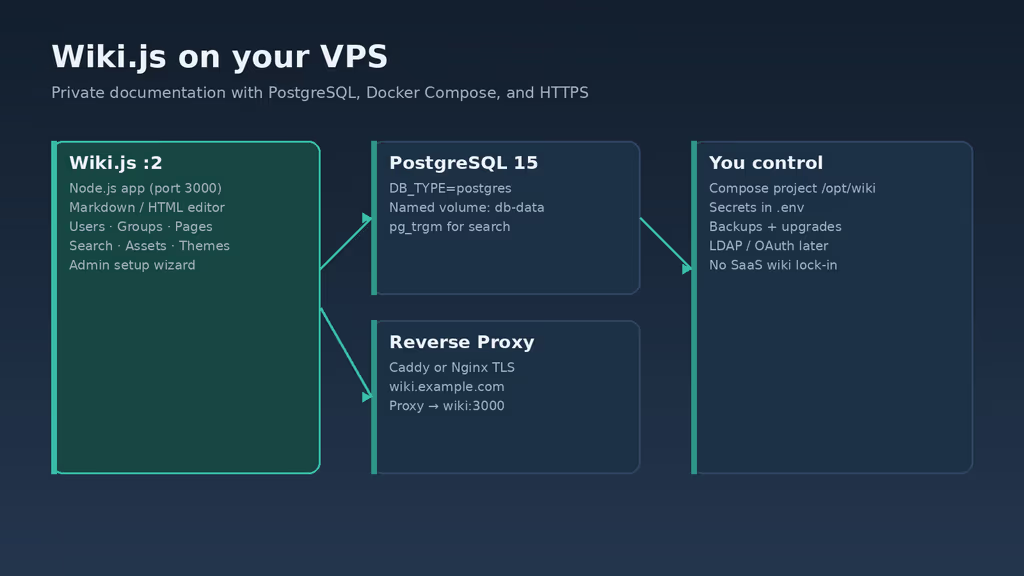
Caption: Wiki.js behind Caddy, Postgres on the Compose network. I almost left the sample wikijsrocks password in the file.
Why I wanted this on my server
I was tired of runbooks, API notes, and client handoffs living in Notion tabs I do not control. I already had Docker on Ubuntu — Authentik, Gitea, Uptime Kuma — and I wanted the wiki next to that stack: named volumes, TLS on the proxy, dumps I can restore. Agencies I work with keep the same pattern: one VPS, several Compose projects, one Caddy (or Nginx) in front.
Wiki.js is Node, Markdown, assets, and groups. Nested pages and a real Administration area matter more to me than a pretty marketing site. It is not a static folder of Markdown files. Pages and users live in the database. If I pick SQLite because first boot looks easy, the wiki comes up; a second replica later has nothing to sync. Postgres is the path I actually wanted for performance and for whatever Wiki.js 3 expects later. MySQL and MariaDB still work today; I did not use them. LDAP and OAuth can wait. Local users and a reverse proxy are enough for day one.
I also wanted a dedicated hostname. Shared cookies and reverse-proxy path stripping make /wiki a bad habit here. wiki.example.com keeps the Caddyfile boring.
What I actually installed
Ubuntu 24.04 LTS, official Compose for Wiki.js 2 (ghcr.io/requarks/wiki:2) plus postgres:15-alpine, project under /opt/wiki. App bound to 127.0.0.1:3000. Caddy on 80/443 for https://wiki.example.com — replace that hostname. Nginx is the same idea: proxy to localhost, do not put Wiki.js on example.com/wiki. Subfolder installs are not supported.
Hardware I planned for: official Linux floor is 1 CPU and 1 GB RAM with a bit over 1 GB disk for a personal wiki. For a small team I want 2+ cores, 2 GB RAM, 20 GB+ SSD so workers and uploads have headroom. Extra disk if people dump screenshots, PDFs, or video into assets. Off-server storage for Postgres dumps and the Compose file that holds secrets.
Software: sudo on the box, DNS A/AAAA for a dedicated subdomain, Docker Engine with the Compose v2 plugin, OpenSSL to generate the database password, a password manager for that password and the first admin account. SMTP is optional until I invite a second person.
I do not publish Postgres to the public internet. I keep Compose mode 600 when it contains secrets and I do not push it to a public remote. I generated the Postgres password with OpenSSL and stored it before I wrote Compose. I did not ship the sample wikijsrocks password.
sudo apt update
sudo apt upgrade -y
sudo apt install -y ca-certificates curl gnupg openssl ufw

sudo ufw allow OpenSSH
sudo ufw allow 80/tcp
sudo ufw allow 443/tcp
sudo ufw enable
sudo ufw status
Where it broke
On a fresh Ubuntu 24.04 box this install is famous for a password that looks set and is not. The official Compose sample uses wikijsrocks. If I leave that in a file that will face the internet, I have published the database. If I change only one side of the pair, I get a subtler failure.
I copied the upstream Compose shape, set POSTGRES_PASSWORD on db, and left DB_PASS on wiki as the sample — or I changed one side after db-data was already initialized. The wiki container started. The setup page did not. Logs said database authentication failed:
error: password authentication failed for user "wikijs"
Wiki.js often wraps that as cannot connect to the database. DB_PASS must equal POSTGRES_PASSWORD. Postgres bakes the first password into the volume on first boot. Changing the YAML later does not change the role inside the volume. In a lab I aligned both values. If there was nothing worth keeping I ran docker compose down -v and brought the stack up again. That deletes the database volume. I do not do that on a wiki people already wrote.
Second wall: SQLite (or a “just boot it” database URL) looks fine until I add another instance. First boot succeeds. Content is a local file. A replica has an empty wiki. Experience notes I keep for this app: first boot looks fine until a second replica and content vanishes. I used Postgres from the start. DB_TYPE: postgres and DB_HOST: db are not optional decoration.
Third: search returned nothing. The homepage never mentions a search sidecar. There is none in this Compose file. Wiki.js search on Postgres wants pg_trgm. Official postgres Docker images include it. If I had swapped a stripped image, or never saved a published page, the search box stays dead. I confirmed pages were saved, then searched again. Empty results after a real save means I look at the database image, not the Markdown editor.
Fourth: I tried https://example.com/wiki out of habit. Assets 404, setup looks broken. Wiki.js wants its own host. I moved DNS to wiki.example.com. Path-based installs are a documented non-feature, not something Caddy can paper over with a rewrite.
Fifth, after the wizard: mixed content and login loops until Administration → General (Site URL) was exactly https://wiki.example.com, matching Caddy. I had HTTPS in the browser and http://wiki.example.com in the setting. Redirects fought the certificate. Fixing Site URL was one save, not a Compose rebuild.
docker compose logs wiki
curl -sS http://127.0.0.1:3000
If localhost answers and HTTPS does not, the proxy or DNS is the problem, not Wiki.js. Setup page never loading is the same split: wiki logs first, then curl on 3000, then UFW 80/443, then Caddy logs. I do not start by rewriting the Caddyfile when the app is not healthy on loopback.
I treat those as one chain, not a FAQ. Password mismatch is first because the container “is up” while the app is dead. SQLite is second because it fails later, when I already wrote pages. Search is third because the UI looks finished. Subfolder is fourth because I copy URL habits from WordPress. Site URL is last because the wizard does not force it.
The working install
Official Docker Compose example for Wiki.js 2 with PostgreSQL, then Caddy. Keep the project under /opt/wiki. I followed upstream for the two services and added the proxy myself. If docker compose version fails after the Engine install, I stop — Wiki.js expects Compose v2, not the old Python docker-compose binary.
1. Install Docker Engine
Install Docker from Docker's official Ubuntu packages:
sudo apt-get update -qqy
sudo apt-get install ca-certificates curl -qqy
sudo install -m 0755 -d /etc/apt/keyrings
sudo curl -fsSL https://download.docker.com/linux/ubuntu/gpg -o /etc/apt/keyrings/docker.asc
sudo chmod a+r /etc/apt/keyrings/docker.asc

echo \
  "deb [arch=$(dpkg --print-architecture) signed-by=/etc/apt/keyrings/docker.asc] https://download.docker.com/linux/ubuntu \
  $(. /etc/os-release && echo "$VERSION_CODENAME") stable" | \
  sudo tee /etc/apt/sources.list.d/docker.list > /dev/null

sudo apt-get update -qqy
sudo apt-get install docker-ce docker-ce-cli containerd.io docker-compose-plugin -qqy

sudo usermod -aG docker "$USER"
newgrp docker

docker --version
docker compose version
If docker compose version fails, fix Docker before continuing. Wiki.js expects Compose v2. I log out and back in (or use newgrp docker) so the socket group actually applies; otherwise every compose command wants sudo and I end up with root-owned files under /opt/wiki.
2. Create the project directory and secrets
sudo mkdir -p /opt/wiki
sudo chown "$USER":"$USER" /opt/wiki
cd /opt/wiki

openssl rand -base64 32
Paste the same string into both the db and wiki environment blocks.
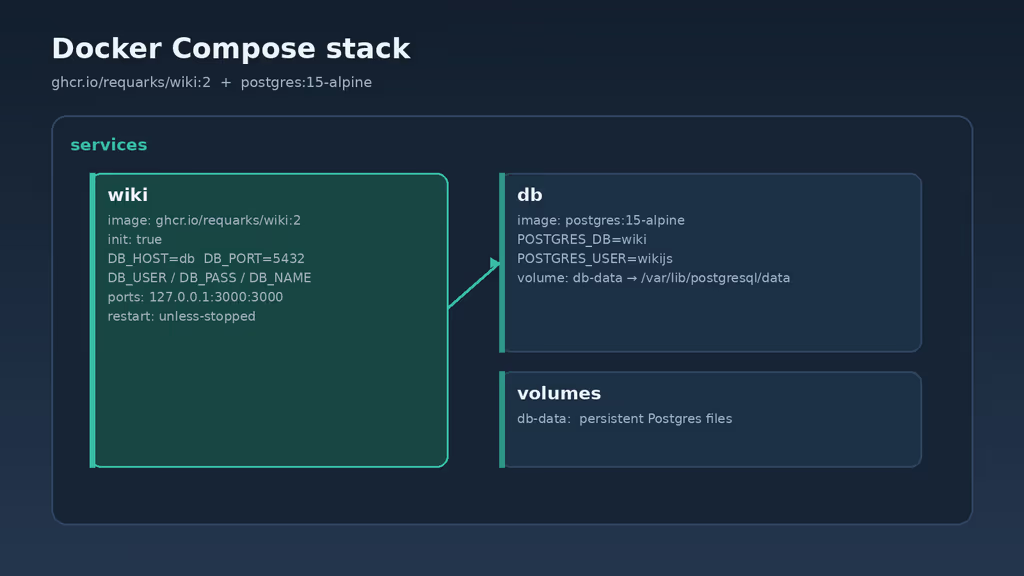
Caption: ghcr.io/requarks/wiki:2 beside postgres:15-alpine. One named volume. Same password on both services or the wiki never talks to the database.
3. Write docker-compose.yml
Create /opt/wiki/docker-compose.yml based on the official Compose example. Pin the major tag :2 (upstream prefers that over latest), bind the app to localhost, and replace the sample password:
services:
  db:
    image: postgres:15-alpine
    environment:
      POSTGRES_DB: wiki
      POSTGRES_PASSWORD: YOUR_STRONG_DB_PASSWORD
      POSTGRES_USER: wikijs
    logging:
      driver: none
    restart: unless-stopped
    volumes:
      - db-data:/var/lib/postgresql/data

  wiki:
    image: ghcr.io/requarks/wiki:2
    depends_on:
      - db
    init: true
    environment:
      DB_TYPE: postgres
      DB_HOST: db
      DB_PORT: 5432
      DB_USER: wikijs
      DB_PASS: YOUR_STRONG_DB_PASSWORD
      DB_NAME: wiki
    restart: unless-stopped
    ports:
      - "127.0.0.1:3000:3000"

volumes:
  db-data:
chmod 600 /opt/wiki/docker-compose.yml
DB_HOST must match the Compose service name (db). The official Alpine Postgres image already includes pg_trgm. Do not change POSTGRES_PASSWORD after the volume is initialized unless you also update the role inside Postgres or recreate the volume in a disposable lab.
Optional: for a lab without a reverse proxy yet, you can temporarily publish "80:3000" like the upstream sample. For production, keep the localhost bind and put TLS on Caddy or Nginx.
4. Add Caddy for HTTPS
Create a Caddyfile beside Compose. Caddy obtains and renews Let's Encrypt certificates when DNS already points at the server:
cat > /opt/wiki/Caddyfile <<'EOF'
wiki.example.com {
    reverse_proxy wiki:3000
}
EOF
Extend docker-compose.yml under services: and volumes::
  caddy:
    image: caddy:2
    ports:
      - "80:80"
      - "443:443"
    volumes:
      - ./Caddyfile:/etc/caddy/Caddyfile:ro
      - caddy_data:/data
      - caddy_config:/config
    depends_on:
      - wiki
    restart: unless-stopped
  caddy_data:
  caddy_config:
Confirm DNS for wiki.example.com points at the server before the first start so certificate issuance succeeds. If Caddy logs show issuance failing, I wait on DNS — I do not keep hitting the hostname hoping Let's Encrypt will guess.
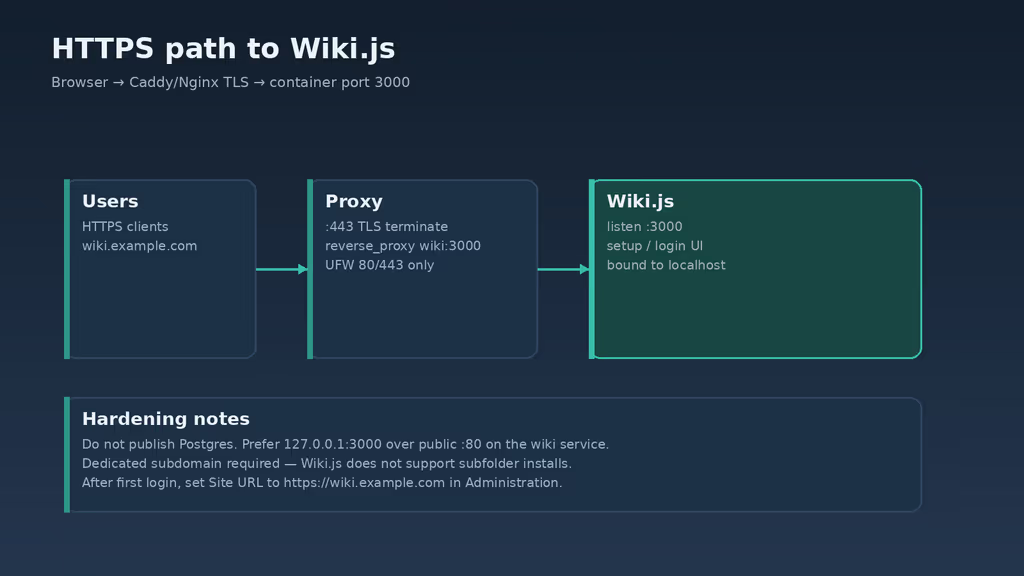
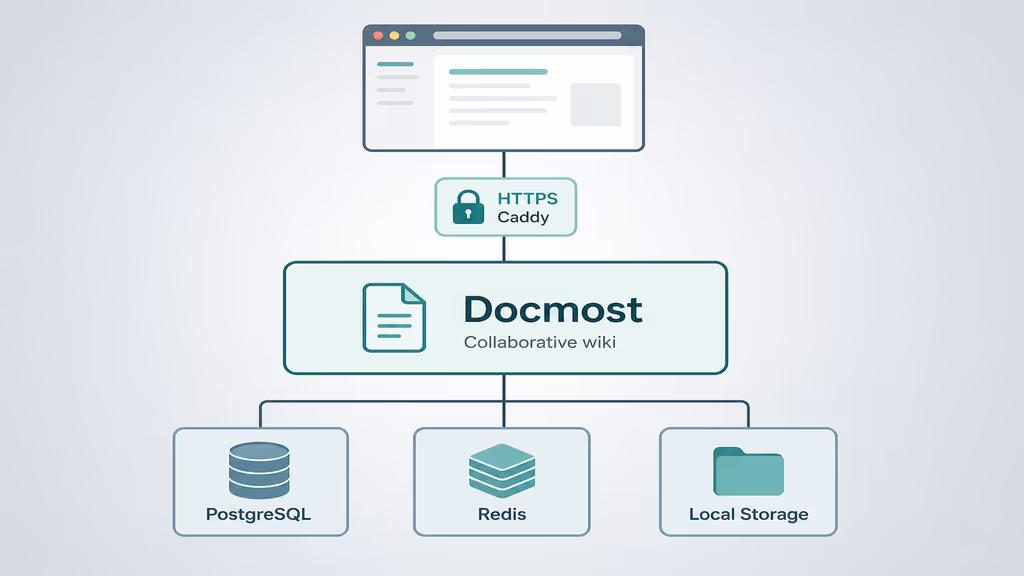
Caption: Caddy on 443, Wiki.js on the Docker network, Postgres unpublished. Site URL in Administration has to match this hostname or redirects lie.
Nginx is equally valid: proxy https://wiki.example.com to http://127.0.0.1:3000 (or the wiki service on a shared Docker network), enable WebSocket upgrade headers if you add interactive modules later, and obtain certificates with Certbot. Wiki.js itself does not require Nginx or Apache when you use containers — the proxy is for TLS and hostname routing. I picked Caddy because I already terminate several Compose apps on one box and I did not want a second Certbot timer. If Nginx is already the front door, I would not add Caddy just for this wiki.
On a lab without DNS I can bind "80:3000" like the upstream sample and finish the wizard on HTTP. I do not leave that publish in production. The localhost bind plus Caddy is the shape I keep.
5. Start the stack
cd /opt/wiki
docker compose pull
docker compose up -d
docker compose ps
docker compose logs --tail=80 wiki
curl -sS -o /dev/null -w "%{http_code}\n" http://127.0.0.1:3000
Open https://wiki.example.com. Complete the administrator account, site title, and locale. After login, set the public Site URL to https://wiki.example.com.
Site URL must be the HTTPS URL people type. A mismatch breaks redirects, OAuth callbacks, and shared links.
Database: keep DB_TYPE=postgres with matching host, user, password, and database name. I use a dedicated wikijs user, not the Postgres superuser, for the app connection.
Authentication: local accounts first. I disable public registration unless I actually want open sign-ups. LDAP, OAuth2, and the rest wait in Administration until backups are boring.
Mail: SMTP under Administration so password resets and invites work. I test with a second user before invite-only onboarding.
Storage: plan disk for uploads. Large media libraries grow the host filesystem even when page text stays small.
Updates check: Wiki.js periodically checks for updates when the host has internet. Air-gapped boxes follow upstream sideload docs instead.
TLS: Wiki.js can enable built-in Let's Encrypt via SSL_ACTIVE, LETSENCRYPT_DOMAIN, and LETSENCRYPT_EMAIL with ports 3000/3443 exposed. I still prefer one reverse proxy in front of every service; this write-up uses Caddy for that reason.
Important to know
The Docker README gets you a container. It does not shout that Site URL is a production setting, not a cosmetic one. Wrong host or http vs https breaks redirects, OAuth later, and shared links. Mixed content in the browser is usually this, not a “Caddy bug.”
Search is the other quiet one. There is no separate Elasticsearch sidecar in this Compose file. Wiki.js uses Postgres plus pg_trgm on the official image. Skip a real database, or never publish a page, and the search box looks broken.
After editing Compose environment variables:
cd /opt/wiki
docker compose up -d
docker compose logs --tail=100 wiki
What I check before I trust the wiki is not a marketing “testing checklist.” I finish the wizard and store the admin credentials offline — if I lose that account before SMTP works, I am rebuilding users. I create a top-level page tree for runbooks, product docs, and onboarding so the wiki is not one untitled page. I invite a second user after SMTP, or I create a local editor and put them in a group with write access; a solo admin is how pages go stale. I upload a small image or PDF and embed it so I know the asset path survives a recreate. I search for that page after save — that is the pg_trgm check without opening Postgres. I log out and back in over HTTPS and watch that cookies stay on wiki.example.com. I run docker compose up -d --force-recreate wiki and confirm the embed still loads. I confirm Postgres is not published; docker compose ps should not show 5432 on 0.0.0.0.
What I have running
HTTPS Wiki.js, Postgres on the Compose network, Caddy at the edge, Site URL matching the hostname. Next I lock registration, watch disk for assets, put the restore steps on a page inside the wiki, and pin a minor tag when this is shared documentation.
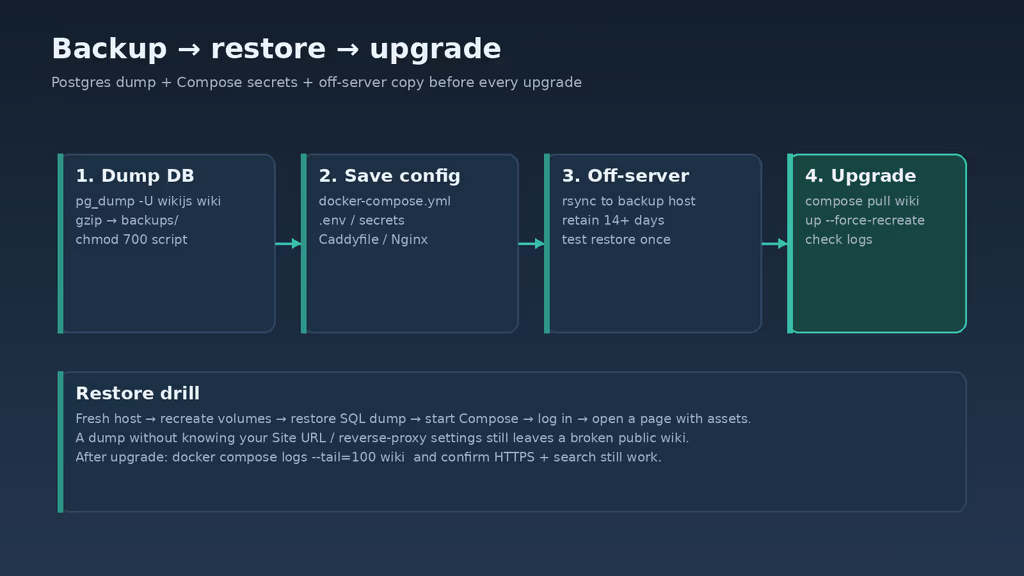
Caption: Dump Postgres, copy Compose secrets, rsync off the box, restore on a spare VM. Compose files alone are not a backup.
Compose is not a backup. Dump PostgreSQL and copy the secrets:
sudo tee /opt/wiki/backup.sh >/dev/null <<'EOF'
#!/usr/bin/env bash
set -euo pipefail

cd /opt/wiki
stamp="$(date -u +%Y%m%dT%H%M%SZ)"
mkdir -p backups

docker compose exec -T db pg_dump -U wikijs wiki | gzip > "backups/wikijs-db-${stamp}.sql.gz"
mkdir -p "backups/wikijs-config-${stamp}"
cp -a docker-compose.yml Caddyfile "backups/wikijs-config-${stamp}/"
# Include .env if you move secrets out of compose:
# cp -a .env "backups/wikijs-config-${stamp}/" 2>/dev/null || true

find backups -type f -mtime +14 -delete
EOF

sudo chmod 700 /opt/wiki/backup.sh
/opt/wiki/backup.sh
rsync -avz /opt/wiki/backups/ backup-user@backup.example.net:/srv/backups/wikijs/
Test a restore on a separate machine before I trust this wiki with anything I cannot rewrite from memory. I create a fresh Compose project, start Postgres long enough to accept connections, restore the SQL dump into the wiki database, start the wiki service, log in, and open a page that references an asset. If the image 404s, I restored the database without the volume that held uploads — or I pointed Site URL at the wrong host. I write the public hostname into the restore notes next to the dump filename. A perfect dump behind https://wiki.wrong.example still looks broken to everyone else.
I also watch docker system df after a month of screenshots. Assets and Postgres WAL grow even when I think “it is only Markdown.” After an upgrade I prune unused images so the disk graph stops lying.
Upgrades after a fresh backup:
cd /opt/wiki
/opt/wiki/backup.sh
docker compose pull wiki
docker compose up --force-recreate -d
docker compose logs --tail=120 wiki
curl -sS -o /dev/null -w "%{http_code}\n" http://127.0.0.1:3000
Always pass -d so recreate detaches. If I omit it, the upgrade sits in the foreground and I think the box hung. Pinning ghcr.io/requarks/wiki:2.5 instead of only :2 keeps upgrades deliberate when other people edit pages during the day. :2 floats; a busy wiki should not float on a weekday. I read the upgrade docs for that tag, take a dump, then recreate.
When I outgrow one VPS I would move Postgres off the box, keep the wiki close to users, put object storage behind assets if uploads dominate disk, and add SSO from Wiki.js auth modules after local accounts and backups are boring. Authentik in front is tempting because I already run it, but I would not wire OAuth until Site URL, HTTPS, and restore are proven. A broken callback loop is worse than local logins for a week.
If Caddy never issues a cert, DNS was not pointing at the server yet. I check docker compose logs caddy the same way I check wiki. Mixed content after a successful cert is almost always Site URL still on http://. Disk filling is not a mystery: assets plus WAL. I prune unused images after upgrades so docker system df matches what I think I am hosting.
What I have running now is a private HTTPS Wiki.js with PostgreSQL, Caddy at the edge, a completed admin user, and a dump script I have actually executed. Next I build the page tree, lock registration, document restore inside the wiki itself, and keep a short upgrade log so a new :2 image does not surprise me. The wiki is only as good as the last restore I rehearsed.
Did you hit the same wall?
I got stuck on DB_PASS not matching POSTGRES_PASSWORD (and almost left wikijsrocks in Compose). Did you hit the same thing, or a different one — empty search, /wiki subfolder 404s, Caddy cert before DNS, Site URL still on http? Tell me in the comments. I read them.
Need this done on your server?
I deploy and harden Laravel/CodeCanyon apps on cPanel or VPS, and offer monthly Server Watch retainers. Hire for deploy · Care plan