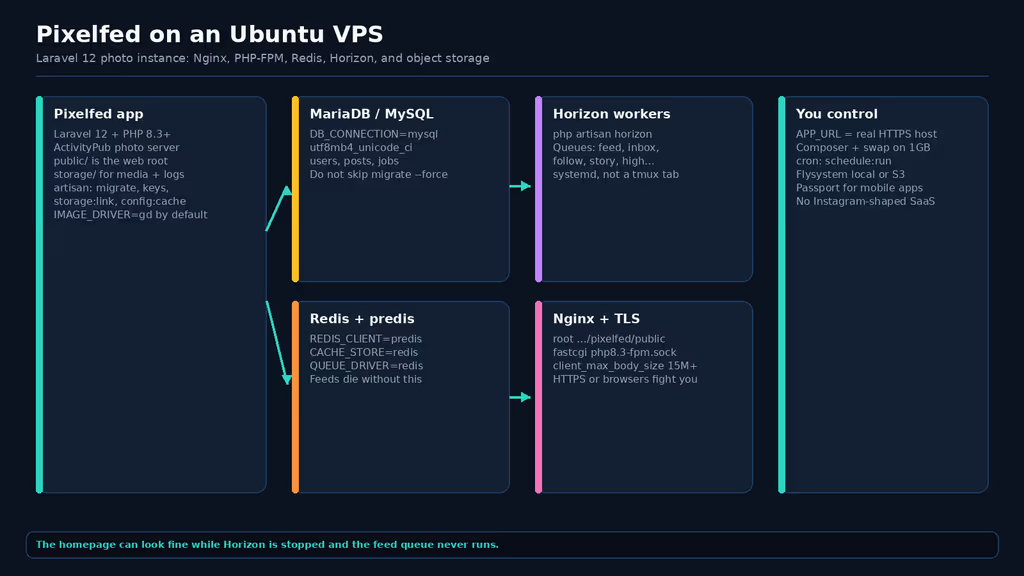
Caption: Nginx to PHP-FPM to Redis and Horizon. The site can return 200 while the feed queue is dead.
Why I picked this app
I wanted phone photos off a hosted silo without standing up a second Immich-shaped backup box. Pixelfed is the Fediverse photo server people actually federate with, and it is a Laravel app — which is the part I care about as an operator. Queues, .env, Composer, a scheduler, storage/ permissions. If those are wrong, the pretty web UI still loads and nothing useful happens.
Laravel matters here more than the marketing site admits. Pixelfed on the dev branch (that is the deployable branch until a v1.0 stable exists) requires PHP 8.3+ and Laravel 12. Uploads are not “saved and shown.” They enqueue jobs. Timelines are not a SELECT in the request. ActivityPub inbox/outbox work is jobs. If I treat this like a PHP gallery that only needs Nginx, I get a login page and an empty home.
I ran this as a lab on Ubuntu 24.04 LTS. I covered both paths the queue asked for: official Docker Compose (app + Horizon + scheduler already in the file) and a manual Composer install under /var/www/pixelfed. The failures below are the manual path. Compose hides some of them; it does not hide a bad APP_URL.
Target for a personal instance: 2 vCPU, 2 GB RAM, 40 GB+ disk. Official docs will let you try smaller. Composer on 1 GB RAM is the first wall. Redis on the same box is required even if the homepage never says the word Horizon.
Where install failed
On a fresh Ubuntu 24.04 box this install is famous for Composer dying in the middle of vendor/, then for a “working” site whose home feed never fills because nobody started Horizon.
I installed the stack the docs actually list: PHP-FPM, MariaDB, Redis, Nginx, Composer, Git, GD, jpegoptim, optipng, pngquant, ffmpeg.
sudo apt update
sudo apt install -y nginx mariadb-server redis-server git unzip curl \
  jpegoptim optipng pngquant ffmpeg composer \
  php8.3-fpm php8.3-cli php8.3-bcmath php8.3-curl php8.3-gd php8.3-intl \
  php8.3-mbstring php8.3-mysql php8.3-xml php8.3-zip php8.3-redis php8.3-ffi

sudo systemctl enable --now php8.3-fpm mariadb redis-server nginx
php8.3-ffi is not in the pretty prerequisite list. Current composer.json requires intervention/image-driver-vips, and that package pulls jcupitt/vips, which wants ext-ffi. GitHub issue #6480 is the failure this install is famous for on hosts that skipped FFI:
Your requirements could not be resolved to an installable set of packages.

  Problem 1
    - Root composer.json requires intervention/image-driver-vips ^1.0
    - jcupitt/vips ... require ext-ffi * -> it is missing from your system.
I kept IMAGE_DRIVER=gd in .env (that is the default in .env.example). GD is enough for day one. I still needed FFI so Composer would finish. Maintainers have told people to composer remove intervention/image-driver-vips when FFI is blocked; I would rather install the extension than edit the app’s require list.
Then I cloned the deployable branch. Official docs still show /usr/share/webapps; on Ubuntu I use /var/www:
sudo mkdir -p /var/www
sudo git clone -b dev https://github.com/pixelfed/pixelfed.git /var/www/pixelfed
cd /var/www/pixelfed
sudo chown -R www-data:www-data .
sudo find . -type d -exec chmod 755 {} \;
sudo find . -type f -exec chmod 644 {} \;
sudo chmod -R ug+rwx storage bootstrap/cache
Wall one — Composer OOM on 1 GB. Experience notes I keep for this app: Composer often OOMs on a 1 GB VPS during Pixelfed install. I ran the documented command first:
sudo -u www-data composer install --no-ansi --no-interaction --optimize-autoloader --no-dev
On the small box it did not get to “Generating optimized autoload files.” I got the error shape this class of Laravel apps hits when PHP and the kernel both run out of room:
PHP Fatal error: Allowed memory size of 1610612736 bytes exhausted
(tried to allocate 4096 bytes) in phar:///usr/bin/composer/src/Composer/DependencyResolver/Solver.php
Sometimes it is not even PHP’s limit. The kernel says:
mmap() failed: [12] Cannot allocate memory
COMPOSER_MEMORY_LIMIT=-1 alone does not invent RAM. I added 2 GB swap, then reran Composer with the limit unset:
sudo fallocate -l 2G /swapfile
sudo chmod 600 /swapfile
sudo mkswap /swapfile
sudo swapon /swapfile
echo '/swapfile none swap sw 0 0' | sudo tee -a /etc/fstab

cd /var/www/pixelfed
sudo -u www-data COMPOSER_MEMORY_LIMIT=-1 composer install \
  --no-ansi --no-interaction --optimize-autoloader --no-dev
Swap is slow. It finished. I would not leave a production photo instance on 1 GB after that — Horizon workers want headroom — but that is how the vendor tree actually appeared.
Wall two — MariaDB charset on Debian/Ubuntu. Official troubleshooting: migrations fail because MariaDB defaulted to uca1400_ai_ci while Pixelfed expects utf8mb4_unicode_ci. I set the collation before migrate:
CREATE DATABASE pixelfed CHARACTER SET utf8mb4 COLLATE utf8mb4_unicode_ci;
CREATE USER 'pixelfed'@'localhost' IDENTIFIED BY 'use-a-real-password';
GRANT ALL PRIVILEGES ON pixelfed.* TO 'pixelfed'@'localhost';
FLUSH PRIVILEGES;
If the server was already on the Debian default, the docs say edit /etc/mysql/mariadb.conf.d/50-server.cnf and replace utf8mb4=uca1400_ai_ci with utf8mb4=utf8mb4_unicode_ci, restart MariaDB, then ALTER DATABASE pixelfed CHARACTER SET utf8mb4 COLLATE utf8mb4_unicode_ci;.
Wall three — .env looks set, sessions 419. Copy .env.example, then php artisan key:generate. APP_URL must be the HTTPS hostname. APP_DOMAIN, ADMIN_DOMAIN, and SESSION_DOMAIN are the hostname without https://. Official troubleshooting for 419 is exactly those three plus APP_URL. I also set Redis the way the example file already does:
APP_URL="https://pixelfed.example.com"
APP_DOMAIN="pixelfed.example.com"
ADMIN_DOMAIN="pixelfed.example.com"
SESSION_DOMAIN="pixelfed.example.com"

DB_CONNECTION="mysql"
DB_DATABASE="pixelfed"
DB_USERNAME="pixelfed"
DB_PASSWORD="use-a-real-password"

REDIS_CLIENT="predis"
REDIS_HOST="127.0.0.1"
REDIS_PORT="6379"
CACHE_STORE="redis"
QUEUE_DRIVER="redis"
HORIZON_PREFIX="horizon-"

IMAGE_DRIVER=gd
OAUTH_ENABLED="true"
ACTIVITY_PUB="false"
Every .env edit needs cache rebuild. Docs are blunt about this:
sudo -u www-data php artisan key:generate
sudo -u www-data php artisan storage:link
sudo -u www-data php artisan migrate --force
sudo -u www-data php artisan passport:keys
sudo -u www-data php artisan config:cache
sudo -u www-data php artisan route:cache
sudo -u www-data php artisan view:cache
If I enable ActivityPub later, ACTIVITY_PUB=true and php artisan instance:actor are not optional decoration. I left federation off until Horizon was proven.
Wall four — Horizon never ran. This is the failure the homepage README makes easy. The web pool comes up. I created an admin. I uploaded a photo. The file hit storage/. The home timeline stayed empty. Media sat in a queue named feed (and friends: inbox, follow, story, high…). Official troubleshooting: “Horizon is not working” means the process user cannot see the repo or Redis.
A one-shot php artisan horizon in SSH dies when I disconnect. I used systemd, Ubuntu paths, www-data:
# /etc/systemd/system/pixelfed-horizon.service
[Unit]
Description=Pixelfed task queueing via Laravel Horizon
After=network.target redis-server.service php8.3-fpm.service mariadb.service
Requires=redis-server.service

[Service]
Type=simple
ExecStart=/usr/bin/php /var/www/pixelfed/artisan horizon
User=www-data
Group=www-data
Restart=always
WorkingDirectory=/var/www/pixelfed

[Install]
WantedBy=multi-user.target
sudo systemctl daemon-reload
sudo systemctl enable --now pixelfed-horizon
sudo -u www-data php artisan horizon:status
Docs also want a cron line for the scheduler. Horizon is not a substitute for schedule:run:
* * * * * /usr/bin/php /var/www/pixelfed/artisan schedule:run >> /dev/null 2>&1
Install that crontab as www-data (sudo crontab -u www-data -e), not root, so the scheduler can write storage/.
Wall five — Nginx root not public/. If root is /var/www/pixelfed, Pixelfed does not work. Docs warn about this. Ubuntu 24.04 socket is /run/php/php8.3-fpm.sock. client_max_body_size must sit above MAX_PHOTO_SIZE (example file uses 15000 KB).
server {
    listen 443 ssl http2;
    server_name pixelfed.example.com;
    root /var/www/pixelfed/public;
    index index.php;
    client_max_body_size 16M;

    location / {
        try_files $uri $uri/ /index.php?$query_string;
    }

    location ~ \.php$ {
        include snippets/fastcgi-php.conf;
        fastcgi_pass unix:/run/php/php8.3-fpm.sock;
        fastcgi_param SCRIPT_FILENAME $realpath_root$fastcgi_script_name;
        include fastcgi_params;
    }

    location ~ /\.(?!well-known).* {
        deny all;
    }
}
Certbot for the hostname after DNS points here. Pixelfed generates HTTPS URIs; mixed APP_URL=http:// behind TLS is how you get cookie and 419 loops.
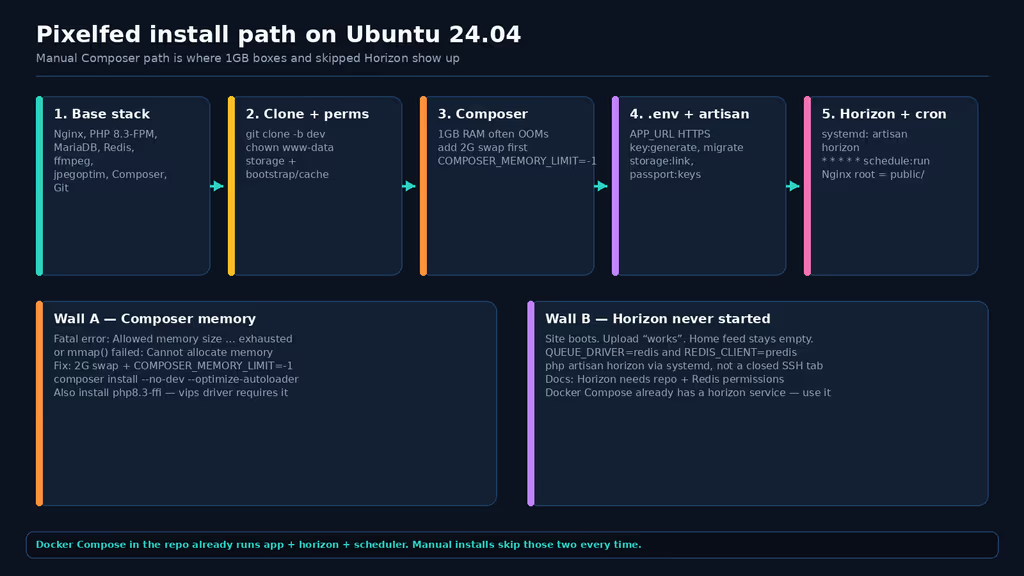
Caption: Clone, Composer with swap, then Horizon as a service. Docker Compose already has horizon and scheduler containers; the manual path does not.
Docker path, if I do not want to babysit PHP-FPM: the repo docker-compose.yml already defines pixelfed (8080), horizon (php artisan horizon), scheduler (php artisan schedule:work), db (mysql:9), and redis (redis:7-alpine). Put a reverse proxy in front of 8080. Do not skip the horizon service because “the app container is healthy.”
Packages the README skips
I opened composer.json on pixelfed/pixelfed dev. These are in require. I am not guessing.
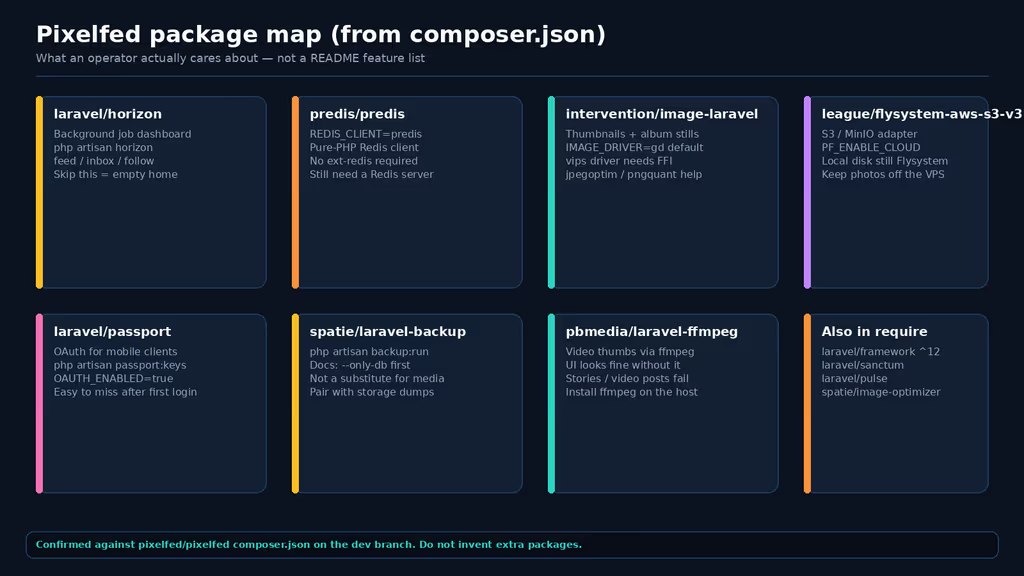
Caption: Horizon, predis, Intervention Image, Flysystem S3 — plus Passport, Spatie Backup, and laravel-ffmpeg. Confirmed on the app’s composer.json.
laravel/horizon — this is the queue system Pixelfed actually documents as preferred. config/horizon.php lists production queues: high, default, follow, shared, inbox, feed, low, story, delete, mmo, intbg, groups, adelete, move, pushnotify. If I fall back to queue:work I have to name every one of those or jobs never launch. The docs say that. Horizon is the less painful process. Operators care because a stopped worker looks like a product bug: “federation is broken,” “thumbnails never appear,” “follows do nothing.” Check php artisan horizon:status before rewriting .env.
Dashboard lives at /horizon after php artisan horizon:install / horizon:publish if you want admins to see throughput. Docs: if the UI says inactive while the process looks up, run package:discover or composer install, then horizon:install, route:cache, restart the unit.
predis/predis — .env.example sets REDIS_CLIENT="predis". That is a pure-PHP Redis client. I still need a Redis server. php8.3-redis is the extension; predis does not replace redis-server. Cache (CACHE_STORE=redis) and the queue (QUEUE_DRIVER=redis) both point here. Unix socket vs TCP is in the install docs; TCP on 127.0.0.1:6379 is the default that actually works on Ubuntu’s packaged Redis.
Intervention Image (intervention/image-laravel + intervention/image-driver-vips) — the queue called this intervention/image. Direct requires on current dev are the Laravel bridge and the vips driver. This is how thumbnails, album stills, and the IMAGE_DRIVER switch exist. Default is gd. imagick is documented. vips needs FFI and libvips on the box. Prerequisites still want jpegoptim / optipng / pngquant because PF_OPTIMIZE_IMAGES=true hands files to those binaries via spatie/laravel-image-optimizer. Missing optimizer binaries does not always 500 — it leaves fat originals and a quiet log.
Flysystem (league/flysystem-aws-s3-v3, Laravel’s filesystem) — local photos are already Flysystem disks under storage/. The S3 adapter is a first-class require. .env.example has PF_ENABLE_CLOUD=false and FILESYSTEM_CLOUD=s3. When I turn cloud on, this is the package that talks to S3 or an S3-compatible endpoint (MinIO, etc.). Operators care because a 40 GB VPS fills on photos long before MariaDB does. Backups of the database without the disk (or the bucket) restore an instance with broken media URLs.
Also in require, and worth knowing once Horizon works: laravel/passport (OAuth clients — passport:keys), laravel/sanctum, spatie/laravel-backup (php artisan backup:run --only-db is what the docs tell you to run before changing database drivers), pbmedia/laravel-ffmpeg (needs host ffmpeg or video thumbs never exist), laravel/pulse.
A feature I would not have found from the homepage
Horizon’s /horizon dashboard, and the fact that feed generation is a queue name. The public site talks about photos and federation. It does not say that a successful upload only enqueues work. I would not have found that from the homepage. I found it in config/horizon.php and in the install chapter that recommends Horizon over a bare queue:work.
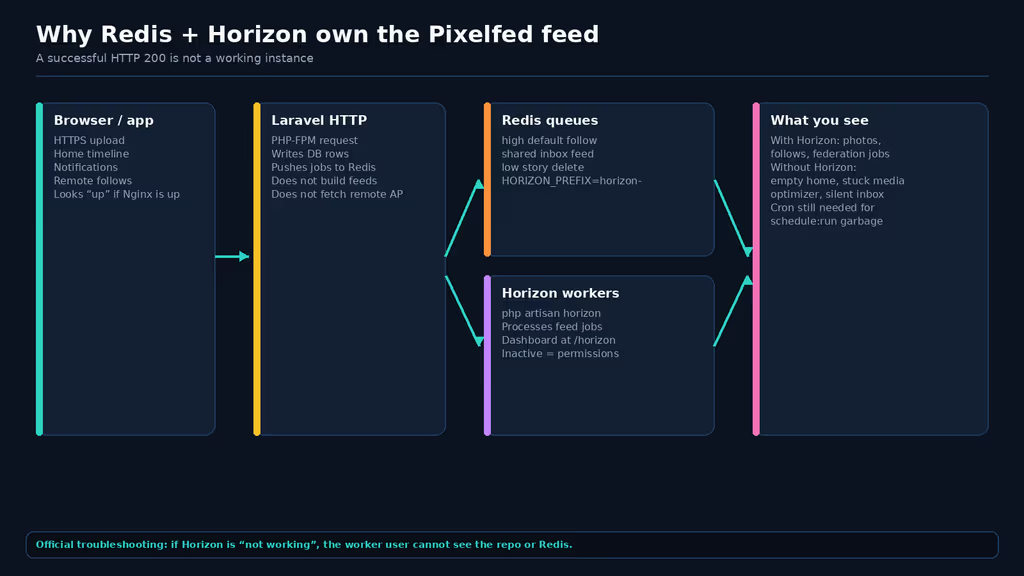
Caption: PHP-FPM writes rows and pushes jobs. Horizon drains feed, inbox, follow. HTTP 200 is not a timeline.
Second hidden ops feature: OAuth for the official mobile/desktop clients. OAUTH_ENABLED=true is already in .env.example. php artisan passport:keys is the one-time command. Skip it and third-party apps show the generic “Something went wrong” page. Troubleshooting also mentions regenerating storage/oauth-private.key with passport:install if keys are missing. I ran passport:keys as the install chapter says.
Third: ActivityPub is a switch plus an actor, not a checkbox on the marketing site. php artisan instance:actor after ACTIVITY_PUB=true. I would not enable that until Horizon is a service, Redis is up, and APP_URL matches the certificate. Remote follows are jobs on follow / inbox. A silent Horizon is how people conclude “Pixelfed does not federate.”
What I have running
HTTPS Pixelfed, PHP 8.3-FPM, MariaDB with utf8mb4_unicode_ci, Redis, Horizon under systemd, cron for schedule:run, Nginx root on public/. Composer finished after swap. Feeds move when Horizon is active. Next I would turn on ActivityPub with instance:actor, point Flysystem at object storage before disk fills, and run backup:run --only-db plus a storage/app copy off-box. I would not run composer update on this 1 GB memory profile again without swap.
Did you hit the same wall?
I got stuck on Composer exhausting ~1.5 GB on a 1 GB VPS, then on a site that looked installed while Horizon was not a service — so the feed queue never ran. Did you hit the same thing, or a different one — ext-ffi / vips, MariaDB uca1400_ai_ci migrations, storage/ owned by the wrong user, Nginx root not public/, 419 because SESSION_DOMAIN was still localhost? Tell me in the comments. I read them.
Need this done on your server?
I deploy and harden Laravel/CodeCanyon apps on cPanel or VPS, and offer monthly Server Watch retainers. Hire for deploy · Care plan
References
- Pixelfed prerequisites
- Pixelfed installation
- Pixelfed configuration
- Pixelfed troubleshooting (Horizon, OAuth, 419, MariaDB charset)
- pixelfed/pixelfed composer.json (dev)
- pixelfed/pixelfed .env.example (dev)
- pixelfed/pixelfed docker-compose.yml (dev)
- GitHub issue #6480 — intervention/image-driver-vips and ext-ffi
- Laravel Horizon documentation