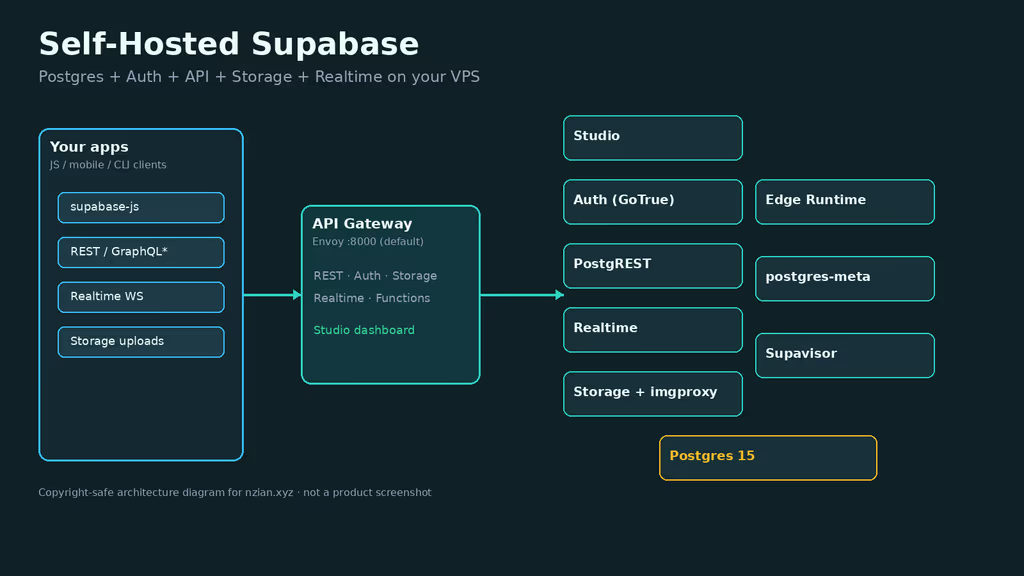
Caption: Postgres, Auth, REST, Realtime, Storage, Functions, Studio behind a gateway on my VPS.
Why I wanted this on my server
I wanted a Firebase-shaped backend without sending user data to a hosted vendor. Supabase is Postgres plus Auth, PostgREST, Realtime, Storage, Edge Functions, and Studio. Self-hosting is for data residency, predictable costs, and secrets I control. Agencies can host client backends next to Laravel or Node apps. This is not supabase start on a laptop, and it is not feature-parity with every cloud SKU on day one. Logs analytics are optional. The default API gateway is Envoy (Kong remains an override).
A leaked SUPABASE_SECRET_KEY or a weak DASHBOARD_PASSWORD is full backend compromise. I planned disk for Postgres and Storage before inviting anyone. Self-hosted Auth keys and URL settings have to be correct before a production frontend points at the stack.
What I actually installed
Ubuntu 24.04 LTS, official supabase/supabase Docker tree pinned to self-hosted/v0.8.0, secrets from generate-keys.sh / add-new-auth-keys.sh, run.sh start, Caddy HTTPS override. Public URL: https://supabase.example.com. Live config in /opt/supabase-project.
Official hardware: minimum 2 CPU / 4 GB RAM / 40 GB SSD; recommended 4+ CPU / 8 GB+ / 80 GB+ SSD. Extra headroom if Logflare / Vector analytics are enabled. Off-server dumps for Postgres and Storage. 2 GB droplets are a known bad time.
Security I would not skip: never start with .env.example placeholders on a public IP, publish 80/443 when using the HTTPS overrides, DASHBOARD_PASSWORD with at least one letter, .env mode 600, and SUPABASE_PUBLIC_URL / API_EXTERNAL_URL / SITE_URL on HTTPS before OAuth. I do not expose Postgres (5432 / 6543) to the whole internet.
I keep Git, OpenSSL, jq, curl, and UFW on the host. SMTP is required for real signup confirmation; I would not open public registration without it.
Where it broke
On a fresh Ubuntu 24.04 box this stack is famous for Studio basic auth that never accepts the password you typed.
Official guidance: DASHBOARD_PASSWORD must include at least one letter. I generated a long numeric string, saved it, and Studio kept rejecting login. Resetting to a password with a letter fixed it. Not an Auth bug — dashboard HTTP basic auth.
Second: Auth redirects after flipping to HTTPS. I started on :8000 HTTP, then added Caddy. Browsers still used http://…:8000 callback URLs until I set SUPABASE_PUBLIC_URL, API_EXTERNAL_URL, and SITE_URL to https:// and ran sh run.sh recreate. OAuth callbacks must match API_EXTERNAL_URL + /callback.
Third: services never become healthy on a 2 GB VPS. sh tests/test-container-logs.sh and docker compose ps. Add RAM or skip the logs/analytics overlay.
Placeholder secrets from .env.example on a public IP are how you donate the database. Run the key scripts before start.
Other documented issues: Realtime WebSocket failures — reverse proxy must upgrade connections; official Caddy/Nginx overrides include that, custom proxies must forward Upgrade / Connection and X-Forwarded-*. Mixed content — SUPABASE_PUBLIC_URL and SITE_URL must be https://. Analytics missing in Studio — sh run.sh config add logs && sh run.sh start. Storage on macOS Docker Desktop prefers a named volume; Linux VPS bind mounts are the usual production path. Keep SUPABASE_SECRET_KEY on servers only. Client libraries set supabaseUrl to SUPABASE_PUBLIC_URL and the publishable key in browsers.
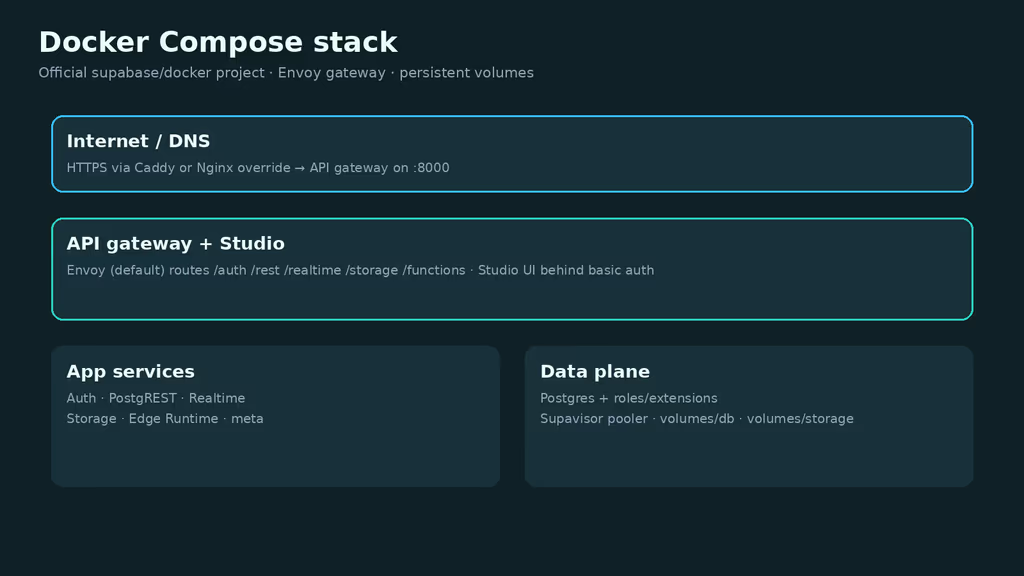
Caption: HTTPS proxy, then Envoy to Auth, REST, Realtime, Storage, Functions, Studio.
The working install
sudo apt update
sudo apt upgrade -y
sudo apt install -y ca-certificates curl gnupg openssl jq git ufw

sudo ufw allow OpenSSH
sudo ufw allow 80/tcp
sudo ufw allow 443/tcp
sudo ufw enable
sudo ufw status
Do not expose Postgres (5432 / 6543) to the whole internet.
1. Install Docker Engine
curl -fsSL https://get.docker.com | sudo sh
sudo usermod -aG docker "$USER"
newgrp docker

docker --version
docker compose version
2. Clone the official Docker configuration
On a greenfield VPS you can use curl -fsSL https://supabase.link/setup.sh | sh — inspect that script first. I pinned a tag:
sudo mkdir -p /opt
sudo chown "$USER":"$USER" /opt
cd /opt

git clone --depth 1 --branch self-hosted/v0.8.0 https://github.com/supabase/supabase
mkdir supabase-project
cp -rf supabase/docker/. supabase-project
cd supabase-project
cp .env.example .env
printf 'ref=self-hosted/v0.8.0\n' > .supabase-version
chmod 600 .env

docker compose pull
Keep the upstream clone separate from supabase-project. .supabase-version is what update.sh reads.
3. Generate keys and secrets
cd /opt/supabase-project
sh utils/generate-keys.sh
sh utils/add-new-auth-keys.sh
Confirm POSTGRES_PASSWORD, encryption keys, SUPABASE_PUBLISHABLE_KEY, SUPABASE_SECRET_KEY, and DASHBOARD_USERNAME / DASHBOARD_PASSWORD (include a letter).
sh run.sh secrets
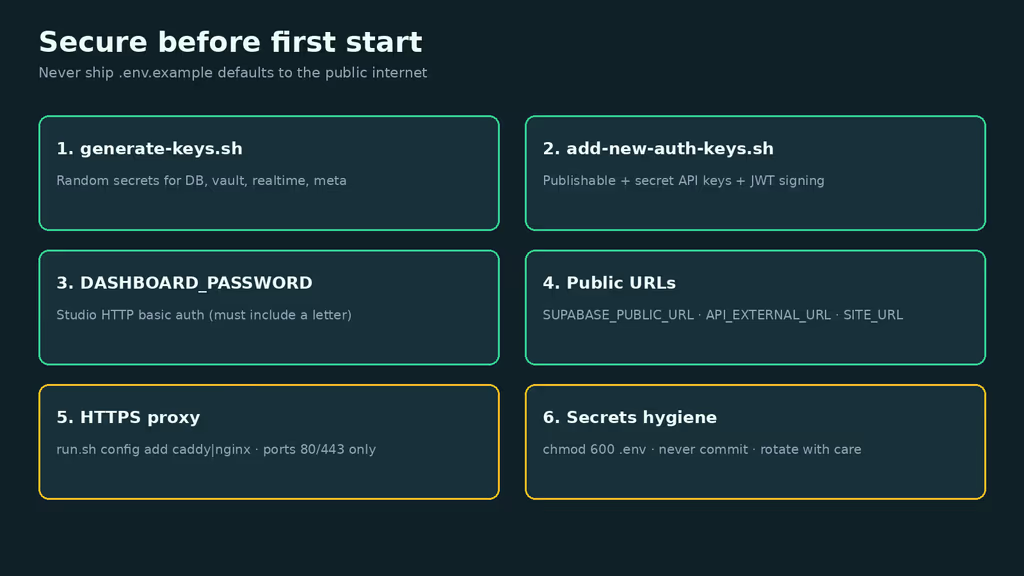
Caption: Generated keys, Studio basic auth, public HTTPS URLs, private .env.
4. Configure public URLs
First HTTP bring-up on port 8000:
SUPABASE_PUBLIC_URL=http://supabase.example.com:8000
API_EXTERNAL_URL=http://supabase.example.com:8000/auth/v1
SITE_URL=http://app.example.com
Production HTTPS:
SUPABASE_PUBLIC_URL=https://supabase.example.com
API_EXTERNAL_URL=https://supabase.example.com/auth/v1
SITE_URL=https://app.example.com
PROXY_DOMAIN=supabase.example.com
CERTBOT_EMAIL=you@example.com
SITE_URL is the frontend origin, not the Supabase hostname.
5. Start the stack
cd /opt/supabase-project
sh run.sh start
docker compose ps
sh run.sh start is docker compose up -d --wait. If something stays created or exits:
sh tests/test-container-logs.sh
sh run.sh logs storage
Studio is on the gateway (port 8000 until the proxy override), HTTP basic auth.
6. Add HTTPS with Caddy or Nginx
cd /opt/supabase-project
# Prefer Caddy for automatic Let's Encrypt:
sh run.sh config add caddy
# Or Nginx + Certbot image:
# sh run.sh config add nginx

# Ensure .env URLs use https:// as shown above, then:
sh run.sh start
curl -I https://supabase.example.com/auth/v1/
A 401 from /auth/v1/ means TLS reached Auth. Watch docker logs supabase-caddy if certs fail.
Configuration
sh run.sh help
sh run.sh secrets
sh run.sh logs auth
sh run.sh restart studio
sh run.sh recreate
sh run.sh config add logs
sh run.sh config remove logs
SMTP for real signup mail, then sh run.sh recreate. Session-mode Postgres through Supavisor: port 5432 with username postgres.[POOLER_TENANT_ID]; transaction mode 6543. Prefer letters and numbers in POSTGRES_PASSWORD to avoid URL-encoding pain.
Envoy is the default api-gw. Kong: sh run.sh config add kong. Terminate TLS with Caddy/Nginx overrides, not gateway-native HTTPS.
Confusion about the setup
sh run.sh config add … edits COMPOSE_FILE so optional YAML layers on. I almost hand-merged Caddy into the base compose. Enabling logs starts Logflare and Vector and eats RAM. For 2026 installs, Envoy is default — old Kong snippets will confuse you.
Rootless Docker: container supabase-vector exited often means DOCKER_SOCKET_LOCATION should be /run/user/1000/docker.sock. Windows checkouts with CRLF break gateway scripts.
Usage
- Studio login with basic auth.
- Table
public.noteswith RLS onauth.uid(). - REST with the publishable key; Realtime over WSS on the same hostname.
- Small Storage upload; optional
curl https://supabase.example.com/functions/v1/hello.
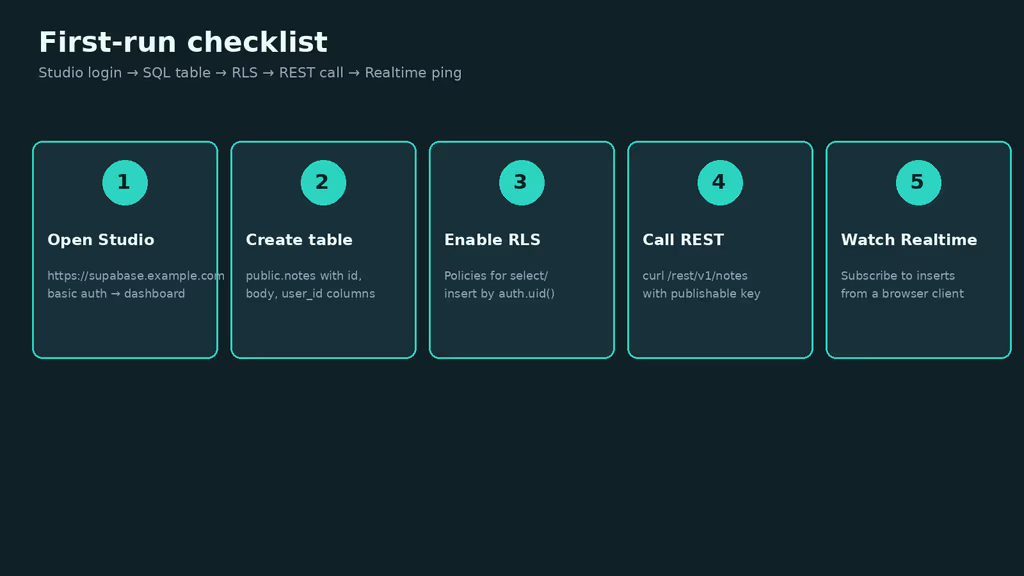
Caption: Studio → table with RLS → REST → Realtime.
curl -sS "https://supabase.example.com/rest/v1/notes?select=*" \
  -H "apikey: YOUR_SUPABASE_PUBLISHABLE_KEY" \
  -H "Authorization: Bearer YOUR_SUPABASE_PUBLISHABLE_KEY"
sh run.sh restart functions
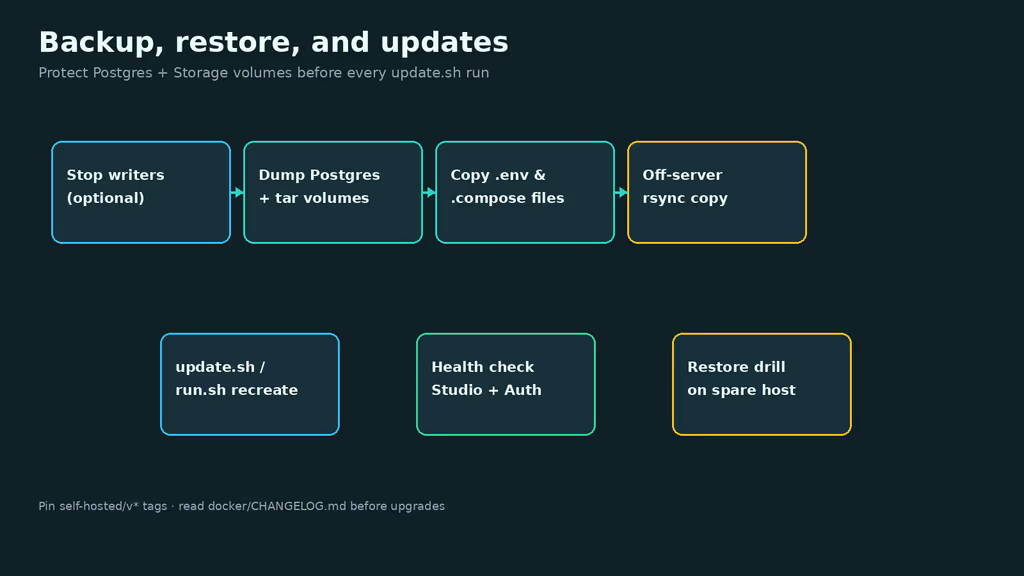
Caption: Postgres dump, Storage volume, Compose, .env, then update.sh.
Backup, expose, next step
cd /opt/supabase-project
stamp="$(date -u +%Y%m%dT%H%M%SZ)"
mkdir -p backups

# Logical dump through the running db container (adjust service name if needed)
docker compose exec -T db pg_dump -U postgres postgres | gzip > "backups/postgres-${stamp}.sql.gz"

tar --one-file-system -czf "backups/storage-${stamp}.tar.gz" volumes/storage
tar --one-file-system -czf "backups/config-${stamp}.tar.gz" \
  .env .supabase-version docker-compose.yml docker-compose.*.yml volumes/api volumes/proxy 2>/dev/null || true

rsync -avz backups/ backup-user@backup.example.net:/srv/backups/supabase/
sh utils/db-passwd.sh
sh run.sh recreate
Upgrades: docker/CHANGELOG.md, backup, update.sh, pin self-hosted/v* tags. Then Studio, curl -I https://supabase.example.com/auth/v1/, a REST select, a Storage download.
What I have running now: self-hosted Supabase v0.8.0, generated keys, Envoy, Caddy HTTPS, Studio behind basic auth with a password that includes a letter. I pin self-hosted/v* rather than tracking master. Next: SMTP, RLS before public signups, point one app at the publishable key, document the restore drill, schedule upgrades against the monthly snapshots. I am not enabling the logs overlay on this RAM budget.
Did you hit the same wall?
I got stuck on Studio rejecting a numbers-only DASHBOARD_PASSWORD, then Auth redirects until I recreated after HTTPS URLs. Did you hit the same thing, or a different one — 2 GB RAM, Vector socket, CRLF on Windows? Tell me in the comments. I read them.
Need this done on your server?
I deploy and harden Laravel/CodeCanyon apps on cPanel or VPS, and offer monthly Server Watch retainers. Hire for deploy · Care plan