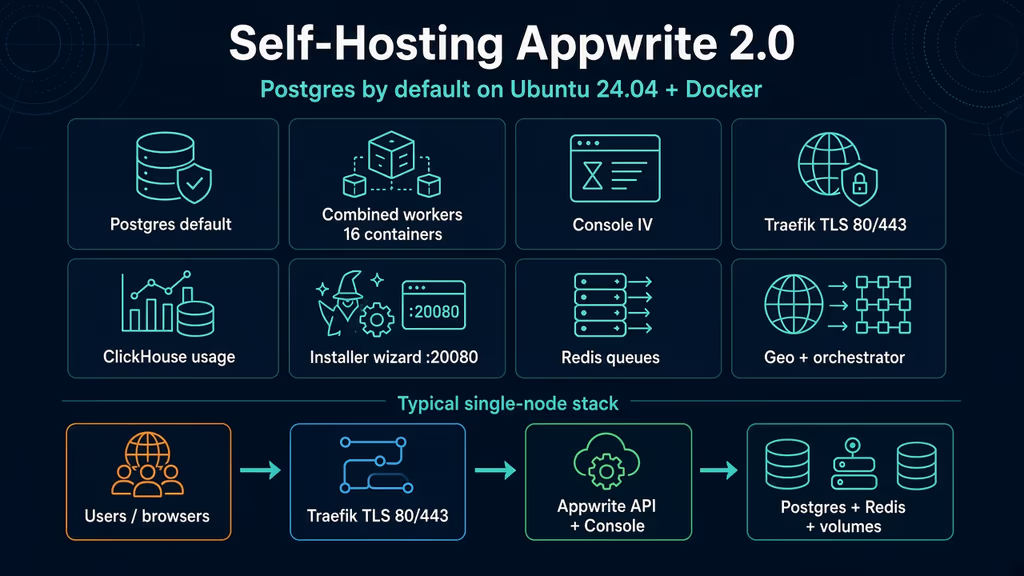
Caption: Browser to Traefik on 80/443, then the API and Console IV, then Postgres, Redis, and the volumes I actually have to back up.
Why I wanted this on my server
I keep reaching for a hosted backend when a Laravel app needs auth, storage, and functions I did not want to wire from scratch. That is fine until the user table lives in someone else’s region. I wanted the stack on a VPS I already SSH into.
Appwrite 2.0 opened for self-hosting on 7 Sep 2026. Postgres is the default database. Combined workers cut the default stack from 33 containers to 16. Console IV is a new UI (appwrite/new) over the same APIs. That is the version I would stand up now — not a 1.8 MariaDB compose from last year.
I need one hostname, Traefik on 80/443, a secret I can restore, and a Postgres dump I can tar. A wizard that only listens on the VPS loopback, or a 2 GB droplet that dies while ClickHouse starts, is a half-booted Docker project.
What I actually installed
Ubuntu 24.04 LTS, Docker Engine with the Compose v2 plugin, official installer image appwrite/appwrite:2.0.0. Project under /opt/appwrite — the installer creates that folder from wherever I run docker run. Public hostname https://api.example.com — replace it. Traefik 3.6 ships in the generated compose and binds 80/443. I do not put Nginx on those ports next to Appwrite unless I am replacing Traefik on purpose.
Official floor: 2 CPU, 4 GB RAM, 2 GB swap, Compose v2. Combined topology is still 16 containers, including ClickHouse for usage metrics and appwrite/postgres:0.1.0. A 2 GB VPS will OOM before Console IV loads. I would not pretend otherwise.
Database choice is the first wizard step. Postgres is preselected. MariaDB and MongoDB still work. The database is fixed for the life of the instance. An existing 1.8/1.9 MariaDB box that I upgrade to 2.0 keeps MariaDB. There is no migrate-to-Postgres path. Fresh install if I want Postgres.
Software on the host: sudo, DNS A/AAAA for the hostname, Docker from Docker’s apt repo, UFW. I open 20080 only while the installer wizard is running, then I close it. I do not leave the wizard port in the security group.
sudo apt update
sudo apt upgrade -y
sudo apt install -y ca-certificates curl gnupg openssl ufw

sudo ufw allow OpenSSH
sudo ufw allow 80/tcp
sudo ufw allow 443/tcp
sudo ufw enable
sudo ufw status
I keep .env mode 600. _APP_OPENSSL_KEY_V1 encrypts sessions, webhooks, and storage. Lose it and a restore is a pile of ciphertext.
Where it broke
On a fresh Ubuntu 24.04 box this install is famous for a wizard that looks like it should open on my laptop, and does not.
Experience notes I keep for this app: the installer listens on 20080. Docs say open that port on a remote VPS, then hit the public IP. http://localhost:20080 is the box running Docker, not my laptop. The hostname I type in the wizard has to match the name I will actually open, or Traefik Host() rules miss Console IV.
I ran the official 2.0 installer from /opt, published 20080, and on the laptop opened http://localhost:20080. Connection refused. The container was healthy. The browser was wrong:
# On my laptop this is me, not the VPS.
curl -sS -o /dev/null -w "%{http_code}\n" http://localhost:20080
# 000  (connection refused)

# From the VPS, or from the laptop to the VPS public IP, it answers.
curl -sS -o /dev/null -w "%{http_code}\n" http://127.0.0.1:20080
Docs still print “open http://localhost:20080” because the author is assumed to be on the same machine as Docker. I am not. On a remote VPS I temporarily allow 20080, then I open http://VPS_PUBLIC_IP:20080 from the laptop. SSH tunnel is the other path if I refuse to publish 20080 at all:
ssh -L 20080:127.0.0.1:20080 user@your-vps
# then http://localhost:20080 on the laptop is the tunnel
Second wall: I typed localhost or the bare public IP as Hostname because the wizard accepted it, then I pointed DNS at api.example.com and opened HTTPS. Traefik’s Console router is Host(_APP_DOMAIN) || Host(_APP_CONSOLE_DOMAIN). If those env vars are localhost and I browse api.example.com, the Host rule misses. API health with the wrong Host header fails the same way the generated healthcheck is written:
# Inside the appwrite container the check is Host: $_APP_DOMAIN
curl -fsS -o /dev/null -H "Host: localhost" http://127.0.0.1/v1/health/version
# vs
curl -fsS -H "Host: api.example.com" http://127.0.0.1/v1/health/version
Use HTTPS in the wizard when the public name is a real domain. 2.0 turns HTTPS off for loopback, .local, .internal, and bare IPs. A real hostname with HTTPS off, then a later “I will add TLS,” is how cookies and Console redirects disagree.
Third wall: I almost installed on a 2 GB droplet because “combined topology is only 16 containers.” Combined is the default. It is not small. ClickHouse, Postgres, Redis, Traefik, the API, Console, realtime, appwrite-worker, appwrite-task-scheduler, geo, orchestrator, executor — they all start. Official floor is 4 GB RAM + 2 GB swap. On 2 GB the kernel OOM-killer hits a Java or PHP process and Compose looks like a restart loop:
appwrite-postgresql   Restarting
appwrite-worker       Exit 137
clickhouse            OOMKilled
137 is SIGKILL. I add swap and a bigger box before I debug “why is Console blank.”
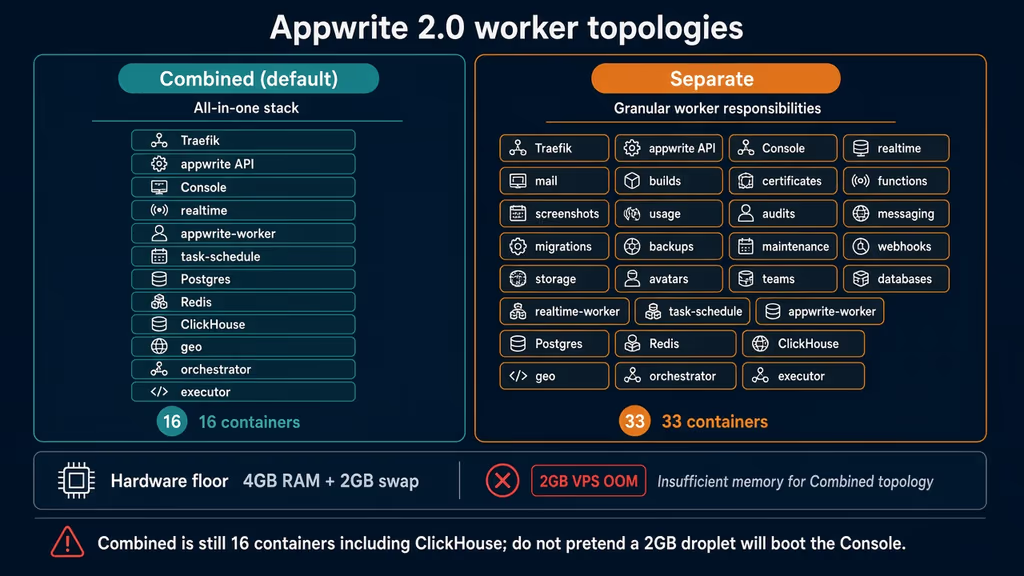
Caption: Combined is 16 containers including ClickHouse. Separate is 33. A 2 GB VPS OOMs on either. The floor is 4 GB RAM plus 2 GB swap.
Fourth: I cannot “just switch” an old MariaDB Appwrite to Postgres. 2.0 defaults Postgres for new installs. Upgrade keeps the engine you had. Fresh install if I want Postgres.
Fifth: _APP_OPENSSL_KEY_V1 is shown once in the wizard. I copy it into the password manager before Install. Rotate it later and encrypted payloads stop decrypting.
docker logs appwrite --tail 120
docker compose -f /opt/appwrite/docker-compose.yml ps
ss -tlnp | grep -E '20080|80|443'
If 20080 answers and 443 does not, the wizard is still the only listener — I have not finished Install. If 443 answers and Console is a blank Traefik error, hostname is the problem, not PHP.
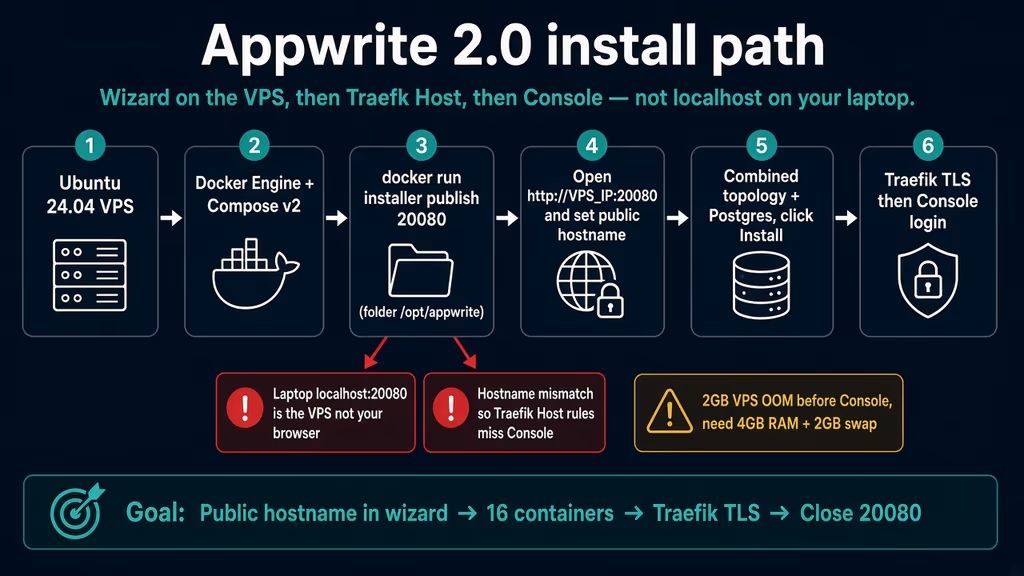
Caption: Installer published on the VPS, wizard at the public IP or an SSH tunnel, hostname equal to DNS, then Traefik. The red branch is opening localhost on the laptop.
The working install
Official Docker installer for Appwrite 2.0, combined topology, Postgres. I followed upstream for the wizard, then I closed 20080 myself. If docker compose version fails after the Engine install, I stop.
1. Confirm RAM and add 2 GB swap
free -h
nproc

sudo swapon --show
sudo fallocate -l 2G /swapfile
sudo chmod 600 /swapfile
sudo mkswap /swapfile
sudo swapon /swapfile
echo '/swapfile none swap sw 0 0' | sudo tee -a /etc/fstab
free -h
If Mem: is under 4 GB, I resize the VPS before the installer. Swap is the documented companion, not a substitute for RAM.
2. Install Docker Engine
sudo apt-get update -qqy
sudo apt-get install ca-certificates curl -qqy
sudo install -m 0755 -d /etc/apt/keyrings
sudo curl -fsSL https://download.docker.com/linux/ubuntu/gpg -o /etc/apt/keyrings/docker.asc
sudo chmod a+r /etc/apt/keyrings/docker.asc

echo \
  "deb [arch=$(dpkg --print-architecture) signed-by=/etc/apt/keyrings/docker.asc] https://download.docker.com/linux/ubuntu \
  $(. /etc/os-release && echo "$VERSION_CODENAME") stable" | \
  sudo tee /etc/apt/sources.list.d/docker.list > /dev/null

sudo apt-get update -qqy
sudo apt-get install docker-ce docker-ce-cli containerd.io docker-compose-plugin -qqy

sudo usermod -aG docker "$USER"
newgrp docker

docker --version
docker compose version
If the installer later prints client version … is too new, official docs say pass --env DOCKER_API_VERSION=1.42 (or the version they document) on the docker run line. I do not downgrade Engine on a guess.
3. Open 20080 for the wizard, then run the installer
DNS for api.example.com should already point here so Traefik can attempt certificates. I allow the wizard port only for this step.
sudo ufw allow 20080/tcp
sudo mkdir -p /opt
cd /opt

docker run -it --rm \
    --publish 20080:20080 \
    --volume /var/run/docker.sock:/var/run/docker.sock \
    --volume "$(pwd)"/appwrite:/usr/src/code/appwrite:rw \
    --entrypoint="install" \
    appwrite/appwrite:2.0.0
Leave that process running. From the laptop I open http://VPS_PUBLIC_IP:20080 — not localhost unless I used the SSH tunnel.
Wizard step 1:
- Hostname —
api.example.com, the name I will type in the browser. - Use HTTPS — on for a real domain, including when Traefik is the proxy (it is).
- Database — PostgreSQL (default).
- Advanced — combined workers (default). HTTP/HTTPS ports 80/443 unless something else already owns them. SSL email for certificates. I leave the OpenAI assistant off unless I have a key I want in
.env.
Wizard step 2: copy the generated secret. That becomes _APP_OPENSSL_KEY_V1. I will not see the same screen again.
Wizard step 3: Console email, password, and name. 2.0 made the account step optional; I still create it so the first sign-in is not a race with an open registration form.
Wizard step 4: Review, then Install. The installer writes docker-compose.yml and .env under /opt/appwrite and starts the stack.
cd /opt/appwrite
chmod 600 .env docker-compose.yml
docker compose ps
docker compose logs --tail=80 appwrite
docker compose logs --tail=80 appwrite-worker
I want Traefik, appwrite, appwrite-console, postgresql, redis, clickhouse, and appwrite-worker healthy — not restarting.
4. Close the wizard port and confirm health on the public hostname
sudo ufw delete allow 20080/tcp
sudo ufw status

curl -fsS -H "Host: api.example.com" http://127.0.0.1/v1/health/version
curl -fsS https://api.example.com/v1/health/version
A version JSON means the API answered with that Host. It does not mean Console IV routed. I open https://api.example.com and sign in with the wizard account. The first Console user gets an organization and a project; later accounts join by invitation.
If _APP_DOMAIN is wrong, I edit .env and docker compose up -d. I do not patch Traefik labels by hand.
5. Production env bits I set after the first login
_APP_ENV=production
_APP_DOMAIN=api.example.com
_APP_CONSOLE_DOMAIN=api.example.com
_APP_OPTIONS_ABUSE=enabled
_APP_CONSOLE_WHITELIST_ROOT=enabled
_APP_CONSOLE_WHITELIST_ROOT=enabled (the default) means only the first Console user can register; everyone else is invited. I want that on a public hostname.
SMTP is not required for the Console to load. It is required the moment I invite a teammate or send a user confirmation. Without _APP_SMTP_HOST / _APP_SMTP_PORT / _APP_SMTP_USERNAME / _APP_SMTP_PASSWORD, invites sit in the UI and never leave the box. I configure SMTP before I treat this as a shared backend.
cd /opt/appwrite
docker compose up -d
docker compose exec appwrite vars | grep -E 'DOMAIN|OPENSSL|DB_ADAPTER|ENV'
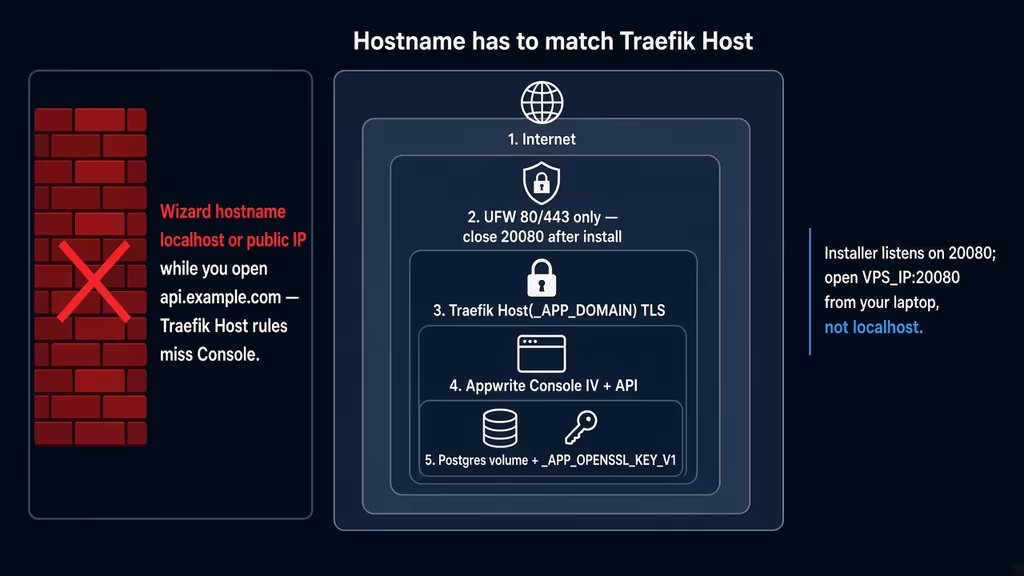
Caption: UFW 80/443, Traefik Host(_APP_DOMAIN), Console IV, Postgres plus the openssl key. The discarded path is wizard hostname localhost while I browse api.example.com.
Useful to know
The 2.0 announcement uses appwrite/appwrite:2.0.0. The installation page still showed 1.9.6 in places when I read it. I pin 2.0.0 for a new Postgres install. GitHub’s 2.0.0 snippet also omits --publish 20080:20080; without that flag the wizard is only on the container network.
Worker logs in combined topology are one container: docker compose logs -f appwrite-worker. Separate topology (--topology=separate) is 33 containers. I would use it when one queue needs its own replicas, not to “make a small VPS work.” Usage metrics live in ClickHouse, not Postgres. Do not put a second reverse proxy on 80/443 next to Traefik unless I have unbound Traefik — that fight looks like “Appwrite never gets a certificate.” Git (GitHub, GitLab, Bitbucket, Gitea) and the new orchestrator wait until HTTPS, the openssl key backup, and a dump restore are boring.
Backup, expose, next step
Official backup docs still describe MariaDB mysqldump and MongoDB mongodump. A 2.0 Postgres install is pg_dump against the postgresql service, plus Docker volumes, plus .env. Shut the stack down for a consistent volume tar.
Day-one volumes: appwrite-postgresql, appwrite-uploads, functions/builds/sites if I use them, plus appwrite-certificates / appwrite-config. ClickHouse and Redis can be rebuilt.
sudo mkdir -p /var/backups/appwrite
cd /opt/appwrite
TIMESTAMP=$(date +%Y%m%d-%H%M%S)
docker compose exec -T postgresql sh -c 'pg_dump -U "$POSTGRES_USER" -d "$POSTGRES_DB"' \
  > "/var/backups/appwrite/appwrite-pg-$TIMESTAMP.sql"
cp -a .env "/var/backups/appwrite/env-$TIMESTAMP"
docker compose stop
docker volume ls | grep appwrite
docker run --rm -v appwrite_appwrite-postgresql:/data -v /var/backups/appwrite:/backup \
  ubuntu tar czf "/backup/postgresql-$TIMESTAMP.tar.gz" -C /data .
docker run --rm -v appwrite_appwrite-uploads:/data -v /var/backups/appwrite:/backup \
  ubuntu tar czf "/backup/uploads-$TIMESTAMP.tar.gz" -C /data .
docker compose start
Volume names are prefixed with the Compose project directory. Confirm with docker volume ls before the first tar. _APP_OPENSSL_KEY_V1 lives in .env — a dump without that file is not a restore. Official MariaDB/Mongo pages say restore onto a fresh same-version instance; I treat Postgres the same. docker compose exec appwrite migrate is the 1.9.6 → 2.0 upgrade path, not day one.
Uptime Kuma can hit https://api.example.com/v1/health/version. I keep 20080 closed.
What I have running now is Appwrite 2.0 combined topology, Postgres, Traefik on 80/443, hostname matching _APP_DOMAIN, wizard port closed, openssl key copied off-box, and a pg_dump plus uploads tar. Next: SMTP so invites leave, a restore drill on a throwaway VM, then one Functions runtime from Gitea — not on day one. Authentik in front of Console is tempting; a broken OAuth callback on Console IV is worse than the wizard password for a week.
Did you hit the same wall?
I got stuck on http://localhost:20080 (that is the VPS, not the laptop) and on a wizard hostname that did not match Traefik Host(). Did you hit the same thing, or a different one — OOM on 2 GB, MariaDB you cannot convert to Postgres, _APP_OPENSSL_KEY_V1 never copied, SMTP invites that never send? Tell me in the comments. I read them.
Need this done on your server?
I deploy and harden Laravel/CodeCanyon apps on cPanel or VPS, and offer monthly Server Watch retainers. Hire for deploy · Care plan