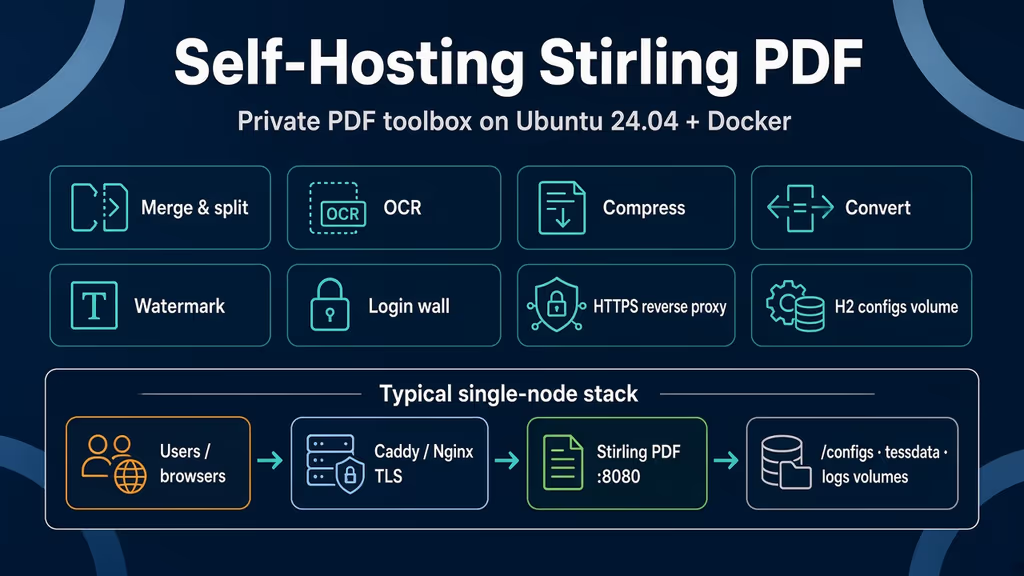
Caption: Browser to Caddy or Nginx, then Stirling on loopback 8080, then the configs volume that actually holds the H2 user database.
Why I wanted this on my server
I keep sending invoices, contracts, and scans through somebody else's PDF site. Merge two pages, OCR a scan, stamp a watermark, strip metadata. The files leave my VPS, sit on a host I do not operate, and come back as a download link. That is a bad habit for client paperwork.
Stirling PDF is a Java toolbox I can run next to the other Compose stacks. Merge, split, compress, convert, OCR, watermarks, password tools. I need one hostname I control, a login wall, and a volume I can tar — not a raw :8080. A PDF toolbox with login off is free compute for whoever finds the port.
What I actually installed
Ubuntu 24.04 LTS, Docker Engine with the Compose v2 plugin, image docker.stirlingpdf.com/stirlingtools/stirling-pdf:latest (standard tag). Project under /opt/stirling-pdf. App bound to 127.0.0.1:8080. Nginx on 80/443 for https://pdf.example.com — replace that hostname. Caddy is the same idea: terminate TLS, proxy to localhost, do not publish 8080 on 0.0.0.0.
Official production Compose wants 2 GB RAM minimum, 4 GB+ recommended, 10 GB disk. That is the standard image with login and OCR. A 1 GB VPS may force latest-ultra-lite. That tag is not the same product.
Software on the host: sudo, DNS A/AAAA for a dedicated subdomain, Docker from Docker's apt repo, OpenSSL to generate the first admin password, Nginx + Certbot if I follow the production reverse-proxy path. I do not open 8080 in UFW.
sudo apt update
sudo apt upgrade -y
sudo apt install -y ca-certificates curl gnupg openssl ufw nginx

sudo ufw allow OpenSSH
sudo ufw allow 80/tcp
sudo ufw allow 443/tcp
sudo ufw enable
sudo ufw status
I keep Compose mode 600 when it holds SECURITY_INITIALLOGIN_PASSWORD. I do not push that file to a public remote.
Where it broke
On a fresh Ubuntu 24.04 box this install is famous for a compose file that looks production-ready and is not.
Official Docker "Full Setup" still pastes SECURITY_ENABLELOGIN=false. Blog one-liners copy it. Production docs set SECURITY_ENABLELOGIN=true and mount /configs. Experience notes I keep for this app: tutorials still paste login off on a public port.
I copied the full-setup shape, mapped '8080:8080', left login false, and thought "I will put auth in Nginx later." The container started. curl on 8080 returned the UI. Anyone who could reach that port could merge, OCR, and strip passwords on my CPU. That is the failure, not a stack trace:
# The container is healthy. The config is the bug.
SECURITY_ENABLELOGIN=false
ports:
  - '8080:8080'
The health endpoint does not save me. /api/v1/info/status is reachable without authentication by design. Uptime checks work. So does an open toolbox.
curl -sS http://127.0.0.1:8080/api/v1/info/status
A typical lab response shape is {"status":"UP","version":"<version>"}. UP means Java is up. It does not mean login is on.
Second wall: I almost picked latest-ultra-lite because the VPS was tight. Official troubleshooting for a container that keeps restarting is "try ultra-lite for limited hardware." That is honest about RAM. It is not honest about features. Ultra-lite is core PDF operations. No Tesseract in the image. No LibreOffice conversion. Login is not included the way it is on latest. Docs say ultra-lite is the minimal build without authentication unless DISABLE_ADDITIONAL_FEATURES=false. If I write a post that says "I self-hosted Stirling" and I ran ultra-lite, I did not install the toolbox people mean.
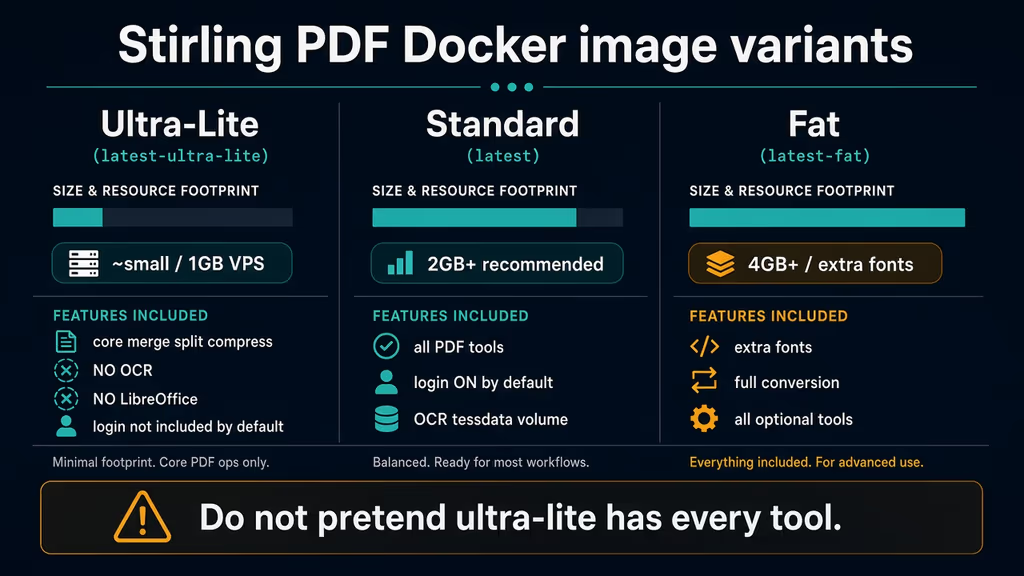
Caption: Ultra-lite vs standard vs fat. A 1 GB box may force ultra-lite. I do not pretend OCR and login still exist on that tag.
Third: I bound 8080:8080 the way the sample does, then asked UFW to allow 8080 because the production troubleshooting line says sudo ufw allow 8080. That publishes the app beside the proxy. I want Nginx on 443 and Stirling on loopback. 127.0.0.1:8080:8080 is the bind I actually want.
Fourth: default admin is admin / stirling. Docs say change it immediately. SECURITY_INITIALLOGIN_USERNAME and SECURITY_INITIALLOGIN_PASSWORD only apply on first startup. If the H2 file already exists in /configs, changing env vars does not rotate the password. I set the initial password in Compose before the first up, then still change it in Account settings after login. Users are forced to change the default on first login when they used admin/stirling. I would rather never ship stirling as a password that faced the internet for five minutes.
Fifth: /configs not mounted. Settings and the H2 database live there (stirling-pdf-DB-<schema>.mv.db). Recreate the container without that volume and users vanish. Same class of bug as a missing database volume on every other Java app.
docker logs stirling-pdf --tail 120
docker compose ps
ss -tlnp | grep 8080
If localhost answers and HTTPS does not, Nginx or DNS is the problem, not Stirling. If 8080 is on 0.0.0.0 and login is false, I stop and fix Compose before I touch certificates.
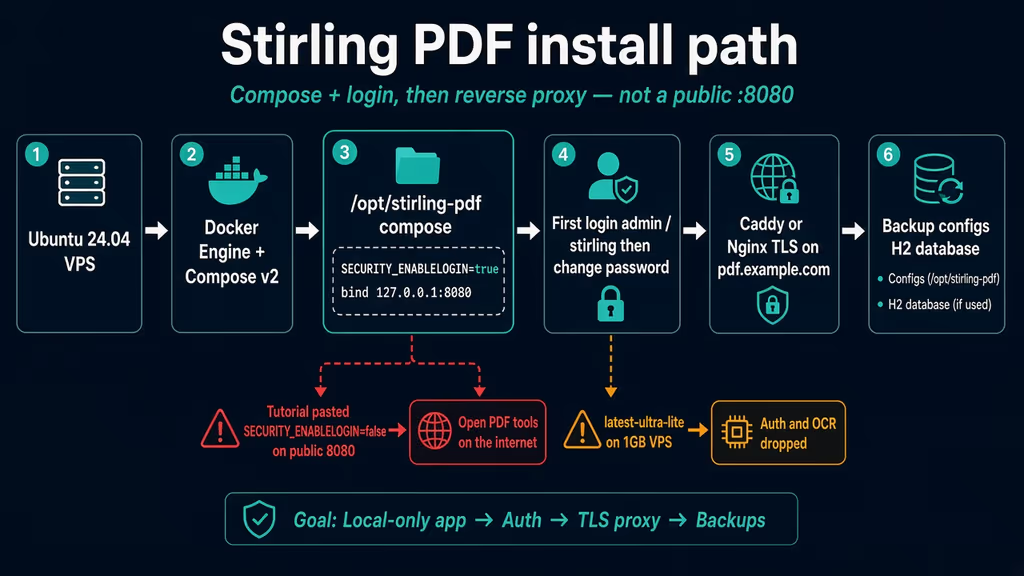
Caption: Compose with login on and loopback bind, then the first admin password, then TLS. The red branch is the tutorial paste.
The working install
Official production Docker Compose for Stirling PDF, then Nginx. I followed upstream for volumes and SECURITY_ENABLELOGIN=true, then bound loopback myself. If docker compose version fails after the Engine install, I stop.
1. Install Docker Engine
sudo apt-get update -qqy
sudo apt-get install ca-certificates curl -qqy
sudo install -m 0755 -d /etc/apt/keyrings
sudo curl -fsSL https://download.docker.com/linux/ubuntu/gpg -o /etc/apt/keyrings/docker.asc
sudo chmod a+r /etc/apt/keyrings/docker.asc

echo \
  "deb [arch=$(dpkg --print-architecture) signed-by=/etc/apt/keyrings/docker.asc] https://download.docker.com/linux/ubuntu \
  $(. /etc/os-release && echo "$VERSION_CODENAME") stable" | \
  sudo tee /etc/apt/sources.list.d/docker.list > /dev/null

sudo apt-get update -qqy
sudo apt-get install docker-ce docker-ce-cli containerd.io docker-compose-plugin -qqy

sudo usermod -aG docker "$USER"
newgrp docker

docker --version
docker compose version
Official snippets still say docker-compose. On this box I use the plugin: docker compose. Same YAML.
2. Create the project directory and an initial password
sudo mkdir -p /opt/stirling-pdf
sudo chown "$USER":"$USER" /opt/stirling-pdf
cd /opt/stirling-pdf
mkdir -p stirling-data/{tessdata,configs,logs,customFiles,pipeline}

openssl rand -base64 24
Store that string. It becomes SECURITY_INITIALLOGIN_PASSWORD for the first boot only.
3. Write production Compose with login on
This is the official production shape (volumes, login true, locale, upload limit, Google visibility off) with three operator changes: loopback publish, an initial admin password, DISABLE_ADDITIONAL_FEATURES=false so the security jar stays in play, and frontend/CORS URLs for the public hostname.
services:
  stirling-pdf:
    image: docker.stirlingpdf.com/stirlingtools/stirling-pdf:latest
    container_name: stirling-pdf
    ports:
      - '127.0.0.1:8080:8080'
    volumes:
      - ./stirling-data/tessdata:/usr/share/tessdata
      - ./stirling-data/configs:/configs
      - ./stirling-data/logs:/logs
      - ./stirling-data/customFiles:/customFiles:rw
      - ./stirling-data/pipeline:/pipeline
    environment:
      - SECURITY_ENABLELOGIN=true
      - DISABLE_ADDITIONAL_FEATURES=false
      - SECURITY_INITIALLOGIN_USERNAME=admin
      - SECURITY_INITIALLOGIN_PASSWORD=replace-with-openssl-output
      - SYSTEM_DEFAULTLOCALE=en-US
      - SYSTEM_GOOGLEVISIBILITY=false
      - SYSTEM_ROOTURIPATH=/
      - SYSTEMFILEUPLOADLIMIT=2000MB
      - SYSTEM_FRONTENDURL=https://pdf.example.com
      - SYSTEM_CORSALLOWEDORIGINS=https://pdf.example.com
    restart: unless-stopped
    logging:
      driver: json-file
      options:
        max-size: "10m"
        max-file: "3"
Pin latest only if I accept floating tags. For a shared box I pin a digest after I read the notes. v2.14.2 is a Postgres user-data hotfix; free Docker still uses H2 in /configs.
chmod 600 docker-compose.yml
docker compose up -d
docker compose ps
docker compose logs --tail=80 stirling-pdf
curl -sS http://127.0.0.1:8080/api/v1/info/status
If the container restarts in a loop, I read logs before I jump to ultra-lite. OOM on 1 GB is a real outcome. The tradeoff is features, not a silent "use ultra-lite and keep login."
4. First login, then change the password
Open http://127.0.0.1:8080 over SSH tunnel if DNS is not ready:
ssh -L 8080:127.0.0.1:8080 user@your-vps
Log in with the initial username and password from Compose. Default if I skipped the env vars: admin / stirling. Change it under account settings before I expose HTTPS. Confirm the admin gear shows Security / user management. If login never appears, I am on ultra-lite or SECURITY_ENABLELOGIN=false.
5. Nginx reverse proxy and Let's Encrypt
Official production path. Install Certbot if it is not already there. Create /etc/nginx/sites-available/stirling-pdf. Replace pdf.example.com. The client_max_body_size 2000M line matters: Stirling's own upload limit is 2000 MB by default; Nginx's default is tiny. A 413 on a scanned PDF is almost always the proxy.
server {
    listen 80;
    server_name pdf.example.com;
    return 301 https://$server_name$request_uri;
}

server {
    listen 443 ssl http2;
    server_name pdf.example.com;

    ssl_certificate /etc/letsencrypt/live/pdf.example.com/fullchain.pem;
    ssl_certificate_key /etc/letsencrypt/live/pdf.example.com/privkey.pem;

    ssl_protocols TLSv1.2 TLSv1.3;
    ssl_ciphers HIGH:!aNULL:!MD5;
    ssl_prefer_server_ciphers on;

    add_header Strict-Transport-Security "max-age=31536000; includeSubDomains" always;
    add_header X-Frame-Options "SAMEORIGIN" always;
    add_header X-Content-Type-Options "nosniff" always;

    client_max_body_size 2000M;
    client_body_timeout 300s;

    location / {
        proxy_pass http://127.0.0.1:8080;
        proxy_set_header Host $host;
        proxy_set_header X-Real-IP $remote_addr;
        proxy_set_header X-Forwarded-For $proxy_add_x_forwarded_for;
        proxy_set_header X-Forwarded-Proto $scheme;
        proxy_http_version 1.1;
        proxy_set_header Upgrade $http_upgrade;
        proxy_set_header Connection "upgrade";
        proxy_connect_timeout 300s;
        proxy_send_timeout 300s;
        proxy_read_timeout 300s;
    }
}
Certbot cannot fill those ssl_certificate paths until a cert exists. Official docs show the HTTPS server then certbot --nginx. DNS has to point here first.
sudo ln -sf /etc/nginx/sites-available/stirling-pdf /etc/nginx/sites-enabled/
sudo nginx -t
sudo systemctl reload nginx
sudo apt install -y certbot python3-certbot-nginx
sudo certbot --nginx -d pdf.example.com
sudo certbot renew --dry-run
If Certbot never issues, DNS is not on this box yet. I do not debug Stirling for a failed ACME challenge.
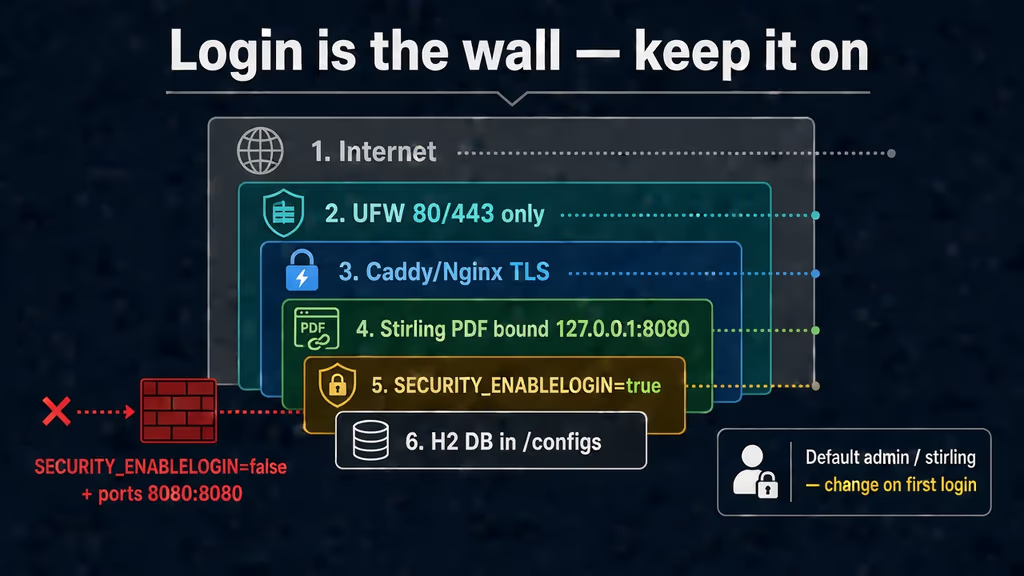
Caption: UFW 80/443, TLS at Nginx, Stirling on 127.0.0.1:8080, SECURITY_ENABLELOGIN=true, H2 in /configs. The discarded path is login false plus published 8080.
Useful to know
The Docker Install page and the Production guide disagree on the one line that matters. Quick start: login is on by default (admin/stirling). Full Setup example: SECURITY_ENABLELOGIN=false. Production Compose: SECURITY_ENABLELOGIN=true. I treat production as the source of truth for anything that will have a public hostname.
Image tags are a product choice, not a size slider:
| Tag | What I actually get | When I would use it |
|---|---|---|
latest |
All PDF features, login on by default | Normal VPS, 2 GB+ |
latest-fat |
Extra fonts and conversion tools | Disk and RAM are not the constraint |
latest-ultra-lite |
Core ops; no OCR stack; auth not in the default ultra-lite build | 1 GB box, and I write that tradeoff in the runbook |
Permission errors on volumes: create the directories first, chmod -R 755 ./stirling-data if the container cannot write /configs. API scripts use X-API-KEY from Account Settings. The status URL stays open on purpose.
Backup, expose, next step
Free edition users live in H2 under ./stirling-data/configs/. The filename embeds a schema version (stirling-pdf-DB-<version>.mv.db). I back up the whole configs/ tree plus customFiles/ and tessdata/. Logs are optional.
sudo mkdir -p /opt/stirling-pdf /var/backups/stirling-pdf
cat > /opt/stirling-pdf/backup.sh << 'EOF'
#!/bin/bash
set -euo pipefail
BACKUP_DIR="/var/backups/stirling-pdf"
STIRLING_DATA="/opt/stirling-pdf/stirling-data"
RETENTION_DAYS=30
mkdir -p "$BACKUP_DIR"
TIMESTAMP=$(date +%Y%m%d-%H%M%S)
BACKUP_FILE="$BACKUP_DIR/stirling-backup-$TIMESTAMP.tar.gz"
tar -czf "$BACKUP_FILE" -C "$STIRLING_DATA" configs/ customFiles/ tessdata/
find "$BACKUP_DIR" -name "stirling-backup-*.tar.gz" -mtime +"$RETENTION_DAYS" -delete
echo "[$TIMESTAMP] Backup completed: $BACKUP_FILE"
EOF
sudo chmod 700 /opt/stirling-pdf/backup.sh
sudo /opt/stirling-pdf/backup.sh
Official comments suggest stopping the container for a consistent tar. For a shared toolbox I docker compose stop stirling-pdf, run the script, then start. Restore is stop, tar -xzf into stirling-data/, confirm the .mv.db and settings.yml, start, log in.
Upgrades after a backup:
cd /opt/stirling-pdf
sudo /opt/stirling-pdf/backup.sh
docker compose pull
docker compose up -d
docker compose logs --tail=80 stirling-pdf
curl -sS http://127.0.0.1:8080/api/v1/info/status
I keep 8080 off the public firewall. Uptime Kuma can hit http://127.0.0.1:8080/api/v1/info/status from the same host, or HTTPS on the hostname if I accept that the status path is unauthenticated.
Next on this box: extra Tesseract languages in tessdata if I OCR more than English, invite-only users instead of sharing admin, and I would not wire SSO until login, HTTPS, and restore are boring. Authentik in front is tempting because I already run it; a broken OAuth callback is worse than local accounts for a week.
What I have running now is Stirling PDF on the standard image, login enabled, loopback 8080, Nginx + Let's Encrypt, an initial password that is not stirling, and a tar of /configs. Next I merge a real invoice on that hostname and confirm a 40 MB scan does not 413.
Did you hit the same wall?
I got stuck on compose that still ships SECURITY_ENABLELOGIN=false (and almost published 8080). Did you hit the same thing, or a different one — ultra-lite with no login, Nginx 413 on big scans, H2 gone after a recreate, default admin/stirling left for a week? Tell me in the comments. I read them.
Need this done on your server?
I deploy and harden Laravel/CodeCanyon apps on cPanel or VPS, and offer monthly Server Watch retainers. Hire for deploy · Care plan