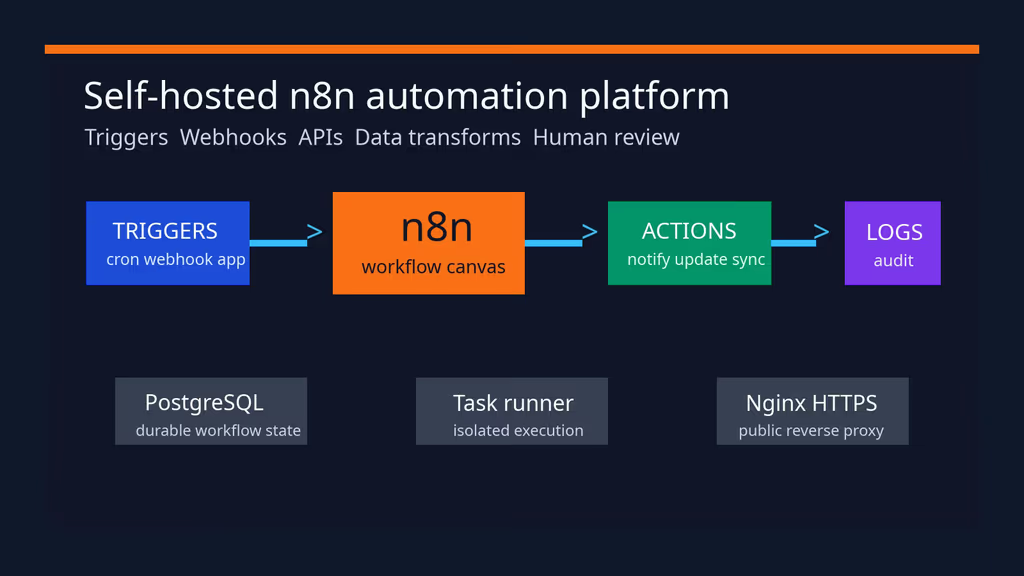
Caption: n8n on my VPS: triggers, webhooks, API calls, and a run history I can actually read.
Why I wanted this on my server
I had glue: cron, a couple of webhook PHP files, and one Zapier-ish SaaS I did not want holding CRM tokens. n8n is a visual workflow tool that still lets me drop in HTTP nodes and code. Self-hosting meant credentials, execution logs, and payloads stay on the VPS next to the apps they touch. That includes finance exports, support tickets, source-code events, and homelab alerts I would not send to a hosted integration product.
I treat it like CI: if someone owns n8n, they own every API key I saved. HTTPS and a stable encryption key are not optional. A compromised instance can send unwanted API calls, change records, or fire webhooks in a loop. The install is the easy part; day-two operations are the job.
What I actually installed
Ubuntu 24.04 LTS, Docker Compose, docker.n8n.io/n8nio/n8n:stable, PostgreSQL 16, an external task runner (n8nio/runners), Nginx + Let’s Encrypt. Project under /opt/n8n. Editor at https://n8n.example.com, app bound to 127.0.0.1:5678.
Hardware: 2 vCPU / 2–4 GB for light use; 4 vCPU / 8 GB if executions are frequent or transformations are large. SSD for Postgres, credentials metadata, execution logs, binary files, and backups. Off-server copies. Extra RAM if workflows run heavy JavaScript or pull large files.
Security I would not skip: HTTPS before users and production webhooks, N8N_ENCRYPTION_KEY stored off-box as well as in .env, file access limited to /files unless I have a documented reason, outbound firewall if workflows should only call approved hosts, and a dump of Postgres plus the n8n volume before upgrades.
I keep Nginx, Certbot, rsync, jq, and the PostgreSQL client on the host. Queue mode with Redis is the next step when long workflows should leave the editor process — same encryption key and runner token across main and workers.
Where it broke
On a fresh Ubuntu 24.04 box this install is famous for webhook URLs that still say localhost.
The editor loaded on HTTPS. I added a webhook trigger. n8n printed http://localhost:5678/webhook/.... External services cannot hit that. OAuth redirects break the same way.
Official reverse-proxy notes want:
N8N_WEBHOOK_URL=https://n8n.example.com/N8N_EDITOR_BASE_URL=https://n8n.example.com/N8N_PROTOCOL=httpsN8N_HOST= the public hostnameN8N_PROXY_HOPS=1because Nginx is one hop in front- Nginx forwarding
X-Forwarded-*and WebSocket upgrade headers
After I set those and recreated the n8n container, test webhook URLs showed the public hostname.
The second footgun: N8N_ENCRYPTION_KEY. If you restore Postgres without the same key, saved credentials will not decrypt. I keep that key in the password manager, not only in .env.
Runner jobs that never start are usually a mismatched RUNNERS_AUTH_TOKEN or the broker URI not http://n8n:5679 on the Compose network. Check docker compose logs n8n-runner.
Other documented issues I kept: Postgres unhealthy — init-data.sh must be executable and mounted, and .env names must match. Binary uploads failing — Nginx client_max_body_size, writable n8n volume, workflows not reading outside /files. OAuth redirects to an internal hostname — the external app must use this instance’s public callback, not localhost. Disk filling — execution retention and binary data, not just the n8n image size. The init-data.sh script only runs when the Postgres volume is new; changing users later means a manual migration or a recreated volume after a verified backup.
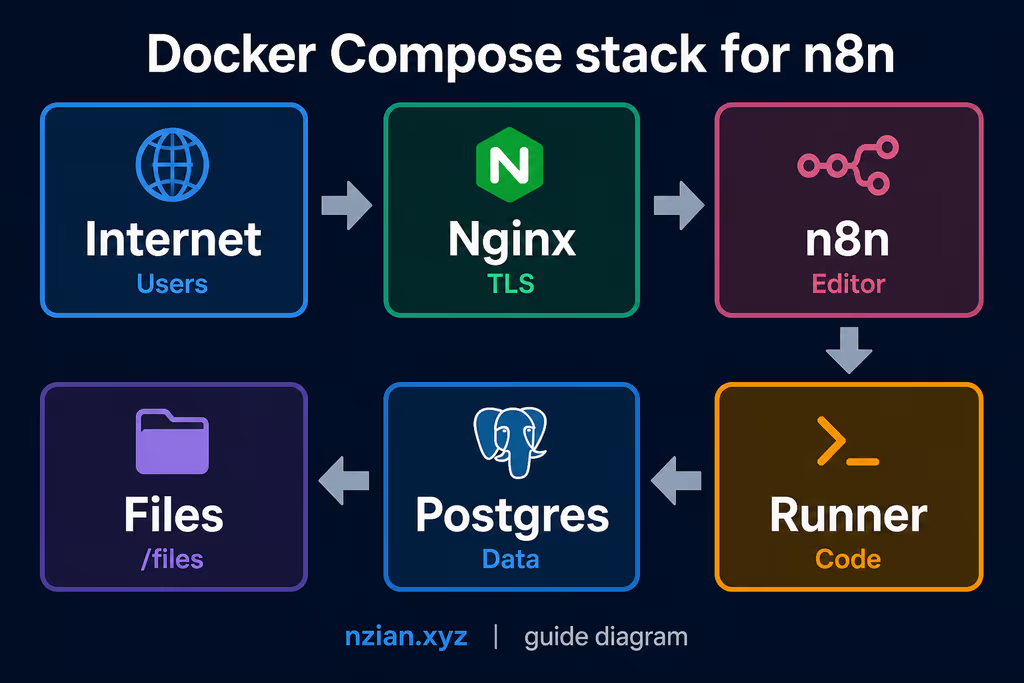
Caption: Postgres, n8n, external runner on a private network; Nginx on 443.
The working install
sudo apt update
sudo apt upgrade -y
sudo apt install -y ca-certificates curl gnupg openssl ufw nginx certbot python3-certbot-nginx jq rsync postgresql-client

sudo ufw allow OpenSSH
sudo ufw allow 80/tcp
sudo ufw allow 443/tcp
sudo ufw enable
sudo ufw status
1. Install Docker Engine
curl -fsSL https://get.docker.com | sudo sh
sudo usermod -aG docker "$USER"
newgrp docker

docker --version
docker compose version
2. Create the project directory
sudo mkdir -p /opt/n8n/local-files
sudo chown -R "$USER":"$USER" /opt/n8n
chmod 700 /opt/n8n
cd /opt/n8n
local-files mounts as /files. That is the sandbox for file nodes.
3. Generate environment values
cd /opt/n8n

POSTGRES_PASSWORD="$(openssl rand -base64 36 | tr -d '\n')"
POSTGRES_NON_ROOT_PASSWORD="$(openssl rand -base64 36 | tr -d '\n')"
N8N_ENCRYPTION_KEY="$(openssl rand -hex 32)"
RUNNERS_AUTH_TOKEN="$(openssl rand -hex 32)"

cat > .env <<EOF
N8N_VERSION=stable
N8N_DOMAIN=n8n.example.com
GENERIC_TIMEZONE=UTC

POSTGRES_USER=n8n_admin
POSTGRES_PASSWORD=${POSTGRES_PASSWORD}
POSTGRES_DB=n8n
POSTGRES_NON_ROOT_USER=n8n_app
POSTGRES_NON_ROOT_PASSWORD=${POSTGRES_NON_ROOT_PASSWORD}

N8N_ENCRYPTION_KEY=${N8N_ENCRYPTION_KEY}
RUNNERS_AUTH_TOKEN=${RUNNERS_AUTH_TOKEN}
EOF

chmod 600 .env
Keep N8N_ENCRYPTION_KEY in the password manager as well as .env.
4. Create the PostgreSQL init script
Official example creates a less-privileged DB user on first boot. Save as init-data.sh:
cat > init-data.sh <<'EOF'
#!/bin/bash
set -e

if [ -n "${POSTGRES_NON_ROOT_USER:-}" ] && [ -n "${POSTGRES_NON_ROOT_PASSWORD:-}" ]; then
  psql -v ON_ERROR_STOP=1 --username "$POSTGRES_USER" --dbname "$POSTGRES_DB" <<-EOSQL
    CREATE USER ${POSTGRES_NON_ROOT_USER} WITH PASSWORD '${POSTGRES_NON_ROOT_PASSWORD}';
    GRANT ALL PRIVILEGES ON DATABASE ${POSTGRES_DB} TO ${POSTGRES_NON_ROOT_USER};
    GRANT CREATE ON SCHEMA public TO ${POSTGRES_NON_ROOT_USER};
EOSQL
else
  echo "SETUP INFO: No non-root PostgreSQL user variables were provided."
fi
EOF

chmod 700 init-data.sh
This only runs when the Postgres volume is new.
5. Create the Compose file
Save as compose.yaml in /opt/n8n:
volumes:
  db_storage:
  n8n_storage:

services:
  postgres:
    image: postgres:16
    restart: always
    environment:
      - POSTGRES_USER
      - POSTGRES_PASSWORD
      - POSTGRES_DB
      - POSTGRES_NON_ROOT_USER
      - POSTGRES_NON_ROOT_PASSWORD
    volumes:
      - db_storage:/var/lib/postgresql/data
      - ./init-data.sh:/docker-entrypoint-initdb.d/init-data.sh:ro
    healthcheck:
      test: ['CMD-SHELL', 'pg_isready -h localhost -U ${POSTGRES_USER} -d ${POSTGRES_DB}']
      interval: 5s
      timeout: 5s
      retries: 10

  n8n:
    image: docker.n8n.io/n8nio/n8n:${N8N_VERSION}
    restart: always
    environment:
      - DB_TYPE=postgresdb
      - DB_POSTGRESDB_HOST=postgres
      - DB_POSTGRESDB_PORT=5432
      - DB_POSTGRESDB_DATABASE=${POSTGRES_DB}
      - DB_POSTGRESDB_USER=${POSTGRES_NON_ROOT_USER}
      - DB_POSTGRESDB_PASSWORD=${POSTGRES_NON_ROOT_PASSWORD}
      - N8N_ENCRYPTION_KEY=${N8N_ENCRYPTION_KEY}
      - N8N_ENFORCE_SETTINGS_FILE_PERMISSIONS=true
      - N8N_RUNNERS_MODE=external
      - N8N_RUNNERS_AUTH_TOKEN=${RUNNERS_AUTH_TOKEN}
      - N8N_RUNNERS_BROKER_LISTEN_ADDRESS=0.0.0.0
      - N8N_HOST=${N8N_DOMAIN}
      - N8N_PORT=5678
      - N8N_PROTOCOL=https
      - N8N_EDITOR_BASE_URL=https://${N8N_DOMAIN}/
      - N8N_WEBHOOK_URL=https://${N8N_DOMAIN}/
      - N8N_PROXY_HOPS=1
      - GENERIC_TIMEZONE=${GENERIC_TIMEZONE}
      - TZ=${GENERIC_TIMEZONE}
      - N8N_RESTRICT_FILE_ACCESS_TO=/files
      - NODE_ENV=production
    ports:
      - "127.0.0.1:5678:5678"
    volumes:
      - n8n_storage:/home/node/.n8n
      - ./local-files:/files
    depends_on:
      postgres:
        condition: service_healthy

  n8n-runner:
    image: n8nio/runners:${N8N_VERSION}
    restart: always
    environment:
      - N8N_RUNNERS_AUTH_TOKEN=${RUNNERS_AUTH_TOKEN}
      - N8N_RUNNERS_TASK_BROKER_URI=http://n8n:5679
    depends_on:
      - n8n
cd /opt/n8n
docker compose config --services
docker compose pull
docker compose up -d

docker compose ps
docker compose logs --tail=80 n8n
Expect postgres, n8n, and n8n-runner. If Postgres is unhealthy, read its logs before restarting in a loop.
6. Configure Nginx and HTTPS
sudo tee /etc/nginx/sites-available/n8n >/dev/null <<'EOF'
server {
    listen 80;
    listen [::]:80;
    server_name n8n.example.com;

    client_max_body_size 50m;

    location / {
        proxy_pass http://127.0.0.1:5678;
        proxy_http_version 1.1;
        proxy_set_header Upgrade $http_upgrade;
        proxy_set_header Connection "upgrade";
        proxy_set_header Host $host;
        proxy_set_header X-Real-IP $remote_addr;
        proxy_set_header X-Forwarded-For $proxy_add_x_forwarded_for;
        proxy_set_header X-Forwarded-Host $host;
        proxy_set_header X-Forwarded-Proto $scheme;
        proxy_read_timeout 300s;
        proxy_send_timeout 300s;
    }
}
EOF

sudo ln -s /etc/nginx/sites-available/n8n /etc/nginx/sites-enabled/n8n
sudo nginx -t
sudo systemctl reload nginx
sudo certbot --nginx -d n8n.example.com --email admin@example.com --agree-tos --redirect
Create the owner account after HTTPS works. Do not add production credentials yet.
Configuration
Public URL variables are the whole game. N8N_RESTRICT_FILE_ACCESS_TO=/files keeps file nodes in the mounted folder. Configure SMTP from n8n’s env reference after the base deploy works — bad SMTP blocks invites.
What you need to look at
External runners are now the documented default in the hosting examples, not an advanced extra. The main process still looks “up” while jobs sit idle if the runner token or broker URI is wrong. I wasted time restarting n8n when n8n-runner was the broken service.
Queue mode with Redis is the next step when long workflows should leave the editor process. Same N8N_ENCRYPTION_KEY and runner token across main and workers.
Usage
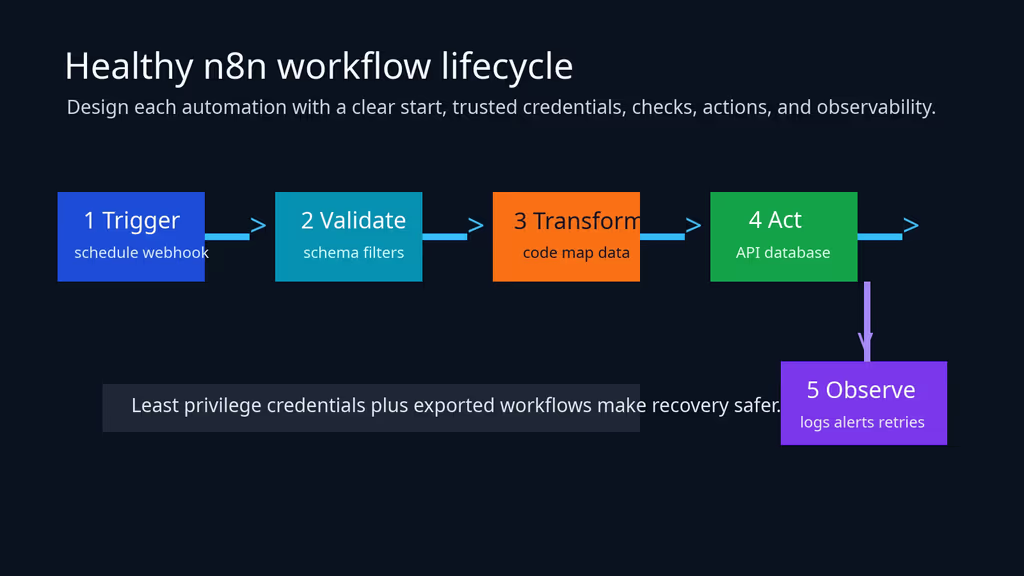
Caption: Trigger, credential boundary, transform, destination, then a run I can inspect.
- Manual Trigger → Set/Edit Fields → HTTP Request to a safe test URL.
- Run it, inspect execution data, export a copy.
- Confirm webhook test URLs show
https://n8n.example.com, not localhost. - One low-privilege credential per integration.
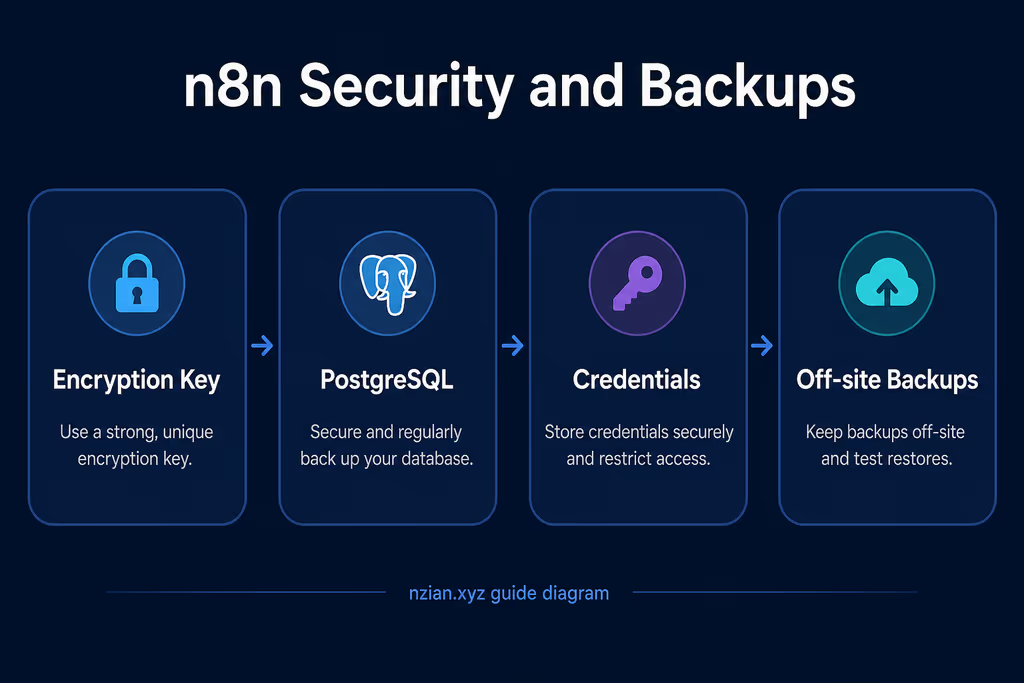
Caption: HTTPS, restricted /files, encryption key, Postgres dumps, off-server copies.
Backup, expose, next step
cd /opt/n8n
mkdir -p backups

BACKUP_DATE="$(date +%F-%H%M%S)"
docker compose exec -T postgres pg_dump -U n8n_admin -d n8n > "backups/n8n-${BACKUP_DATE}.sql"
docker run --rm -v n8n_n8n_storage:/data -v "$(pwd)/backups:/backup" alpine   tar -czf "/backup/n8n-storage-${BACKUP_DATE}.tar.gz" -C /data .

rsync -av --chmod=600 backups/ backupuser@backup.example.com:/srv/backups/n8n/
A restore needs the dump, the n8n volume, .env, and the encryption key together.
cd /opt/n8n
docker compose pull
docker compose down
docker compose up -d
docker compose logs --tail=120 n8n
What I have running now: n8n on HTTPS with Postgres, an external runner, file access limited to /files, webhook URLs that match the public hostname. I create the owner account only after Certbot succeeds, and I still do not save production credentials until a manual workflow runs through the runner. Next: one real workflow with least-privilege credentials, export that workflow after changes, then a restore test that includes the encryption key. I am not enabling queue mode until a workflow actually needs it.
Did you hit the same wall?
I got stuck on webhook URLs still showing localhost:5678 until N8N_WEBHOOK_URL and N8N_PROXY_HOPS=1 were set. Did you hit the same thing, or a different one — encryption key on restore, runner token, Postgres init script? Tell me in the comments. I read them.
Need this done on your server?
I deploy and harden Laravel/CodeCanyon apps on cPanel or VPS, and offer monthly Server Watch retainers. Hire for deploy · Care plan