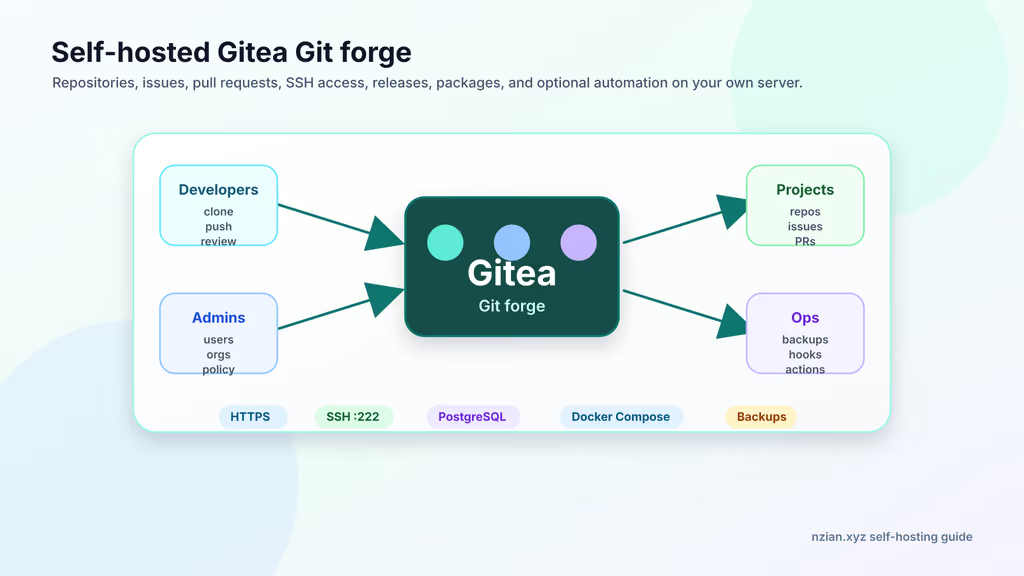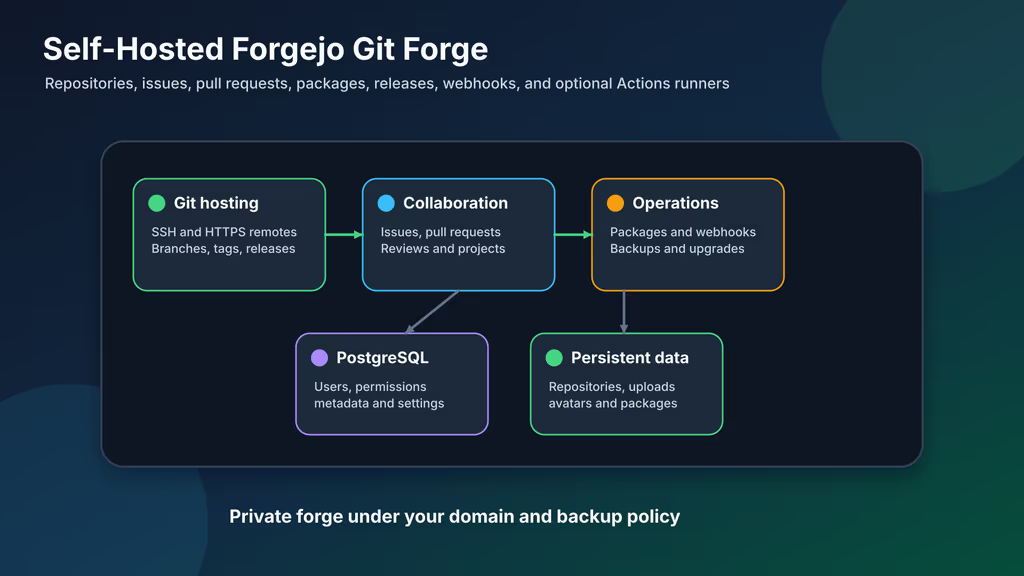
Caption: Forgejo on my VPS: repos, issues, PRs, releases, packages, SSH on a dedicated port.
Why I wanted this on my server
I already knew Gitea. I wanted the same small forge with Forgejo’s community-led governance — a hard fork, same collaboration flow, my backups. Homelab Compose files, client repos, and deploy manifests stay on this VPS. I did not want another SaaS holding deploy keys. Agencies can keep client repositories under their own retention rules. Product teams can host internal packages and release artifacts without a GitHub org bill.
Forgejo can hold production manifests, customer project history, webhook URLs, and runner logs. I treat it like core infrastructure: HTTPS, registration off, backups I have restored once, CI runners outside the forge’s trust boundary.
What I actually installed
Ubuntu 24.04 LTS, Docker Compose, codeberg.org/forgejo/forgejo:16, PostgreSQL 16, Nginx + Let’s Encrypt, data under /opt/forgejo. Site: https://git.example.com. Web on 127.0.0.1:3000. Container SSH on host port 222.
Hardware: 1 vCPU / 1 GB for personal use; 2 vCPU / 2–4 GB for a small team, package registry, or frequent indexing. SSD for Git objects, attachments, avatars, packages, indexes, and Postgres. Off-server backups. Actions runners go on a separate host if I ever enable them — untrusted jobs should not share this Docker daemon.
Security I would not skip: HTTPS before importing repositories, .env and dumps private, registration off, SSH on 222 unless the host is designed around Forgejo owning 22, and both database plus data directory backed up before upgrades.
Where it broke
On a fresh Ubuntu 24.04 box this install fails the same way Gitea does: the UI copy-paste SSH URL ignores your published port.
I mapped "222:22" so host OpenSSH could keep 22. The clone button still looked like GitHub-style git@git.example.com:owner/repo.git. My laptop connected to Ubuntu’s sshd, not Forgejo. ssh -T git@git.example.com was the wrong process.
Fix: set FORGEJO__server__ROOT_URL, SSH_DOMAIN, and SSH_PORT=222, open 222/tcp in UFW, clone with an explicit port:
ssh -F /dev/null -T -p 222 git@git.example.com
git clone ssh://git@git.example.com:222/your-user/test-repo.git
Config lives in app.ini at a path that still says gitea:
docker compose exec server bash -lc 'grep -E "ROOT_URL|SSH_DOMAIN|SSH_PORT|DISABLE_REGISTRATION|COOKIE_SECURE" /data/gitea/conf/app.ini'
That path is not a typo on my part — the image still uses /data/gitea/conf/app.ini. I grepped /data/forgejo/ first and found nothing.
Second failure: cannot write /data. USER_UID / USER_GID must match the owner of /opt/forgejo/forgejo. Permission errors in server logs are almost always that.
Other documented gotchas: database connection — docker compose logs db and matching .env passwords. 413 uploads — Nginx client_max_body_size. Registration policy — DISABLE_REGISTRATION in app.ini after Compose changes. SMTP silent — protocol, host, port, From, user, password, server logs. Actions jobs that never run — runner installed, registered, online, labels matching the workflow. Incomplete backups — restore on a spare host and check users, repos, issues, PRs, attachments, releases, packages, and settings. FORGEJO__section__KEY env vars rewrite app.ini on boot, same trap as Gitea: a hand-edit can get overwritten.
The web port stays on loopback. If I wanted Git SSH on 22, I would plan host OpenSSH first. I did not.
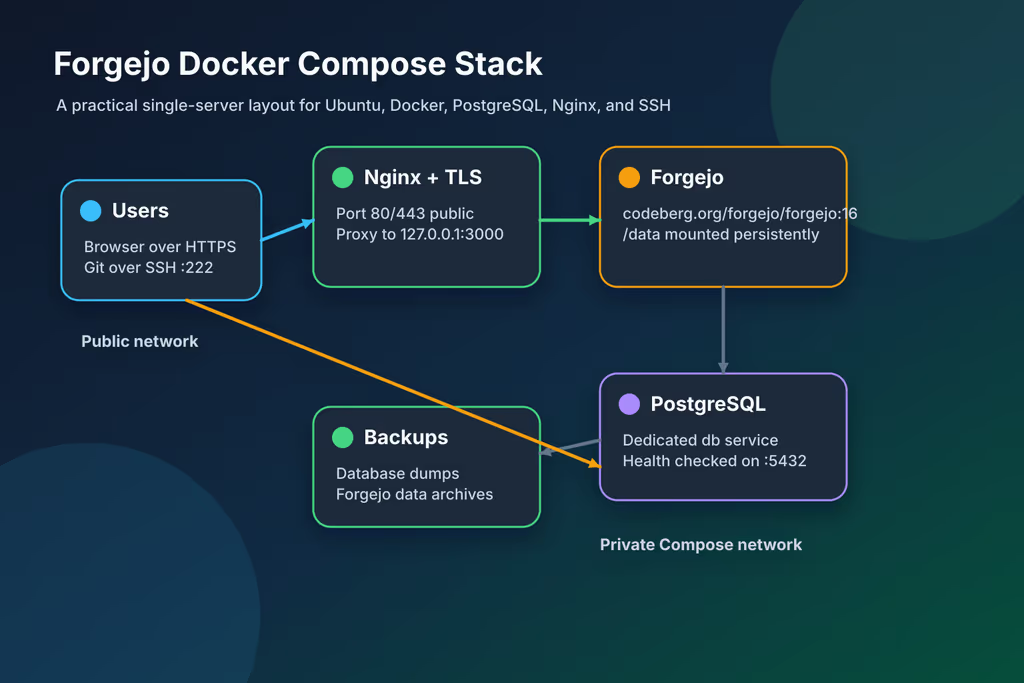
Caption: HTTPS on Nginx, Forgejo on loopback 3000, SSH on 222, Postgres for metadata.
The working install
sudo apt update
sudo apt upgrade -y
sudo apt install -y ca-certificates curl gnupg openssl ufw nginx certbot python3-certbot-nginx jq git rsync postgresql-client

sudo ufw allow OpenSSH
sudo ufw allow 80/tcp
sudo ufw allow 443/tcp
sudo ufw allow 222/tcp
sudo ufw enable
sudo ufw status
1. Install Docker Engine
curl -fsSL https://get.docker.com | sudo sh
sudo usermod -aG docker "$USER"
newgrp docker

docker --version
docker compose version
2. Create the project directory
sudo mkdir -p /opt/forgejo/{forgejo,postgres,backups}
sudo chown -R "$USER":"$USER" /opt/forgejo
chmod 700 /opt/forgejo
cd /opt/forgejo
3. Generate environment values
cd /opt/forgejo

FORGEJO_DB_PASSWORD="$(openssl rand -base64 36 | tr -d '\n')"
cat > .env <<EOF
FORGEJO_DOMAIN=git.example.com
FORGEJO_ROOT_URL=https://git.example.com/
FORGEJO_SSH_PORT=222
FORGEJO_DB_PASSWORD=${FORGEJO_DB_PASSWORD}
POSTGRES_PASSWORD=${FORGEJO_DB_PASSWORD}
EOF

chmod 600 .env
4. Write Docker Compose configuration
networks:
  forgejo:
    external: false

services:
  server:
    image: codeberg.org/forgejo/forgejo:16
    container_name: forgejo
    restart: always
    environment:
      - USER_UID=1000
      - USER_GID=1000
      - FORGEJO__database__DB_TYPE=postgres
      - FORGEJO__database__HOST=db:5432
      - FORGEJO__database__NAME=forgejo
      - FORGEJO__database__USER=forgejo
      - FORGEJO__database__PASSWD=${FORGEJO_DB_PASSWORD}
      - FORGEJO__server__DOMAIN=${FORGEJO_DOMAIN}
      - FORGEJO__server__SSH_DOMAIN=${FORGEJO_DOMAIN}
      - FORGEJO__server__SSH_PORT=${FORGEJO_SSH_PORT}
      - FORGEJO__server__ROOT_URL=${FORGEJO_ROOT_URL}
      - FORGEJO__service__DISABLE_REGISTRATION=true
      - FORGEJO__service__REQUIRE_SIGNIN_VIEW=false
      - FORGEJO__repository__DEFAULT_PRIVATE=last
      - FORGEJO__session__COOKIE_SECURE=true
    networks:
      - forgejo
    volumes:
      - ./forgejo:/data
      - /etc/timezone:/etc/timezone:ro
      - /etc/localtime:/etc/localtime:ro
    ports:
      - "127.0.0.1:3000:3000"
      - "222:22"
    depends_on:
      db:
        condition: service_healthy

  db:
    image: docker.io/library/postgres:16
    container_name: forgejo-db
    restart: always
    environment:
      - POSTGRES_USER=forgejo
      - POSTGRES_PASSWORD=${POSTGRES_PASSWORD}
      - POSTGRES_DB=forgejo
    networks:
      - forgejo
    volumes:
      - ./postgres:/var/lib/postgresql/data
    healthcheck:
      test: ["CMD-SHELL", "pg_isready -U forgejo -d forgejo"]
      interval: 10s
      timeout: 5s
      retries: 5
docker compose config
docker compose pull
docker compose up -d
docker compose ps
docker compose logs -f --tail=100 server
Wait for a clean start. Configure Nginx before onboarding over the public internet.
5. Configure Nginx and HTTPS
sudo tee /etc/nginx/sites-available/forgejo >/dev/null <<'EOF'
server {
    listen 80;
    server_name git.example.com;

    client_max_body_size 512m;

    location / {
        proxy_pass http://127.0.0.1:3000;
        proxy_set_header Host $host;
        proxy_set_header X-Real-IP $remote_addr;
        proxy_set_header X-Forwarded-For $proxy_add_x_forwarded_for;
        proxy_set_header X-Forwarded-Proto $scheme;
    }
}
EOF

sudo ln -s /etc/nginx/sites-available/forgejo /etc/nginx/sites-enabled/forgejo
sudo nginx -t
sudo systemctl reload nginx

sudo certbot --nginx -d git.example.com
curl -I https://git.example.com/
6. Complete first-run onboarding
Open https://git.example.com/. Database: PostgreSQL, db:5432, user/db forgejo, password from .env. Domain and base URL HTTPS. SSH port 222. Create the admin; registration is disabled in Compose.
Configuration
FORGEJO__section__KEY maps into app.ini.
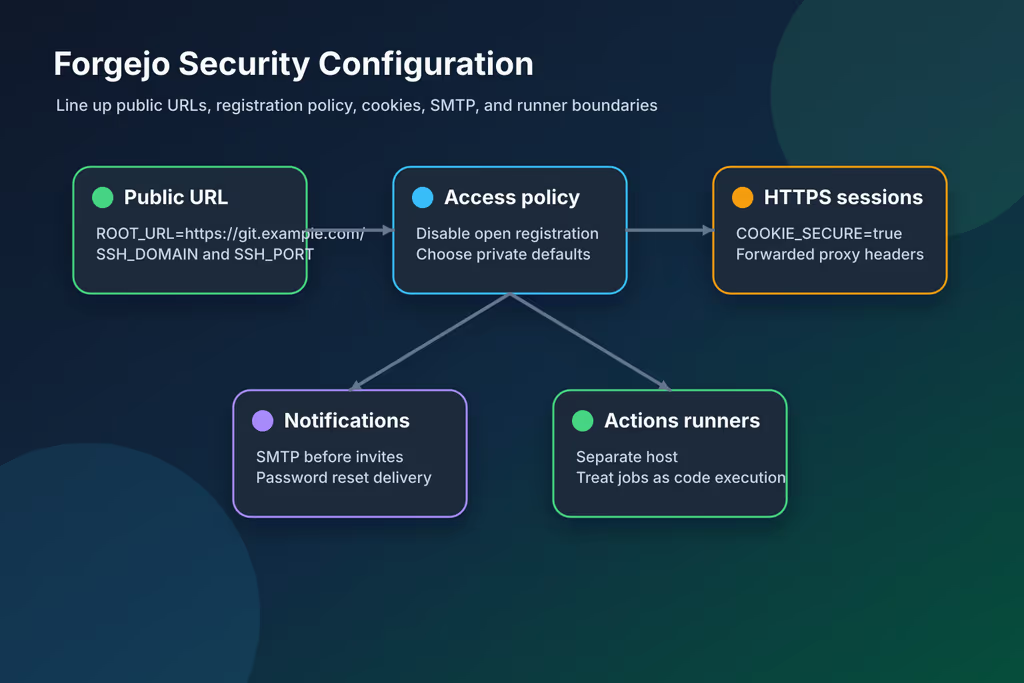
Caption: Public URLs, SSH port, registration, cookies, SMTP, runner boundary.
[service]
DISABLE_REGISTRATION = true
REQUIRE_SIGNIN_VIEW = true
ENABLE_NOTIFY_MAIL = true

[repository]
DEFAULT_PRIVATE = private

[server]
ROOT_URL = https://git.example.com/
SSH_DOMAIN = git.example.com
SSH_PORT = 222

[session]
COOKIE_SECURE = true
SMTP:
services:
  server:
    environment:
      - FORGEJO__mailer__ENABLED=true
      - FORGEJO__mailer__PROTOCOL=smtps
      - FORGEJO__mailer__SMTP_ADDR=smtp.example.com
      - FORGEJO__mailer__SMTP_PORT=465
      - FORGEJO__mailer__FROM=git@example.com
      - FORGEJO__mailer__USER=git@example.com
      - FORGEJO__mailer__PASSWD=${FORGEJO_SMTP_PASSWORD}
docker compose up -d
docker compose logs --tail=100 server
Forgejo Runner is a separate install. I would not put an untrusted runner on the same host as the forge, Postgres, or backups.
Important information
forgejo dump is not a full disaster recovery by itself on a Postgres-backed install. The upgrade guide wants a dump plus a separate pg_dump. I almost skipped the SQL gzip because the zip looked complete.
Usage
- Daily user (not only admin), SSH key, private test repo.
- Clone with port 222, push, issue, pull request.
- Confirm anonymous browse matches your policy.
ssh -F /dev/null -T -p 222 git@git.example.com

git clone ssh://git@git.example.com:222/your-user/test-repo.git
cd test-repo
printf '# Test Repository\n' > README.md
git add README.md
git commit -m "docs: add readme"
git push origin main
git remote add forgejo ssh://git@git.example.com:222/your-user/project.git
git push forgejo main
git push forgejo --tags
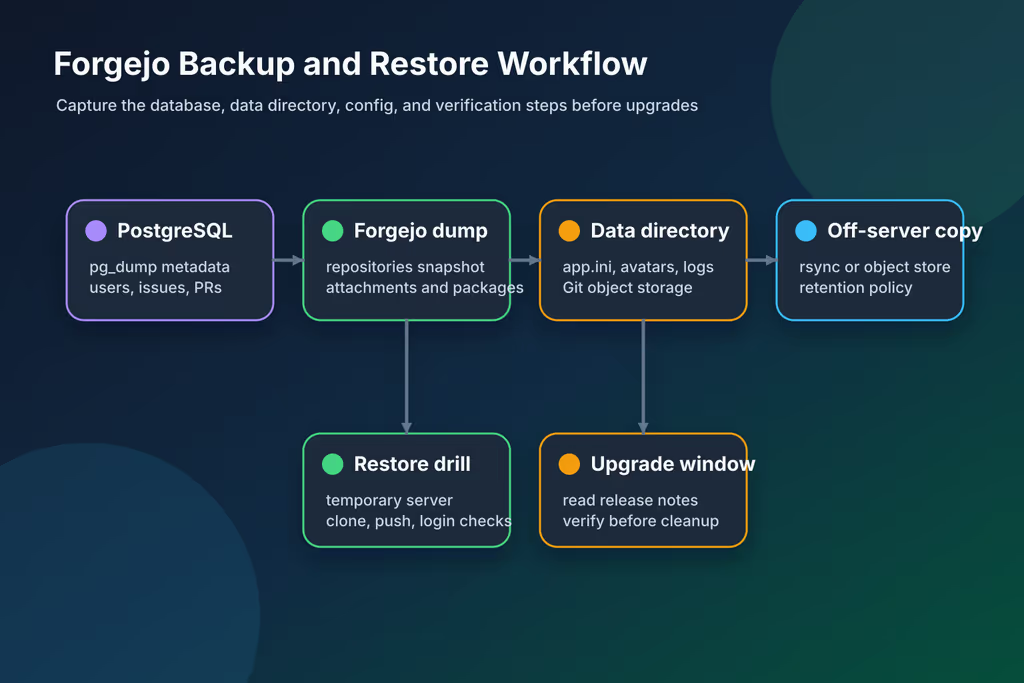
Caption: Postgres, forgejo dump zip, data tarball, off-server copy.
Backup, expose, next step
sudo tee /opt/forgejo/backup.sh >/dev/null <<'EOF'
#!/usr/bin/env bash
set -euo pipefail

cd /opt/forgejo
stamp="$(date -u +%Y%m%dT%H%M%SZ)"
mkdir -p backups

docker compose exec -T db pg_dump -U forgejo -d forgejo | gzip > "backups/forgejo-db-${stamp}.sql.gz"
docker compose exec -T server forgejo dump --type zip --file - > "backups/forgejo-dump-${stamp}.zip"
tar --one-file-system -czf "backups/forgejo-data-${stamp}.tar.gz" forgejo

find backups -type f -mtime +14 -delete
EOF

sudo chmod 700 /opt/forgejo/backup.sh
/opt/forgejo/backup.sh
rsync -avz /opt/forgejo/backups/ backup-user@backup.example.net:/srv/backups/forgejo/
cd /opt/forgejo
/opt/forgejo/backup.sh
docker compose pull
docker compose down
docker compose up -d
docker compose logs --tail=120 server
Pin codeberg.org/forgejo/forgejo:16. Read the upgrade guide before a major tag bump.
What I have running now: Forgejo 16 on HTTPS, registration off, SSH on 222, Postgres, a backup script that dumps SQL, forgejo dump, and the data directory. I migrate one repository at a time after clone URLs look right. Next: SMTP, disk monitoring, a restore on a spare host, and an upgrade log before the next major tag. Runners stay off this machine. Pin codeberg.org/forgejo/forgejo:16 and read the upgrade guide before bumping the series.
Did you hit the same wall?
I got stuck on SSH clones hitting host port 22, and on grepping /data/forgejo/ for app.ini when the file is still /data/gitea/conf/app.ini. Did you hit the same thing, or a different one — UID/GID on /data, 413 uploads, runner labels? Tell me in the comments. I read them.
Need this done on your server?
I deploy and harden Laravel/CodeCanyon apps on cPanel or VPS, and offer monthly Server Watch retainers. Hire for deploy · Care plan