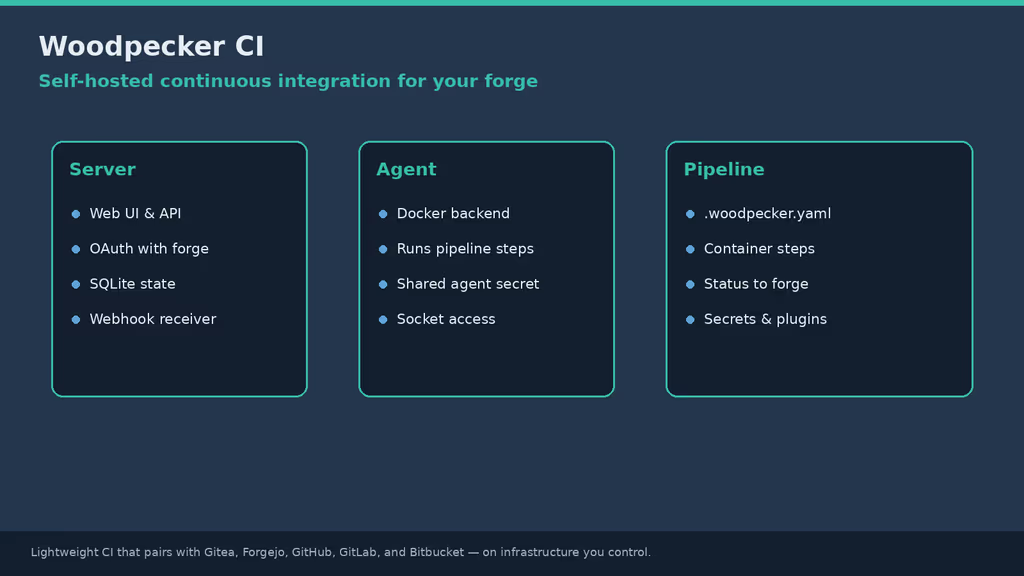
Caption: Woodpecker server + agent, OAuth to the forge, pipelines in Docker.
Why I wanted this on my server
I already had Gitea. I did not want GitLab CE just for .gitlab-ci.yml. Woodpecker CI is small: webhook in, container steps, status back to the forge. It pairs with Gitea, Forgejo, GitHub, GitLab, or Bitbucket over OAuth instead of inventing another user database. Logs and secrets stay on my VPS. Agencies can clone private repos and run tests without sending source to a SaaS CI product.
An agent with the Docker socket can run whatever is in the repo — I treat that as privilege. A leaked agent secret, open registration, or an agent on the same host as production secrets turns a convenience pipeline into a privilege problem. I planned isolation before enabling every org repo.
What I actually installed
Ubuntu 24.04 LTS, woodpeckerci/woodpecker-server:v3 + woodpeckerci/woodpecker-agent:v3, SQLite in a named volume, Gitea OAuth, Caddy to 127.0.0.1:8000. Woodpecker: https://ci.example.com. Gitea: https://git.example.com. Project /opt/woodpecker-ci.
Hardware: 2 vCPU / 2–4 GB for a lab (server + agent on light workloads); 4+ vCPU / 8 GB if agents build large images or run many parallel workflows. 20 GB+ SSD for images, caches, and the Woodpecker data volume. Off-server backups of the server volume plus Compose/.env. Untrusted pipelines should not share the forge’s Docker daemon — optional second host for agents.
Security I would not skip: long WOODPECKER_AGENT_SECRET from openssl rand -hex 32, pin :v3 instead of :latest, .env out of public Git, socket not on a host that also stores unrelated production credentials if pipelines are untrusted, public firewall only SSH/80/443, gRPC on the private Compose network when possible.
Where it broke
On a fresh Ubuntu 24.04 box this pairing is famous for OAuth login works, webhooks never fire.
Since Gitea v1.16, loopback webhooks are blocked unless you allow them. Woodpecker and Gitea on the same host need:
[webhook]
ALLOWED_HOST_LIST=external,loopback
Restart Gitea after editing app.ini. Keep Gitea’s API max page size at least 50 so Woodpecker pagination works.
Second: OAuth redirect errors. Callback must be exactly https://ci.example.com/authorize — same scheme and host as WOODPECKER_HOST, no trailing slash on the host env value. I had a trailing slash once. Gitea rejected it.
Third: pipelines stuck pending. Agent down, WOODPECKER_AGENT_SECRET mismatch, or agent cannot reach woodpecker-server:9000 (gRPC) on the Compose network.
Clone failures inside steps: the agent cannot reach the forge URL Gitea advertises. Same-host Docker: join Gitea’s network and/or set WOODPECKER_BACKEND_DOCKER_NETWORK as the Gitea forge docs say.
Other documented issues: permission errors talking to Docker — socket mount and Docker running on the agent host. 502 from the reverse proxy — server not on 127.0.0.1:8000, proxy misconfigured, or containers restarting. Users cannot register — WOODPECKER_OPEN=false blocks new sign-ups. SELinux denials on RHEL-family hosts — mount with :z as in Woodpecker’s notes. Rotate WOODPECKER_AGENT_SECRET only if every agent can be updated. For agents that reach the server over the internet, enable gRPC TLS with WOODPECKER_GRPC_SECURE=true as the Compose docs describe. Keep Gitea’s API max page size at least 50 so pagination keeps working.
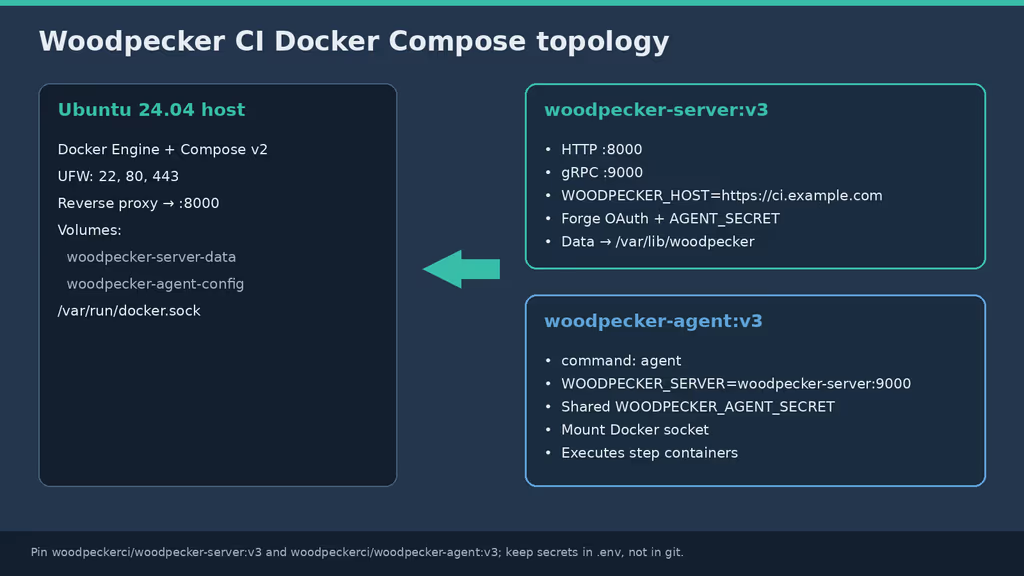
Caption: SQLite under /var/lib/woodpecker; agent mounts Docker socket; gRPC on 9000.
The working install
sudo apt update
sudo apt upgrade -y
sudo apt install -y ca-certificates curl gnupg openssl ufw

sudo ufw allow OpenSSH
sudo ufw allow 80/tcp
sudo ufw allow 443/tcp
sudo ufw enable
sudo ufw status
1. Install Docker Engine
sudo apt-get update -qqy
sudo apt-get install ca-certificates curl -qqy
sudo install -m 0755 -d /etc/apt/keyrings
sudo curl -fsSL https://download.docker.com/linux/ubuntu/gpg -o /etc/apt/keyrings/docker.asc
sudo chmod a+r /etc/apt/keyrings/docker.asc

echo \
  "deb [arch=$(dpkg --print-architecture) signed-by=/etc/apt/keyrings/docker.asc] https://download.docker.com/linux/ubuntu \
  $(. /etc/os-release && echo "$VERSION_CODENAME") stable" | \
  sudo tee /etc/apt/sources.list.d/docker.list > /dev/null

sudo apt-get update -qqy
sudo apt-get install docker-ce docker-ce-cli containerd.io docker-compose-plugin -qqy

sudo usermod -aG docker "$USER"
newgrp docker

docker --version
docker compose version
2. Register a Gitea OAuth application
- User app:
https://git.example.com/user/settings/applications, or admin:https://git.example.com/admin/settings/applications. - Callback:
https://ci.example.com/authorize. - Copy client ID and secret into the password manager.
3. Create the Compose project and secrets
sudo mkdir -p /opt/woodpecker-ci
sudo chown "$USER":"$USER" /opt/woodpecker-ci
cd /opt/woodpecker-ci

AGENT_SECRET="$(openssl rand -hex 32)"
printf 'WOODPECKER_HOST=https://ci.example.com\n' > .env
printf 'WOODPECKER_AGENT_SECRET=%s\n' "$AGENT_SECRET" >> .env
printf 'WOODPECKER_GITEA_URL=https://git.example.com\n' >> .env
printf 'WOODPECKER_GITEA_CLIENT=%s\n' 'YOUR_GITEA_CLIENT_ID' >> .env
printf 'WOODPECKER_GITEA_SECRET=%s\n' 'YOUR_GITEA_CLIENT_SECRET' >> .env
chmod 600 .env
4. Write docker-compose.yaml
services:
  woodpecker-server:
    image: woodpeckerci/woodpecker-server:v3
    restart: always
    ports:
      - "127.0.0.1:8000:8000"
    volumes:
      - woodpecker-server-data:/var/lib/woodpecker/
    environment:
      - WOODPECKER_OPEN=true
      - WOODPECKER_HOST=${WOODPECKER_HOST}
      - WOODPECKER_GITEA=true
      - WOODPECKER_GITEA_URL=${WOODPECKER_GITEA_URL}
      - WOODPECKER_GITEA_CLIENT=${WOODPECKER_GITEA_CLIENT}
      - WOODPECKER_GITEA_SECRET=${WOODPECKER_GITEA_SECRET}
      - WOODPECKER_AGENT_SECRET=${WOODPECKER_AGENT_SECRET}
      # Optional: comma-separated forge usernames that become admins
      # - WOODPECKER_ADMIN=your-gitea-username

  woodpecker-agent:
    image: woodpeckerci/woodpecker-agent:v3
    command: agent
    restart: always
    depends_on:
      - woodpecker-server
    volumes:
      - woodpecker-agent-config:/etc/woodpecker
      - /var/run/docker.sock:/var/run/docker.sock
    environment:
      - WOODPECKER_SERVER=woodpecker-server:9000
      - WOODPECKER_AGENT_SECRET=${WOODPECKER_AGENT_SECRET}

volumes:
  woodpecker-server-data:
  woodpecker-agent-config:
WOODPECKER_HOST: public URL with scheme, no trailing slash. Agent uses gRPC 9000 on the Compose network.
5. Start the stack
cd /opt/woodpecker-ci
docker compose pull
docker compose up -d
docker compose ps
docker compose logs -f woodpecker-server
Configuration
# /etc/caddy/Caddyfile (snippet)
ci.example.com {
        reverse_proxy 127.0.0.1:8000
}
curl -I https://ci.example.com
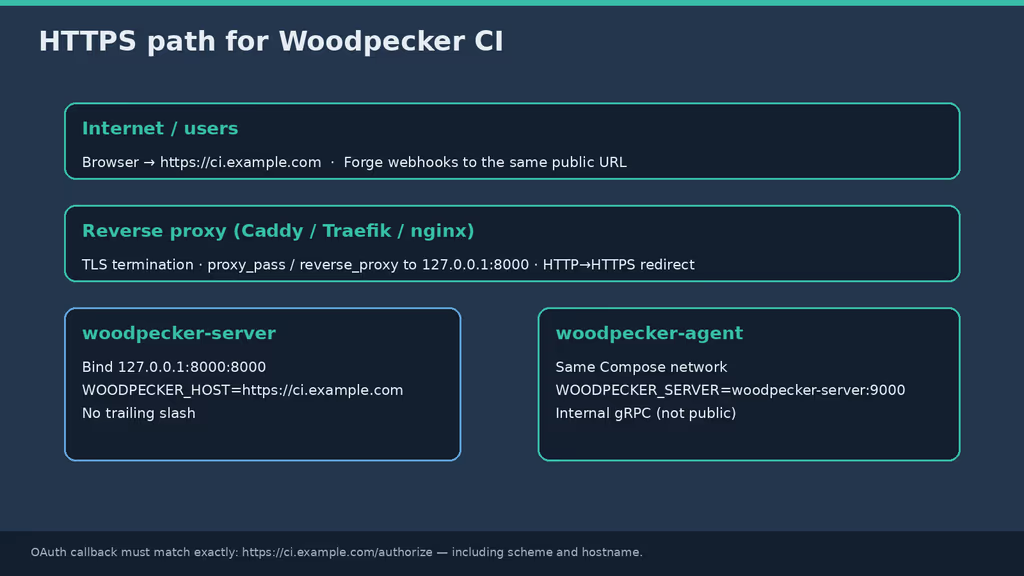
Caption: TLS at the proxy, UI on loopback 8000, gRPC private.
WOODPECKER_OPEN=true lets forge users register on first login. For a private team, turn it off after admins exist, or restrict at the forge. WOODPECKER_ADMIN promotes Gitea usernames.
Remote agents over the internet: WOODPECKER_GRPC_SECURE=true as in the Compose docs.
Extra tips
[CI SKIP] / [SKIP CI] in the commit message skips the pipeline. I learned that after wondering why a docs-only push did nothing. Also: enabling a repo in Woodpecker is what creates the forge webhook — login alone is not enough.
Usage
- Open
https://ci.example.com, Gitea OAuth, enable a repo. - Add
.woodpecker.yaml:
when:
  - event: [push, pull_request]

steps:
  - name: hello
    image: alpine:3.20
    commands:
      - echo "Woodpecker CI is working"
      - uname -a

  - name: test
    image: alpine:3.20
    commands:
      - echo "second step sees the same workspace"
      - ls -la
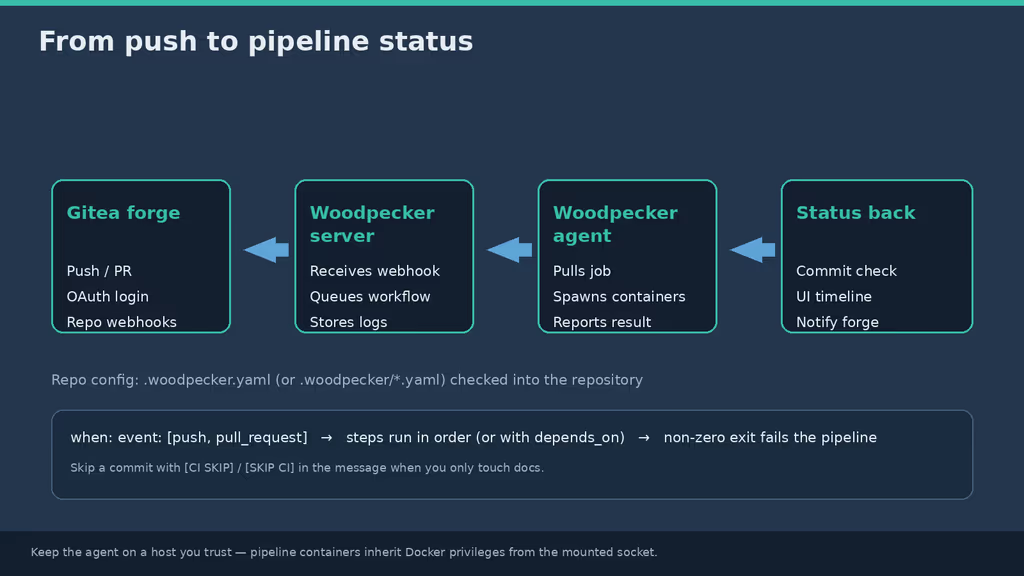
Caption: Forge webhook → server → agent containers → status on the forge.
Store tokens in the Woodpecker UI, not in YAML. Reference secrets from step environment or plugin settings using the names Woodpecker documents. I rotate forge tokens and registry passwords on the same schedule as other production credentials. Skip CI for a single commit with [CI SKIP] or [SKIP CI] in the message — I learned that after a docs-only push did nothing. Enabling a repo is what creates the webhook; login alone is not enough.
A testing checklist I actually use: HTTPS loads, OAuth returns to Woodpecker, /authorize matches, a repo shows a webhook on Gitea, a push runs hello green, the agent survives reboot, .env is mode 600 and not in git. Optional: a second agent on another host with the same secret.
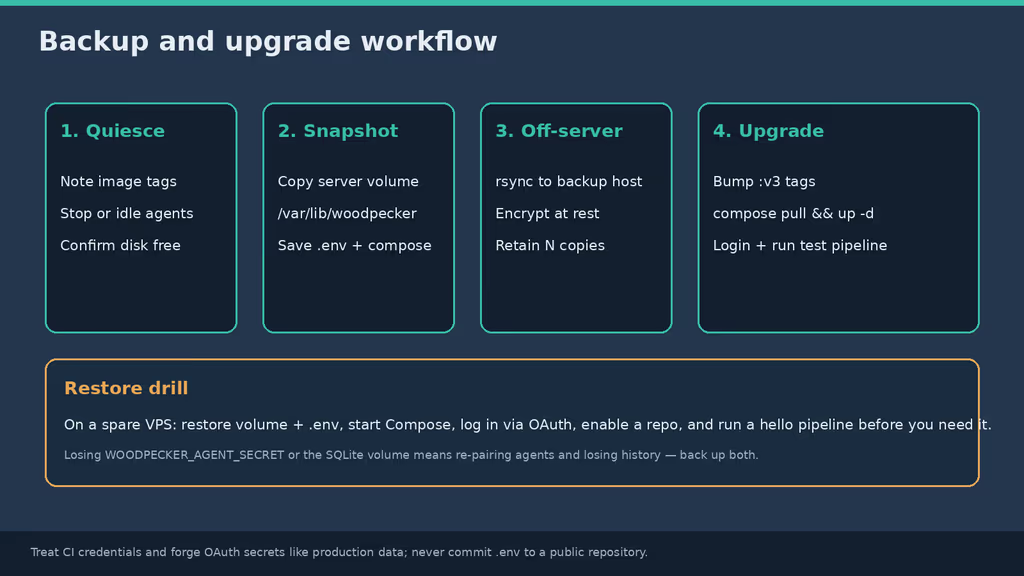
Caption: Server volume, Compose, .env, restore drill.
Backup, expose, next step
cd /opt/woodpecker-ci
docker compose stop woodpecker-agent

sudo mkdir -p /var/backups/woodpecker-ci
# Copy the named volume data (adjust volume name if Compose prefixed it)
docker run --rm \
  -v woodpecker-ci_woodpecker-server-data:/data:ro \
  -v /var/backups/woodpecker-ci:/backup \
  alpine:3.20 \
  sh -c 'cd /data && tar czf /backup/woodpecker-server-data.tgz .'

cp docker-compose.yaml .env /var/backups/woodpecker-ci/
rsync -a /var/backups/woodpecker-ci/ backup-user@backup.example.net:/srv/backups/woodpecker-ci/

docker compose start woodpecker-agent
cd /opt/woodpecker-ci
docker compose pull
docker compose up -d
docker compose ps
docker compose logs -f --tail=100
What I have running now: Woodpecker v3 on HTTPS, Gitea OAuth, loopback webhooks allowed, a green hello pipeline, SQLite on a named volume. Steps run in order; a non-zero exit fails the pipeline unless I use a failure-only condition. Next: WOODPECKER_OPEN=false, deploy credentials as Woodpecker secrets, a second agent host so builds do not share Gitea’s Docker socket, a restore drill that re-runs hello. I keep the :v3 major pin and read release notes before pulling.
Did you hit the same wall?
I got stuck on Gitea blocking loopback webhooks (ALLOWED_HOST_LIST) after OAuth already worked. Did you hit the same thing, or a different one — /authorize mismatch, pending agent secret, clone from inside the step? Tell me in the comments. I read them.
Need this done on your server?
I deploy and harden Laravel/CodeCanyon apps on cPanel or VPS, and offer monthly Server Watch retainers. Hire for deploy · Care plan