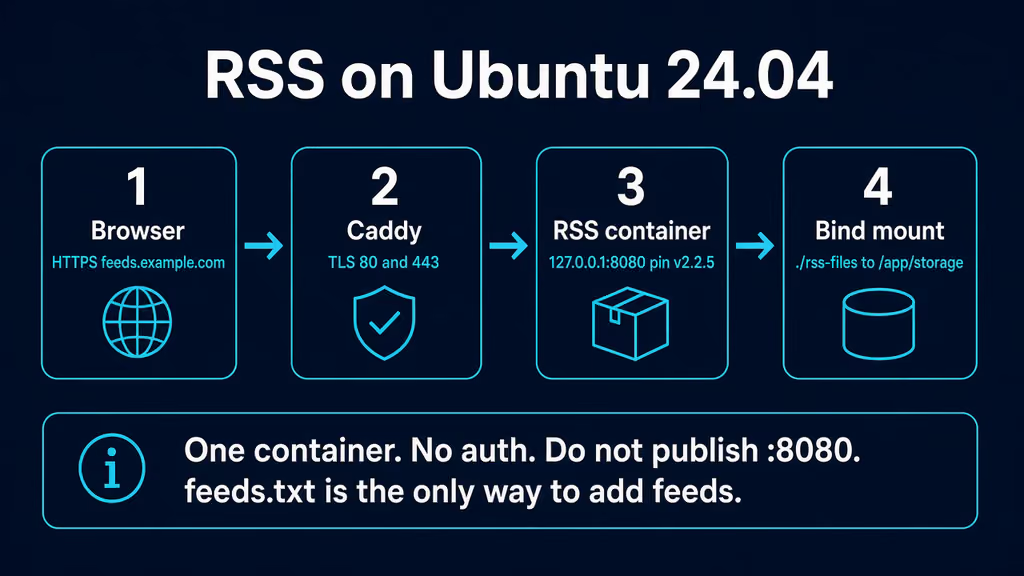
Caption: Browser to Caddy on 443, one Alpine container on loopback 8080, bind mount ./rss-files onto /app/storage. Feeds live in feeds.txt. There is no Add button. I almost published 8080, and I almost waited for a UI that does not exist.
Why I wanted this on my server
I already chase self-hosting news in a dozen browser tabs. Self-Host Weekly. BookStack's blog. PHP and Laravel posts I write against. FreshRSS and Miniflux are the honest readers if I want folders, full-text, and a login. What I do not have is a hostname that looks like a social timeline, updates itself, and does not ask me to click Subscribe in a UI I will forget how to reach from the phone.
Self-Host Weekly put RSS in the 30 Oct 2026 spotlight: Dan Brown's feed aggregator, the same person who ships BookStack. Social-feed UI. Custom names and colours. Tags. Four layouts. One plaintext file. Docker, no extra database container. Weekly said it skips the bells and whistles on purpose. Low-maintenance project. That sentence is the whole product. It does not import full articles. It does not have users. It does not have HTTPS.
I already wrote the BookStack install. This is not a second wiki. This is the same author's reader for the feeds I already copy into a notes file and then never open.
v2.2.4 shipped 21 Oct 2026 as a container rebuild for the PHP criticals announced that day — same week as the PHP 8.5.12 RCE post. v2.2.5 shipped 21 Nov 2026: PHP packages again, another image rebuild for PHP security updates. Official README still pastes codeberg.org/danb/rss:latest. Codeberg's latest package is 2.2.5 today. I pin codeberg.org/danb/rss:v2.2.5. I do not float :latest on a box that will hold a SQLite index I care about. I do not pull ghcr.io/ssddanbrown/rss — that is the archived GitHub image from before the Codeberg move.
I am writing this as a lab log on Ubuntu 24.04. I did not stand the stack up in this Cloud Agent run. The compose, env keys, and failure shapes come from the Codeberg README, docker/run.sh, the Dockerfile, the in-image Caddyfile, the 21 Oct and 21 Nov release notes, the Codeberg package tags, Self-Host Weekly 30 Oct 2026, and the experience notes on this queue item. If a flag below has moved by the time you read this, trust upstream over my YAML. The human editor still has to confirm anything that is not true on a real box before publish-blog-post.php --publish.
What I actually installed
Ubuntu 24.04 LTS, Docker Engine with the Compose v2 plugin. Image codeberg.org/danb/rss:v2.2.5. Project under /opt/rss. Official compose is one service. Alpine 3.24, Caddy on container port 80, PHP 8.5 FPM, Laravel, SQLite under /app/storage/database/database.sqlite. Cron inside the image runs artisan schedule:run every minute. The scheduler treats a feed as stale after APP_FEED_UPDATE_FREQUENCY minutes (default 60). Docker floor is 5. I bind 127.0.0.1:8080 onto container 80. Caddy on the host for https://feeds.example.com — replace that hostname. Nginx is the same idea: terminate TLS, set the forwarded headers, proxy to localhost. The app does not speak HTTPS. The README says so in one sentence.
Official one-liner publishes "8080:80". I tighten that to loopback myself. There is no login. There is no APP_AUTH. Anyone who can reach the origin reads every feed I listed, including the ones I hid from the homepage with a leading -. Hidden is a filter, not a permission. That is enough reason not to leave 8080 on the public IPv4.
Hardware is not the story. One container. No Postgres. No Redis. The image is about 60 MB compressed on amd64. A 1 GB VPS can run this next to Caddy. Thumbnails are the disk cost if I leave APP_LOAD_POST_THUMBNAILS on, which is the default. I would not put a first fetch of fifty busy feeds on the same weekend as an Immich import and then blame PHP.
There is no .env with mailbox secrets. APP_KEY is generated at image build (php85 artisan key:generate in the Dockerfile). Sessions live under the bind mount. I still keep the Caddyfile at mode 600 if I add basic_auth. I do not push that file to a public remote.
sudo apt update
sudo apt upgrade -y
sudo apt install -y ca-certificates curl gnupg openssl ufw

sudo ufw allow OpenSSH
sudo ufw allow 80/tcp
sudo ufw allow 443/tcp
sudo ufw enable
sudo ufw status
UFW is allow-list. I do not add 8080. If something already owns 80 and 443, I reuse that edge. A second proxy fighting for those ports looks like RSS is broken when it is not. I check ss before I write a new Caddyfile.
ss -tlnp | grep -E ':80|:443|:8080'
Where it broke
On a fresh Ubuntu 24.04 box this install is famous for a healthy container and a timeline that never grows.
I copied the README compose, ran docker compose up -d, opened http://localhost:8080, and waited for an Add Feed control. The UI loaded. Card, list, grid, compact. Search. Dark mode. No button. Experience notes I keep for this app say it twice: mount ./rss-files:/app/storage and put feeds in ./rss-files/feeds.txt (url name #tag). An empty mount means an empty timeline. There is no UI to add feeds. run.sh even touches feeds.txt on first boot so the file exists and is empty. I stared at a blank homepage and blamed fetch.
# The container is healthy. feeds.txt is the bug.
# /opt/rss/rss-files/feeds.txt is empty or missing
# run.sh: touch /app/storage/feeds.txt
# UI: no Add, no import, no users
Official README: feed configuration is a plaintext file on the host. Default path in the image is /app/storage/feeds.txt, which is APP_CONFIG_FILE. Lines are https://example.com/feed.xml Name #tag. Underscores in names become spaces. A CSS colour goes in square brackets after the name. A leading - hides the feed from the homepage. Hash starts a comment. I write that file before I call the install done, not after I hunt for a settings page that will never appear.
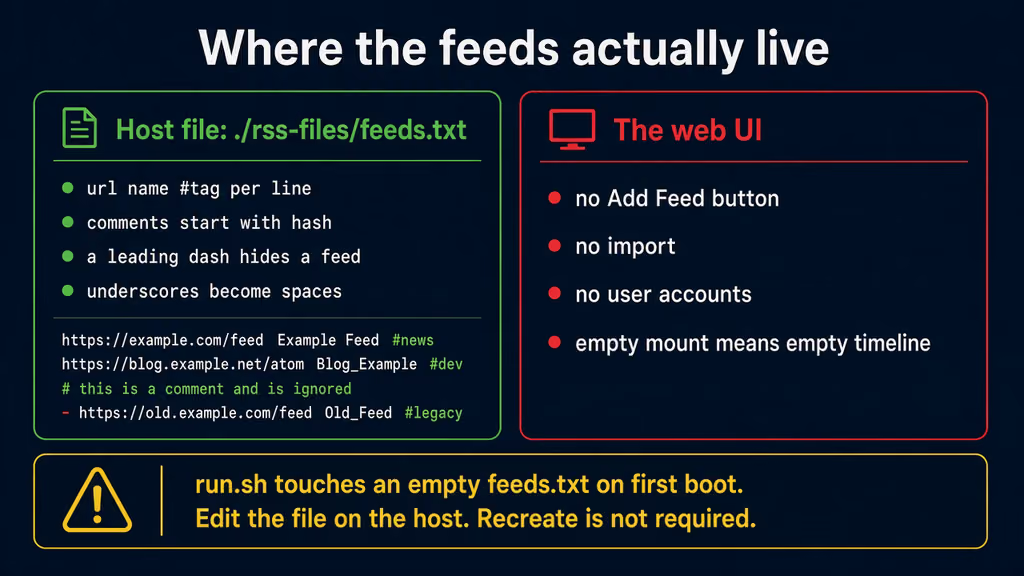
Caption: Feeds live in ./rss-files/feeds.txt on the host. The UI never grows an Add button. First boot touches an empty file so the mount looks populated and the timeline is still blank.
Second wall: I published "8080:80" because that is the README one-liner, and I opened http://VPS_IP:8080 from the laptop. The timeline loaded. There is no first-admin wizard. There is no password. BookStack at least made me pick an admin. Here the failure is quieter: a public feed list on a port I forgot about, HTTP, and every hidden feed still reachable via a tag filter. I bind 8080 to loopback. I finish the first open after Caddy has a cert, or over an SSH tunnel.
# The container is healthy. The bind is the bug.
ports:
  - "8080:80"
# no auth, no HTTPS
# hidden feeds are still in the SQLite index
Third: I put it on a sub-path as /rss/ because I did not want another hostname, and the CSS 404'd. Official reverse-proxy block is nginx location /rss/ with X-Forwarded-Prefix "/rss/" plus Host, Proto, Host, Port. Skip the prefix header and Laravel builds links as if it owns /. Assets 404. The timeline looks like a broken SPA. On a dedicated hostname I still set Host and Proto so Caddy's HTTPS origin is what the app emits. v2.2.2 exists because the in-image Caddy was not forwarding those headers. v2.0.0 also narrowed trusted proxies to private ranges — a proxy that is not on loopback or RFC1918 will look like the app is serving HTTP on the container name.
# The UI is up. The prefix is the bug.
location /rss/ {
    proxy_pass http://127.0.0.1:8080/;
    # missing: X-Forwarded-Prefix "/rss/";
}
Fourth: I almost pulled ghcr.io/ssddanbrown/rss from an old gist. GitHub's README still shows that image. The project moved. Codeberg is codeberg.org/danb/rss. Queue notes from October said Codeberg's latest still showed 1 Aug 2026. Today latest is 2.2.5. That is why I pin a tag.
I treat those as one chain. Empty feeds.txt is first because the UI looks finished. Published 8080 is second because it fails as an exposure. Sub-path headers are third because the app looks broken when it is only lost. The old GHCR name is last because it is the category error.
On a fresh Ubuntu 24.04 box this is the failure this install is famous for: compose that looks ready, a healthy Caddy in the container, and a feeds.txt that touch created empty.
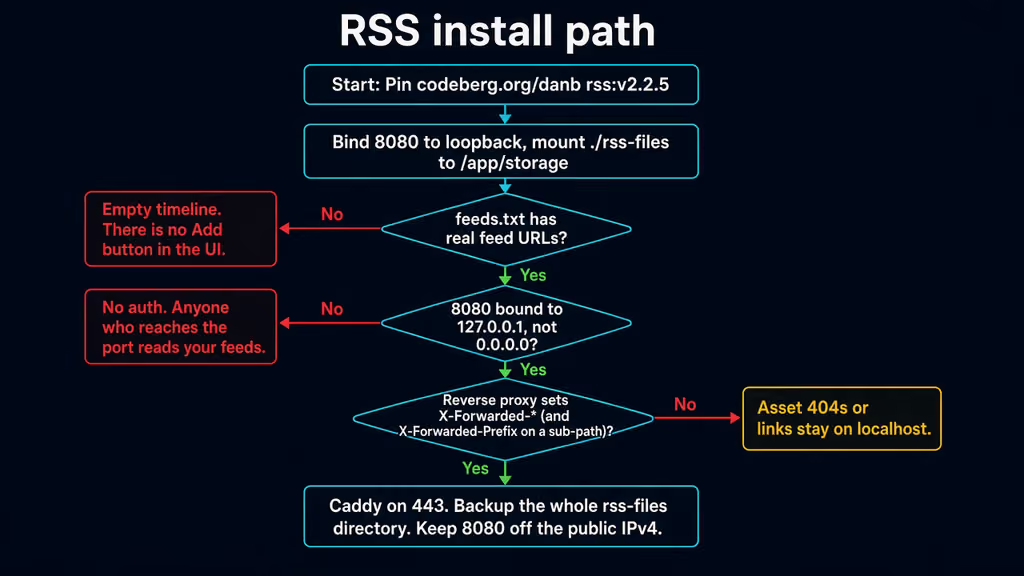
Caption: Pin v2.2.5, bind 8080 to loopback, write feeds.txt on the host. The red branches are an empty timeline with no Add button, and 8080 on the public IPv4. The yellow branch is a sub-path missing X-Forwarded-Prefix.
The working install
Official Docker shape for RSS v2.2.5, then Caddy. I followed upstream for the image, the /app/storage volume, and feeds.txt, then pinned the tag and bound 8080 to loopback. If docker compose version fails after the Engine install, I stop.
1. Install Docker Engine
sudo apt-get update -qqy
sudo apt-get install ca-certificates curl -qqy
sudo install -m 0755 -d /etc/apt/keyrings
sudo curl -fsSL https://download.docker.com/linux/ubuntu/gpg -o /etc/apt/keyrings/docker.asc
sudo chmod a+r /etc/apt/keyrings/docker.asc

echo \
  "deb [arch=$(dpkg --print-architecture) signed-by=/etc/apt/keyrings/docker.asc] https://download.docker.com/linux/ubuntu \
  $(. /etc/os-release && echo "$VERSION_CODENAME") stable" | \
  sudo tee /etc/apt/sources.list.d/docker.list > /dev/null

sudo apt-get update -qqy
sudo apt-get install docker-ce docker-ce-cli containerd.io docker-compose-plugin -qqy

sudo usermod -aG docker "$USER"
newgrp docker

docker --version
docker compose version
If docker compose version fails, I fix Docker before I write YAML. I log out and back in (or newgrp docker) so the socket group applies. Otherwise every compose command wants sudo and I end up with root-owned files under /opt/rss.
2. Create the project directory, write feeds.txt, pin v2.2.5
The clone is optional. Application code lives in the image. I only need a compose file and the storage directory.
sudo mkdir -p /opt/rss/rss-files
sudo chown -R "$USER":"$USER" /opt/rss
cd /opt/rss
feeds.txt first. If I start the container without it, run.sh creates an empty one and I will think fetch is broken. Names with spaces use underscores. A colour is CSS. A leading - hides that feed from the homepage — it is still fetched, still in SQLite, still visible through a tag filter.
cat > /opt/rss/rss-files/feeds.txt << 'EOF'
# Self-hosting and the author's own posts
https://selfh.st/rss/ selfh.st[#0f60d9] #selfhosting
https://www.bookstackapp.com/blog/index.xml BookStack[#0288d1] #projects
https://danb.me/blog/index.xml Dan_Brown[#334155] #blogs

# Hidden from the homepage; still in the index
- https://blog.codeberg.org/feeds/all.atom.xml Codeberg #git
EOF
Official compose still has version: "2" and :latest. I drop the obsolete version key. I pin the tag. I bind loopback. APP_NAME is only the browser tab.
cat > /opt/rss/docker-compose.yml << 'EOF'
services:
  rss:
    image: codeberg.org/danb/rss:v2.2.5
    container_name: rss
    restart: unless-stopped
    environment:
      APP_NAME: RSS
      APP_FEED_UPDATE_FREQUENCY: "60"
      APP_PRUNE_POSTS_AFTER_DAYS: "30"
      APP_LOAD_POST_THUMBNAILS: "true"
    volumes:
      - ./rss-files:/app/storage
    ports:
      - "127.0.0.1:8080:80"
EOF
Pruning is off by default (false). I turn it on at 30 days because some feeds dump years of history into SQLite on first fetch. Frequency is minutes, not hours. 5 is the docker floor — the in-image cron is every minute, and the scheduler will not consider a feed stale faster than that. I do not set SERVER_PORT unless I am in rootless Podman. The Dockerfile HEALTHCHECK still probes http://localhost:80/. Change the listen port and docker compose ps will look unhealthy while the app is fine.
cd /opt/rss
docker compose pull
docker compose up -d
docker compose ps
docker compose logs --tail=80 rss
curl -sS -o /dev/null -w "%{http_code}\n" http://127.0.0.1:8080/
ss -tlnp | grep 8080
ls -la rss-files
8080 should be 127.0.0.1. / should be 200. rss-files/ should show feeds.txt, database/database.sqlite, and framework/ after first boot. run.sh also runs artisan migrate --force, storage:link, and chown -R www /app. If / is not 200, I look at docker compose logs rss before I touch Caddy.
Edits to feeds.txt do not need a recreate. The app rereads the file. New feeds wait until they are stale under APP_FEED_UPDATE_FREQUENCY, or until I load a page that queues a refresh. If a URL never appears, I test it from inside the container:
docker compose exec rss php85 artisan rss:test-feed https://selfh.st/rss/
That command is a boolean fetchable check, not a pretty error. The README is honest that error handling will not alert clearly. A feed that 404s, serves HTML, or sits on a private IP will fail quietly. v2.0.0 also stopped fetching thumbnails whose URLs resolve into local/private ranges.
3. First open on loopback, then put Caddy in front
Open http://127.0.0.1:8080 over an SSH tunnel if DNS is not ready:
ssh -L 8080:127.0.0.1:8080 user@your-vps
I should see the three un-hidden feeds once the first fetch lands. If the list is empty, I cat rss-files/feeds.txt before I debug PHP. Confirm DNS before the first TLS start. Create a Caddyfile. Caddy sets X-Forwarded-* on its own.
feeds.example.com {
    reverse_proxy 127.0.0.1:8080
}
sudo systemctl reload caddy
After the cert lands I open https://feeds.example.com. Card view, then list, then a tag. I do not expect a login. If this hostname should not be a public timeline, I add Caddy basic_auth before I point DNS at it, because there is no app-side wall I can flip later. Hash the password with caddy hash-password and keep the Caddyfile mode 600. Authentik is already a post if I want SSO later; I would not wire that on day one for a single-user reader.
Nginx on a dedicated hostname is the same bind: TLS on 443, proxy_pass http://127.0.0.1:8080, Host plus the X-Forwarded-* headers. Sub-path instead — official README shape. proxy_pass has the trailing slash. X-Forwarded-Prefix has the trailing slash. Miss either and asset URLs 404.
location /rss/ {
    proxy_pass http://127.0.0.1:8080/;
    proxy_set_header Host              $host;
    proxy_set_header X-Real-IP         $remote_addr;
    proxy_set_header X-Forwarded-For   $proxy_add_x_forwarded_for;
    proxy_set_header X-Forwarded-Proto $scheme;
    proxy_set_header X-Forwarded-Host  $host;
    proxy_set_header X-Forwarded-Port  $server_port;
    proxy_set_header X-Forwarded-Prefix "/rss/";
    proxy_redirect off;
}
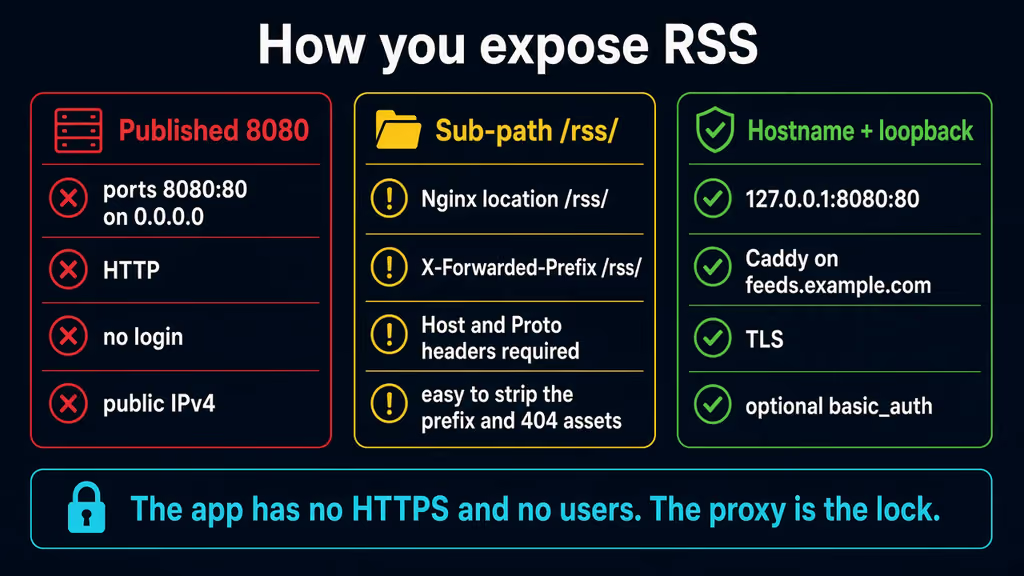
Caption: Published 8080 is HTTP with no login. A sub-path works only with X-Forwarded-Prefix. The path I actually want is loopback 8080 plus Caddy on a hostname, with basic_auth if the timeline is not public.
Useful to know
:latest on Codeberg is v2.2.5 as of this draft. I still pin v2.2.5. Tuesday should not move PHP under a SQLite file because I was lazy with a tag. amd64, arm64, and arm/v7 images exist.
The in-image web server is Caddy, not nginx, since v2.0.0 (May 2026). Laravel 13, PHP 8.5, Alpine. Trusted proxies are private ranges. SERVER_PORT is for rootless; leave it at 80 behind Docker's port map.
APP_KEY is baked at image build. A tag bump is a new key. Sessions under rss-files/framework/sessions will not survive that. The SQLite posts and feeds.txt will. I still back up the whole tree, not only the sqlite file, because thumbnails live under storage after storage:link.
This is a low-maintenance project. Official limitations, not a roadmap: no full-text import, no feed management in the UI, no users, no auth, no plugins. Issues for bugs are fine. PRs that grow the scope are not. I do not write “it will get folders next month.”
BookStack is already a post. FreshRSS is the reader with actual accounts if I outgrow a plaintext file. This is the social-style timeline from the same author, not a second wiki.
Backup, expose, next step
An RSS install is the compose file plus the bind mount. Lose rss-files/ and the SQLite index vanishes. Lose only feeds.txt and a recreate touches an empty one — timeline blank, database still holding posts that no longer have a parent line. I back up the directory, not a mysqldump I do not have.
cat > /opt/rss/backup.sh << 'EOF'
#!/usr/bin/env bash
set -euo pipefail
PROJECT="/opt/rss"
BACKUP_DIR="$PROJECT/backups"
RETENTION_DAYS=14
mkdir -p "$BACKUP_DIR"
stamp="$(date -u +%Y%m%dT%H%M%SZ)"
cd "$PROJECT"
mkdir -p "$BACKUP_DIR/rss-${stamp}"
cp -a docker-compose.yml "$BACKUP_DIR/rss-${stamp}/"
[ -f Caddyfile ] && cp -a Caddyfile "$BACKUP_DIR/rss-${stamp}/"
[ -f /etc/caddy/Caddyfile ] && cp -a /etc/caddy/Caddyfile "$BACKUP_DIR/rss-${stamp}/caddy-etc.Caddyfile"
tar -C "$PROJECT" -czf "$BACKUP_DIR/rss-${stamp}/rss-files.tar.gz" rss-files
find "$BACKUP_DIR" -mindepth 1 -maxdepth 1 -mtime +"$RETENTION_DAYS" -exec rm -rf {} +
echo "[$stamp] compose + rss-files under $BACKUP_DIR"
EOF
chmod 700 /opt/rss/backup.sh
/opt/rss/backup.sh
rsync -avz /opt/rss/backups/ backup-user@backup.example.net:/srv/backups/rss/
A backup that only lives next to the volume is a snapshot, not an offsite copy. I treat the rsync as the actual last step. Restore on a spare VM: compose file in place, extract rss-files.tar.gz next to it, then up -d. Starting the container against an empty directory first will touch a blank feeds.txt and migrate a new sqlite file. I do not want to overlay that with the real tree after the fact.
Upgrades after a backup:
cd /opt/rss
/opt/rss/backup.sh
# Edit the image tag in docker-compose.yml, then:
docker compose pull
docker compose up -d
docker compose logs --tail=80 rss
curl -sS -o /dev/null -w "%{http_code}\n" http://127.0.0.1:8080/
If I floated :latest and a Tuesday image moves 2.2 to 2.3 under the same word, I want the tar from five minutes earlier. Pinning v2.2.5 makes that Tuesday quieter. Read the release notes. Migrations in this image run forward on every boot.
What I have running now, on paper for this lab, is RSS v2.2.5 on loopback 8080, Caddy on 443 for https://feeds.example.com, feeds.txt with four lines, prune at 30 days, a backup script that tars the whole rss-files tree, and 8080 off ss on 0.0.0.0. Next I add the feeds I actually read, I watch database.sqlite after the first hour so I know fetch is not silently failing, I keep basic_auth in mind before I share the hostname, and I leave sub-path hosting until a dedicated name is boring. BookStack stays the wiki. This is the timeline.
Did you hit the same wall?
I got stuck on a healthy container and a homepage that never grew an Add Feed button — run.sh had touched an empty feeds.txt on the bind mount. Did you hit the same thing, or a different one — 8080 on the public IPv4, assets 404ing because X-Forwarded-Prefix was missing on /rss/, ghcr.io/ssddanbrown/rss:latest from an old gist, a feed URL that rss:test-feed quietly refuses? Tell me in the comments. I read them.
Need this done on your server?
I deploy and harden Laravel/CodeCanyon apps on cPanel or VPS, and offer monthly Server Watch retainers. Hire for deploy · Care plan
References
- danb/rss on Codeberg
- README (Docker, feeds.txt, reverse proxy)
- v2.2.5 release
- v2.2.4 release (PHP critical rebuild, 21 Oct 2026)
- Codeberg container package
- docker/run.sh
- Dockerfile
- Self-Host Weekly, 30 Oct 2026
- BookStack install on this site
- PHP 8.5.12 RCE, 21 Oct 2026
- Archived GitHub mirror
- Docker Engine install documentation