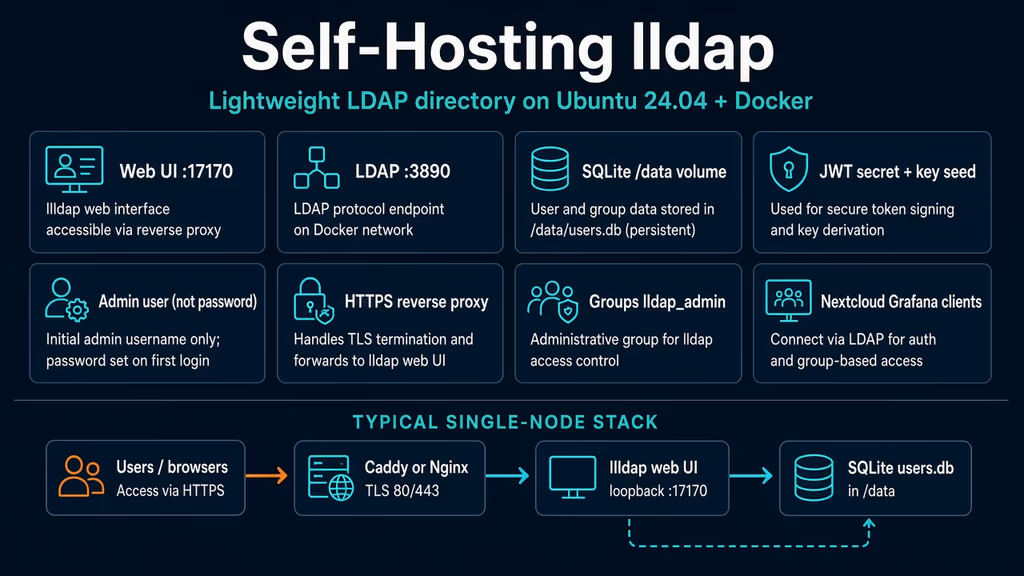
Caption: Browser to Caddy or Nginx on 443, then the lldap web UI on loopback 17170. LDAP stays on the Compose network. I almost published 3890.
Why I wanted this on my server
I already have Grafana, Nextcloud, and a wiki that each want their own user table. That is fine until I invite a second person and I am copying passwords between containers. OpenLDAP would do the job. I have also spent enough hours in slapd to know I do not want that as a weekend project. FreeIPA would do even more of a job. I do not need Kerberos and DNS on this VPS. I need users and groups that the apps I already run can search.
lldap is a Rust directory with a web UI, SQLite by default, and just enough LDAP for the apps I actually run. Users, groups, memberOf filters, password reset by email if I bother with SMTP. It is not a full LDAP server. Synology will not like it. I do not need Synology. I need cn=bob,ou=people,dc=example,dc=com that Nextcloud can bind to.
This is the directory, not a second identity provider. I already wrote up Authentik. Authentik can sit in front later and treat lldap as the source of users. Day one is: one container, one volume, one hostname for the UI, LDAP only between containers. If I wire OIDC before the directory restore is boring, I get two failure domains and I still have not practiced bringing users back.
Self-Host Weekly put it in the 25 Sep 2026 roundup as the light option: one Docker container, SQLite, optional MySQL or Postgres. v0.6.3 is the May 2026 stable line I would pin toward. I used the lldap/lldap:stable tag from the official compose example. :latest is documented as newer, less settled code. A user directory is not where I want surprise schema on a Tuesday.
What I actually installed
Ubuntu 24.04 LTS, Docker Engine with the Compose v2 plugin, image lldap/lldap:stable. Project under /opt/lldap. Web UI bound to 127.0.0.1:17170. Caddy on 80/443 for https://lldap.example.com — replace that hostname. Nginx is the same idea: terminate TLS, proxy to localhost, do not publish 17170 on 0.0.0.0.
Hardware is the easy part. Upstream says the process is around 15 MiB RAM including the database. A 1 GB VPS is not the constraint. Disk is the SQLite file plus the compose secrets. I still want off-server copies of /data and the env file. I would not put this on a 512 MB toy and then complain it is slow. It will not be slow. The next app I attach will be slow, or the proxy, or DNS. lldap itself is the small box in the middle.
I keep .env mode 600. JWT secret, key seed, and the first admin password live there. I do not push that file to a public remote. If I must commit compose, I commit a .env.example with placeholders and I keep the real file on the server. Secrets in git history are still secrets.
Software on the host: sudo, DNS A/AAAA for a dedicated subdomain, Docker from Docker's apt repo, OpenSSL (or the tr one-liner from their config template) to generate JWT and key seed. I do not open 3890 or 6360 in UFW. I do not open 17170 either once Caddy is in front. The UI is for me and for whoever I invite. It is not a search engine.
If this box already runs Caddy or Nginx for other Compose projects, I reuse that edge. A second process fighting for 80 and 443 is a failure that looks like lldap is broken when it is not. I check ss -tlnp | grep -E ':80|:443' before I add another proxy. If something already owns those ports, I add a site file or a Caddy block and I keep this project's 17170 on loopback.
sudo apt update
sudo apt upgrade -y
sudo apt install -y ca-certificates curl gnupg openssl ufw

sudo ufw allow OpenSSH
sudo ufw allow 80/tcp
sudo ufw allow 443/tcp
sudo ufw enable
sudo ufw status
UFW is allow-list. If I later allow 3890 because a client on another VPS "needs LDAP," I have chosen to put the directory on the network path between those boxes. That can be a private WireGuard interface. It is not a reason to publish 3890 on the public IPv4 of a cheap VPS. I would rather run a small VPN and keep LDAP unpublished than explain an open directory to a future me who only wanted Nextcloud logins. That future me will not remember why 3890 was open. I write it down in the restore notes instead. Then I check UFW again after the first HTTPS login.
Where it broke
On a fresh Ubuntu 24.04 box this install is famous for a compose file that looks careful and a port mapping that is not.
Official Docker compose comments out 3890 and 6360. The comment is the whole lesson: "not recommended to expose." Blog pastes uncomment them because "LDAP has to be reachable." Experience notes I keep for this app: publishing 3890 on a VPS puts the directory on the public internet. Only publish 17170, or put the UI behind the proxy and leave LDAP on the Docker network. Authentik is already on this blog. This write-up is the directory behind it, not a second identity provider with pretty flows.
I uncommented the LDAP ports, mapped "3890:3890", and thought I would "lock it down later." The container started. ss -tlnp showed 3890 on 0.0.0.0. Anyone who could reach that port could talk LDAP to my user table. Anonymous binds are not the only risk. A guessed admin password plus a published 3890 is a remote directory. That is the failure, not a stack trace:
# The container is healthy. The publish is the bug.
ports:
  - "3890:3890"
  - "17170:17170"
Nextcloud on the same Compose network should use ldap://lldap:3890. I do not need a public 3890 for that.
ss -tlnp | grep -E '3890|17170|6360'
docker compose ps
If 3890 is on 0.0.0.0, I stop and fix Compose before I touch certificates.
Second wall: I skipped LLDAP_JWT_SECRET, LLDAP_KEY_SEED, and LLDAP_LDAP_USER_PASS because the UI came up anyway. Docs are blunt. If lldap_config.toml is missing on first start, lldap uses defaults. The default admin password is password. I logged in with admin / password on a port that was about to get a hostname. Changing the env later did not rotate it. The config password is only for the initial admin creation unless I set force_ldap_user_pass_reset. FAQ says the same thing: if I changed ldap_user_pass after first run, it is ignored.
# First boot with no secrets:
# admin / password
# JWT and key seed also default. Changing JWT later logs everyone out.
Third: I did not persist /data. Recreate the container and users.db is gone. Sessions die the same way if JWT is regenerated every start because it was never written down. FAQ: make sure /data is a volume or a host bind, and that the process can write it. Official default UID/GID is 1000 if I omit them.
Fourth: I put $ in the admin password and Compose ate it. Docs: escape it (Pas$$word sets Pas$word). I generate hex now so interpolation is not a plot twist.
Fifth: password-reset emails. I turned on SMTP, sent a reset, and the link pointed at http://localhost. LLDAP_HTTP_URL defaults to that. It has to be the URL I actually open (https://lldap.example.com), same class of bug as every other app that builds links from a public URL setting.
docker compose logs --tail=80 lldap
curl -sS -o /dev/null -w "%{http_code}\n" http://127.0.0.1:17170
If localhost answers and HTTPS does not, the proxy or DNS is the problem, not lldap. If I can bind to 3890 from the public IP, the compose publish is the problem, not the UI.
I treat those as one chain. Public 3890 is first because the directory is up and exposed while I am still clicking around the admin UI. Default password is second because the UI "works." Missing /data is third because it fails on the first recreate, after I already created users. $ in Compose is fourth because the password I typed is not the password the container got. LLDAP_HTTP_URL is last because SMTP looks configured until someone clicks the mail and lands on localhost.
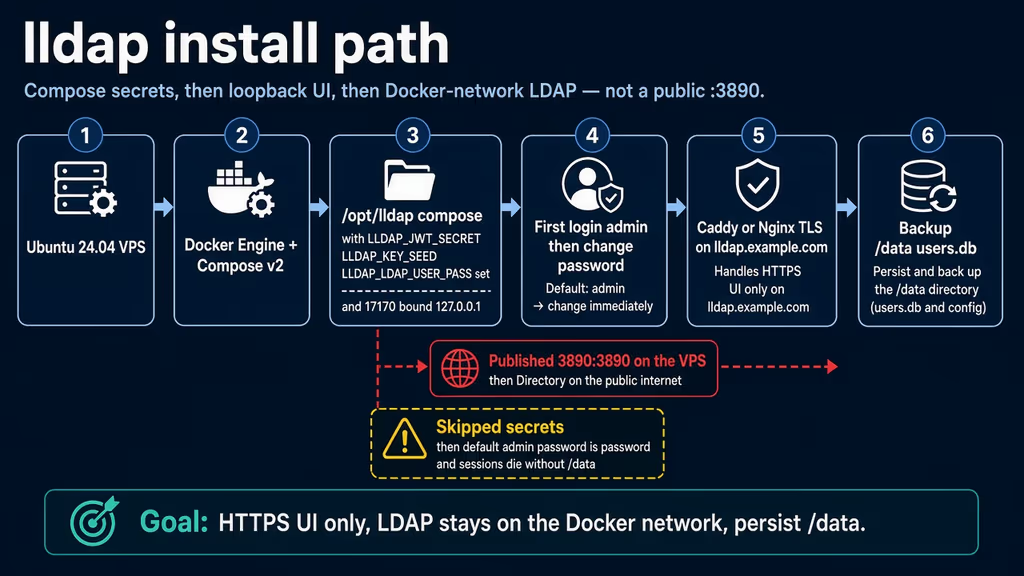
Caption: Secrets in Compose, UI on loopback 17170, LDAP unpublished. The red branch is uncommenting 3890. The yellow branch is skipping JWT, key seed, and /data.
The working install
Official Docker compose shape for lldap, then Caddy. I followed upstream for the image and the commented LDAP ports, then bound the UI to loopback myself. If docker compose version fails after the Engine install, I stop.
1. Install Docker Engine
sudo apt-get update -qqy
sudo apt-get install ca-certificates curl -qqy
sudo install -m 0755 -d /etc/apt/keyrings
sudo curl -fsSL https://download.docker.com/linux/ubuntu/gpg -o /etc/apt/keyrings/docker.asc
sudo chmod a+r /etc/apt/keyrings/docker.asc

echo \
  "deb [arch=$(dpkg --print-architecture) signed-by=/etc/apt/keyrings/docker.asc] https://download.docker.com/linux/ubuntu \
  $(. /etc/os-release && echo "$VERSION_CODENAME") stable" | \
  sudo tee /etc/apt/sources.list.d/docker.list > /dev/null

sudo apt-get update -qqy
sudo apt-get install docker-ce docker-ce-cli containerd.io docker-compose-plugin -qqy

sudo usermod -aG docker "$USER"
newgrp docker

docker --version
docker compose version
If docker compose version fails, I fix Docker before I write YAML. lldap expects Compose v2, not the old Python docker-compose binary. I log out and back in (or newgrp docker) so the socket group applies. Otherwise every compose command wants sudo and I end up with root-owned files under /opt/lldap. Official snippets still show version: "3" at the top of YAML. Compose v2 ignores it. I omit the key.
2. Create the project directory and secrets
sudo mkdir -p /opt/lldap
sudo chown "$USER":"$USER" /opt/lldap
cd /opt/lldap

# Hex avoids Compose eating $ in secrets.
openssl rand -hex 32
openssl rand -hex 32
openssl rand -hex 16
First string is LLDAP_JWT_SECRET. Changing it later invalidates every web session and people have to log in again. Second is LLDAP_KEY_SEED (docs want at least 12 characters; 32 hex is fine). That seed is how the server derives the private key used to store passwords. I keep it with the database dump. Third is LLDAP_LDAP_USER_PASS — minimum 8 characters, both for the LDAP bind and the web UI. Store all three in a password manager before I write the env file. Upstream also ships generate_secrets.sh that prints quoted JWT and key seed from /dev/urandom. Same idea. I still set the admin password myself so I never boot with password.
cat > /opt/lldap/.env <<'EOF'
TZ=Etc/UTC
LLDAP_JWT_SECRET=replace-with-first-openssl
LLDAP_KEY_SEED=replace-with-second-openssl
LLDAP_LDAP_BASE_DN=dc=example,dc=com
LLDAP_LDAP_USER_PASS=replace-with-third-openssl
LLDAP_HTTP_URL=https://lldap.example.com
EOF

chmod 600 /opt/lldap/.env
Replace dc=example,dc=com with the base DN I will type into Nextcloud and Grafana. It does not have to be a domain I own. It does have to stay stable. Changing it later means rewriting every client.
3. Write docker-compose.yml
LDAP ports stay commented. Web UI on loopback only. Named volume for /data.
services:
  lldap:
    image: lldap/lldap:stable
    restart: unless-stopped
    ports:
      # LDAP stays on the Compose network. Do not publish 3890 or 6360.
      # - "3890:3890"
      # - "6360:6360"
      - "127.0.0.1:17170:17170"
    volumes:
      - lldap_data:/data
    env_file:
      - .env
    environment:
      - UID=1000
      - GID=1000
      - TZ=${TZ}
      - LLDAP_JWT_SECRET=${LLDAP_JWT_SECRET}
      - LLDAP_KEY_SEED=${LLDAP_KEY_SEED}
      - LLDAP_LDAP_BASE_DN=${LLDAP_LDAP_BASE_DN}
      - LLDAP_LDAP_USER_PASS=${LLDAP_LDAP_USER_PASS}
      - LLDAP_HTTP_URL=${LLDAP_HTTP_URL}

volumes:
  lldap_data:
:stable is the tag in the official example. :latest includes newer, less settled code. I do not float latest on a directory. Pin v0.6.3 if I want a named release.
chmod 600 /opt/lldap/docker-compose.yml
docker compose pull
docker compose up -d
docker compose ps
docker compose logs --tail=80 lldap
curl -sS -o /dev/null -w "%{http_code}\n" http://127.0.0.1:17170
ss -tlnp | grep -E '3890|17170'
17170 should be 127.0.0.1. 3890 should not be on the host at all. Other containers reach it as lldap:3890 after I put them on the same Compose network. A shared network named something boring like auth_net is enough. I do not create a new overlay per pair on day one. I do create the network before I start Nextcloud so I am not rebuilding Nextcloud later just to attach it.
If the container restarts, I read logs before I change UID. A bind mount that the process cannot write looks like "lldap will not start" and is usually permissions on /data. Named volumes hide that class of bug, which is why I used one.
4. First login, then change how I think about the admin password
Open http://127.0.0.1:17170 over an SSH tunnel if DNS is not ready:
ssh -L 17170:127.0.0.1:17170 user@your-vps
Log in as admin with LLDAP_LDAP_USER_PASS. If I skipped that env, the password is password. I treat that as an incident, not a convenience. Change it in the UI if I ever booted on the default. Editing .env after first boot does not rotate the admin unless force_ldap_user_pass_reset is true (LLDAP_FORCE_LDAP_USER_PASS_RESET). That flag is break-glass, not a weekly rotation tool. Set it, start once, log in, then turn it off so a recreate does not keep slamming the password back to the env value.
Create a second user in lldap_admin before I trust this. Solo admin plus a forgotten password is a restore, not a settings tweak. I store both accounts offline until SMTP works. If I lose the only admin before mail is proven, I am using the force-reset flag or I am restoring /data.
Default bind values for clients:
- Bind DN:
cn=admin,ou=people,dc=example,dc=com(swap the base DN) - Bind password: the same admin password
- Users:
ou=people,dc=example,dc=com - Groups:
ou=groups,dc=example,dc=com - User
bob:cn=bob,ou=people,dc=example,dc=com - Group filter example:
(memberOf=cn=grafana,ou=groups,dc=example,dc=com)
Most apps should bind as a user in lldap_strict_readonly or lldap_password_manager, not as lldap_admin. Password-manager users cannot change lldap_admin passwords. That is the privilege split I actually want. I create a dedicated bind user per app when I can, so a leaked Nextcloud secret is not also Grafana and the wiki.
After login I set the public URL in my head to match Caddy even if the UI does not shout about it: LLDAP_HTTP_URL is already in .env. I still open the site on https://lldap.example.com, log out, log in, and confirm the cookie stays on that host. If I test only on the SSH tunnel, I have not tested the hostname the reset emails will print.
5. Caddy for HTTPS
Create a Caddyfile beside Compose. Caddy obtains and renews Let's Encrypt when DNS already points at the server:
cat > /opt/lldap/Caddyfile <<'EOF'
lldap.example.com {
    reverse_proxy lldap:17170
}
EOF
If Caddy already runs on the host, proxy to 127.0.0.1:17170 and skip an extra service:
lldap.example.com {
    reverse_proxy 127.0.0.1:17170
}
To run Caddy in this Compose file, add a caddy:2 service on 80/443, mount that Caddyfile read-only, and give it caddy_data plus caddy_config volumes. Then I can drop the host publish on 17170 and use expose: ["17170"] only, which matches upstream's "web port exposed to Traefik" architecture. I kept the localhost bind so I can curl while DNS settles.
Nginx is the same job: proxy to http://127.0.0.1:17170 with Host, X-Forwarded-Proto, X-Forwarded-For, and WebSocket upgrade headers. Confirm DNS before the first TLS start. If issuance fails, I wait on DNS — I do not rewrite the Caddyfile hoping Let's Encrypt will guess. Mixed content after a successful cert is almost always LLDAP_HTTP_URL still on http://localhost, not a "Caddy bug."
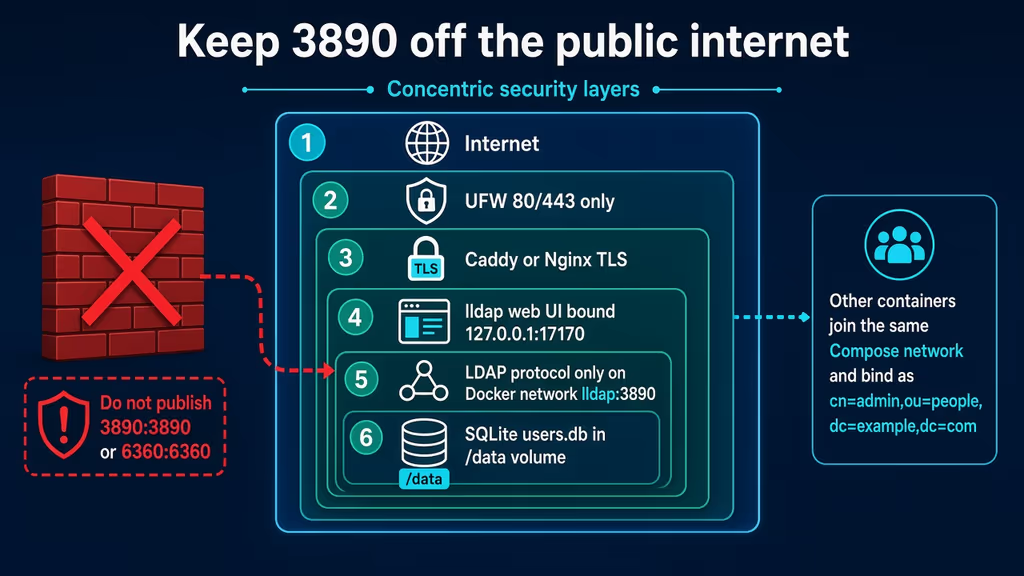
Caption: UFW 80/443, TLS at the proxy, UI on 127.0.0.1:17170, LDAP only as lldap:3890 for other containers. The discarded path is 3890:3890.
Useful to know
Official compose already has the right instinct: LDAP ports commented out, UI published. Tutorials reverse that. I treat the comments as production, not as a checklist of ports to open.
SQLite is enough until it is not. LLDAP_DATABASE_URL can be Postgres or MySQL. Migrating later is a documented dump/load, not a toggle. I would start SQLite for a homelab and only move if I put this in front of a dozen apps that write users all day. Custom attributes exist for clients that demand sAMAccountName. If the app works without the attribute, ignored_user_attributes silences the warning. If it does not work, I add the attribute in the UI instead of pretending this is OpenLDAP.
The default image starts as root to fix ownership, then drops to UID/GID. *-rootless skips that; README says switch to Compose user: when you do. I would switch after /data permissions are boring. LLDAP_VERBOSE=true when a client cannot bind. I do not leave verbose logging on once the bind works.
Groups that matter on day one: lldap_admin for people who may open the UI as operators, lldap_strict_readonly for apps that only search, lldap_password_manager when a helpdesk tool must reset passwords but must not touch admins. I do not hand Nextcloud the admin bind DN because it is convenient.
Backup, expose, next step
Compose is not a backup. /data holds users.db and config. JWT and key seed live in .env. Lose the volume and users vanish. Lose the key seed and I am in a worse place than a missing dump: password material is tied to that key. I tar both. I copy the compose file too, because six months later I will not remember that 3890 was meant to stay commented.
I stop the container before the tar so SQLite is not mid-write. For a directory nobody is editing at 3am that is cheap. For a shared login box I pick a window, stop, tar, start, then rsync off the box. A backup that only lives next to the volume is a snapshot, not an offsite copy.
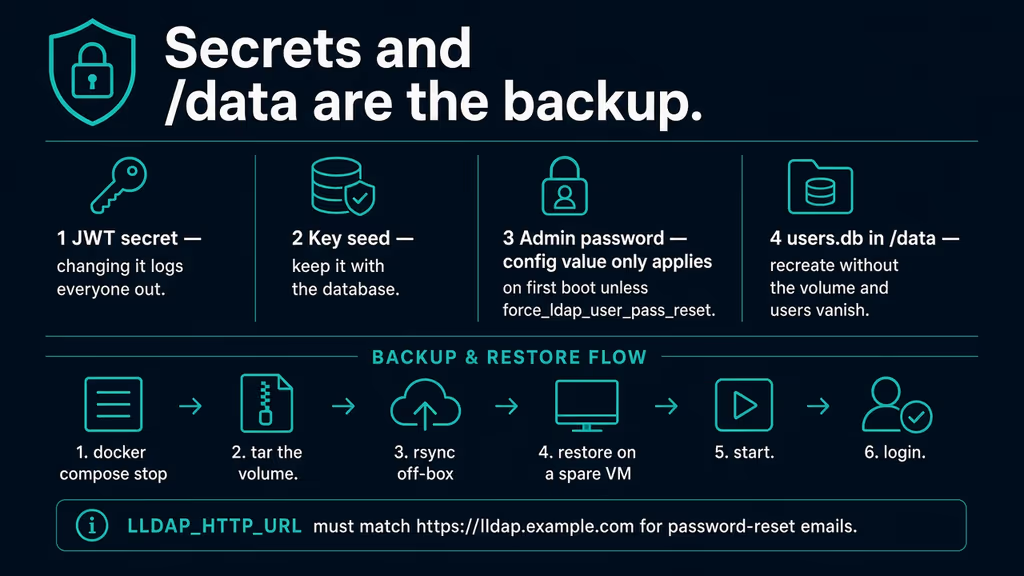
Caption: JWT, key seed, first-boot admin password, and users.db. Changing JWT logs everyone out. Recreate without /data and the directory is empty.
cat > /opt/lldap/backup.sh << 'EOF'
#!/usr/bin/env bash
set -euo pipefail
PROJECT="/opt/lldap"
BACKUP_DIR="$PROJECT/backups"
RETENTION_DAYS=14
mkdir -p "$BACKUP_DIR"
stamp="$(date -u +%Y%m%dT%H%M%SZ)"
cd "$PROJECT"
volume="$(docker compose config --volumes | awk 'NR==1{print}')"
# Compose project "lldap" names the volume lldap_lldap_data. Confirm with docker volume ls.
full_volume="$(docker volume ls -q | grep -E "_?${volume}$" | tail -n1)"
docker compose stop lldap
mkdir -p "$BACKUP_DIR/lldap-config-${stamp}"
cp -a docker-compose.yml .env "$BACKUP_DIR/lldap-config-${stamp}/"
[ -f Caddyfile ] && cp -a Caddyfile "$BACKUP_DIR/lldap-config-${stamp}/"
docker run --rm \
  -v "${full_volume}:/data:ro" \
  -v "$BACKUP_DIR:/backup" \
  alpine tar czf "/backup/lldap-data-${stamp}.tar.gz" -C /data .
docker compose start lldap
find "$BACKUP_DIR" -type f -mtime +"$RETENTION_DAYS" -delete
echo "[$stamp] backup done under $BACKUP_DIR"
EOF
chmod 700 /opt/lldap/backup.sh
/opt/lldap/backup.sh
rsync -avz /opt/lldap/backups/ backup-user@backup.example.net:/srv/backups/lldap/
Restore on a spare VM: fresh compose, restore /data into the new volume, copy .env with the same JWT and key seed, start, log in as admin. If login fails after a restore, I almost always copied the database and forgot the env file, or I regenerated JWT. docker volume ls if the grep in the script surprises me — project directory /opt/lldap usually yields lldap_lldap_data. I do not install ldap-utils on the VPS just to prove 3890 is closed. ss already did.
A bind check belongs on a client container that shares the network, not on the public IP:
# From a client container on the same network, after install:
# ldapsearch -H ldap://lldap:3890 -D "cn=admin,ou=people,dc=example,dc=com" \
#   -w "$LLDAP_LDAP_USER_PASS" -b "ou=people,dc=example,dc=com" "(objectClass=person)"
Upgrades after a backup:
cd /opt/lldap
/opt/lldap/backup.sh
docker compose pull
docker compose up -d
docker compose logs --tail=80 lldap
curl -sS -o /dev/null -w "%{http_code}\n" http://127.0.0.1:17170
SMTP when I invite a second person:
      - LLDAP_SMTP_OPTIONS__ENABLE_PASSWORD_RESET=true
      - LLDAP_SMTP_OPTIONS__SERVER=smtp.example.com
      - LLDAP_SMTP_OPTIONS__PORT=465
      - LLDAP_SMTP_OPTIONS__SMTP_ENCRYPTION=TLS
      - LLDAP_SMTP_OPTIONS__USER=no-reply@example.com
      - LLDAP_SMTP_OPTIONS__PASSWORD=replace-me
      - LLDAP_SMTP_OPTIONS__FROM=lldap <no-reply@example.com>
LLDAP_HTTP_URL must already be https://lldap.example.com or the mail is a localhost souvenir. Encryption is NONE, TLS, or STARTTLS — match the port the provider documents. I send one reset to a second mailbox before I tell anyone else the UI exists.
Next on this box: put Grafana and Nextcloud on a shared Compose network, bind them as a readonly service user, and leave Authentik until the directory restore is something I have actually rehearsed. I would not publish LDAPS "for completeness." Upstream says that is optional even between containers.
If Caddy never issues a cert, DNS was not pointing at the server yet. I check Caddy logs the same way I check lldap logs. Disk filling is not a mystery here: SQLite stays small until I dump backups next to the volume and forget find -mtime. After an upgrade I prune unused images so docker system df matches what I think I am hosting.
What I have running now is lldap on lldap/lldap:stable, UI on loopback 17170, Caddy on 443, LDAP unpublished, SQLite in a named volume, JWT and key seed in a mode-600 env file, and a tar I have executed. Next I create the groups the apps will filter on and I keep 3890 off ss. The directory is only as good as the last restore I rehearsed.
Did you hit the same wall?
I got stuck on uncommenting 3890:3890 (and almost left admin as password because I skipped JWT and key seed). Did you hit the same thing, or a different one — /data gone after a recreate, $ eaten by Compose, reset mail pointing at localhost, UID 1000 unable to write the bind mount? Tell me in the comments. I read them.
Need this done on your server?
I deploy and harden Laravel/CodeCanyon apps on cPanel or VPS, and offer monthly Server Watch retainers. Hire for deploy · Care plan