Self-Hosting Meilisearch: A Complete Guide to Running an Open-Source Search Engine

Meilisearch is a fast, typo-tolerant, open-source search engine for websites, apps, internal tools, and documentation portals. This guide walks through a practical Docker Compose deployment on Ubuntu 24.04 LTS with HTTPS, API keys, index setup, backups, monitoring, and safe operational habits.

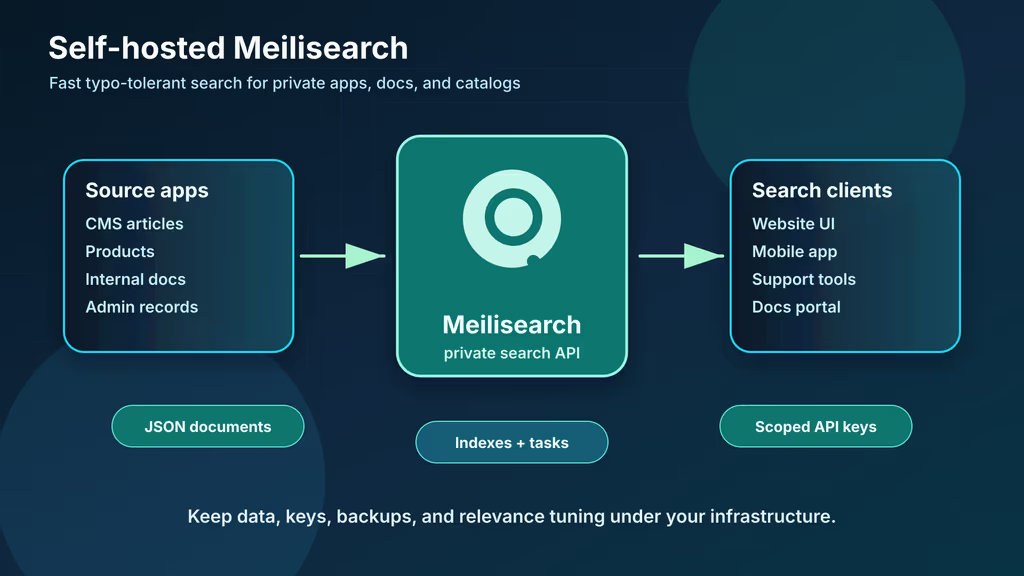
 Meilisearch private search service

Caption: Meilisearch gives your applications a fast private search API while keeping indexes, keys, and backups under your own control.

Introduction

Meilisearch is an open-source search engine built for fast, typo-tolerant search experiences. It is a good fit when a website, SaaS product, internal admin panel, knowledge base, or documentation site needs search that feels immediate without requiring a large Elasticsearch-style operations footprint. Developers send JSON documents to Meilisearch, tune searchable and filterable fields, and query a simple HTTP API from backend services or carefully scoped frontend search keys.

Self-hosting Meilisearch is attractive when search data should stay close to the rest of your stack. Product catalogs, support articles, private docs, issue summaries, customer-facing listings, and internal records may include details you do not want copied into a third-party search service. Running the engine yourself also lets you choose when to upgrade, where snapshots live, which API keys are exposed, and how search traffic is monitored.

This guide installs Meilisearch on Ubuntu 24.04 LTS with Docker Compose. The deployment binds Meilisearch to 127.0.0.1, places Nginx in front for HTTPS, stores data in a persistent Docker volume, enables production mode with a strong master key, prepares a first index, creates a limited search key, and documents backup and restore routines. It is aimed at beginners to intermediate sysadmins who want a small but production-shaped search service for one or more applications.

Why Choose Meilisearch?

  • Developer-friendly search API: Indexes, documents, settings, tasks, and searches are all managed through straightforward HTTP endpoints.
  • Typo tolerance by default: Users can misspell a query and still get useful results, which is valuable for product catalogs and documentation portals.
  • Fast small-team deployment: A single Docker container can serve many modest websites and internal tools.
  • Open-source control: You decide where indexes live, how backups are taken, and which application receives each API key.
  • Good relevance controls: Searchable fields, displayed fields, filterable attributes, sortable attributes, synonyms, stop words, and ranking rules can be tuned per index.
  • Simple migration story: Snapshots help with same-version disaster recovery, while dumps are designed for moving data between Meilisearch versions.
  • Rust-based engine: Meilisearch is written in Rust and designed around low-latency search workloads.

Meilisearch is not a relational database replacement. Treat it as a search index that can be rebuilt from your source application database or content repository. The healthiest pattern is to keep PostgreSQL, MySQL, files, or CMS content as the source of truth, then sync documents into Meilisearch for user-facing search.

Prerequisites

Hardware Recommendations:

  • 1 CPU core and 1 GB RAM for a small documentation site or homelab index
  • 2 CPU cores and 2-4 GB RAM for multiple moderate indexes or heavier indexing jobs
  • 20 GB free disk space to start, with growth room for indexes, snapshots, dumps, and logs
  • SSD-backed storage for lower indexing and query latency
  • Off-server storage for dumps, snapshots, and configuration backups

Software and Accounts:

  • Ubuntu 24.04 LTS server with sudo access
  • A domain such as search.example.com
  • DNS A or AAAA record pointing that hostname to the server
  • Docker Engine and Docker Compose v2
  • Nginx and Certbot for HTTPS
  • curl, jq, and openssl for API tests and secret generation
  • Access to the app, CMS, or data pipeline that will push documents into Meilisearch

Security Notes:

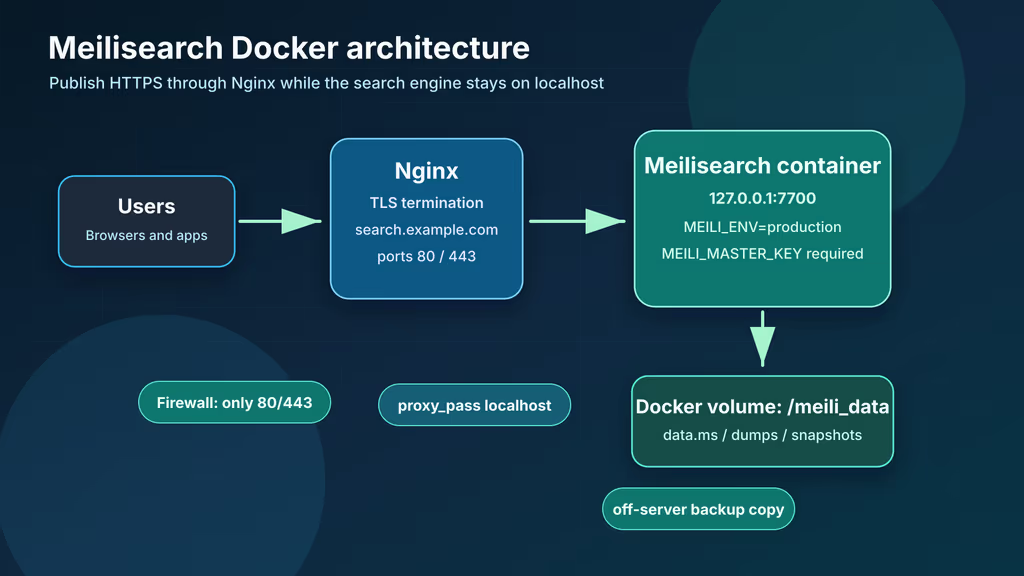
  • Do not expose port 7700 directly to the internet. Bind it to localhost and publish only Nginx on ports 80 and 443.
  • Set MEILI_ENV=production and use a master key of at least 16 bytes. Production mode refuses to start without a valid master key.
  • Never place the master key in browser JavaScript. Use search-only API keys for public search and admin keys only from trusted backend services.
  • Back up both data and configuration. A snapshot without the matching deployment notes and keys is difficult to restore safely.
  • Plan how indexes will be rebuilt from the source of truth before relying on Meilisearch for critical workflows.

Start with an updated host and a restrictive firewall:

sudo apt update
sudo apt upgrade -y
sudo apt install -y ca-certificates curl gnupg jq openssl ufw nginx certbot python3-certbot-nginx

sudo ufw allow OpenSSH
sudo ufw allow 80/tcp
sudo ufw allow 443/tcp
sudo ufw enable
sudo ufw status

Installation Guide

This deployment keeps files under /opt/meilisearch. Docker Compose manages the Meilisearch container and persistent volume, while Nginx terminates HTTPS and forwards traffic to the local Meilisearch port.

1. Install Docker Engine

Install Docker and confirm the Compose plugin is available:

curl -fsSL https://get.docker.com | sudo sh
sudo usermod -aG docker "$USER"
newgrp docker

docker --version
docker compose version

If Docker group membership does not apply immediately, log out and back in before continuing.

2. Create the Project Directory

Create a directory for Compose files, environment values, and backup staging:

sudo mkdir -p /opt/meilisearch/backups
sudo chown -R "$USER":"$USER" /opt/meilisearch
chmod 700 /opt/meilisearch/backups
cd /opt/meilisearch

Keep this directory private because it contains the Meilisearch master key and operational notes.

3. Generate Secrets and Create .env

Generate a strong master key, then write the environment file:

cd /opt/meilisearch

MEILI_MASTER_KEY_VALUE="$(openssl rand -base64 48 | tr -d '\n')"

cat > .env <<EOF
MEILI_ENV=production
MEILI_MASTER_KEY=${MEILI_MASTER_KEY_VALUE}
MEILI_HTTP_ADDR=0.0.0.0:7700
MEILI_DB_PATH=/meili_data/data.ms
MEILI_DUMP_DIR=/meili_data/dumps
MEILI_SNAPSHOT_DIR=/meili_data/snapshots
MEILI_SCHEDULE_SNAPSHOT=86400
MEILI_NO_ANALYTICS=true
MEILI_LOG_LEVEL=INFO
EOF

chmod 600 .env

MEILI_SCHEDULE_SNAPSHOT=86400 schedules a snapshot roughly every 24 hours. Snapshots are useful for same-version recovery. Dumps are better for upgrades and migrations between Meilisearch versions.

4. Create compose.yaml

Create the Compose file:

services:
  meilisearch:
    image: getmeili/meilisearch:latest
    restart: unless-stopped
    env_file: ./.env
    ports:
      - "127.0.0.1:7700:7700"
    volumes:
      - meili_data:/meili_data
    ulimits:
      nofile:
        soft: 65536
        hard: 65536

volumes:
  meili_data:

The official Docker documentation uses getmeili/meilisearch:latest in examples but notes that tagged releases are safer for repeatable production deployments. For a team service, review the latest release notes, choose a tested version tag, and record it in this file before inviting users.

 Meilisearch Docker stack architecture

Caption: Nginx handles public HTTPS traffic while Meilisearch stays bound to localhost with data, dumps, and snapshots stored in a Docker volume.

5. Start Meilisearch

Pull the image and start the service:

cd /opt/meilisearch
docker compose pull
docker compose up -d
docker compose ps
docker compose logs --since=2m meilisearch

Test the unauthenticated health endpoint locally:

curl -s http://127.0.0.1:7700/health | jq

Then confirm protected endpoints require authentication:

curl -i http://127.0.0.1:7700/indexes

source .env
curl -s http://127.0.0.1:7700/indexes \
  -H "Authorization: Bearer ${MEILI_MASTER_KEY}" | jq

The first request should be rejected because production mode protects API routes except /health. The authenticated request should return an index list, which may be empty on a new instance.

6. Configure Nginx and HTTPS

Create /etc/nginx/sites-available/search.example.com:

server {
    listen 80;
    listen [::]:80;
    server_name search.example.com;

    client_max_body_size 100M;

    location / {
        proxy_http_version 1.1;
        proxy_set_header Host $host;
        proxy_set_header X-Real-IP $remote_addr;
        proxy_set_header X-Forwarded-For $proxy_add_x_forwarded_for;
        proxy_set_header X-Forwarded-Proto $scheme;
        proxy_pass http://127.0.0.1:7700;
    }
}

Enable the site and request a certificate:

sudo ln -s /etc/nginx/sites-available/search.example.com /etc/nginx/sites-enabled/
sudo nginx -t
sudo systemctl reload nginx
sudo certbot --nginx -d search.example.com

After Certbot finishes, test the public health endpoint:

curl -s https://search.example.com/health | jq

If this endpoint works, your public traffic reaches Nginx and Nginx can reach Meilisearch on localhost.

Configuration

Create the First Index

Create a small articles index and add sample documents:

cd /opt/meilisearch
source .env
export MEILISEARCH_URL="https://search.example.com"

curl -s -X POST "${MEILISEARCH_URL}/indexes" \
  -H "Authorization: Bearer ${MEILI_MASTER_KEY}" \
  -H "Content-Type: application/json" \
  -d '{"uid":"articles","primaryKey":"id"}' | jq

curl -s -X POST "${MEILISEARCH_URL}/indexes/articles/documents" \
  -H "Authorization: Bearer ${MEILI_MASTER_KEY}" \
  -H "Content-Type: application/json" \
  -d '[
    {"id":1,"title":"Docker backup guide","category":"infrastructure","published":true},
    {"id":2,"title":"Private search with Meilisearch","category":"search","published":true},
    {"id":3,"title":"Draft incident report","category":"internal","published":false}
  ]' | jq

Tasks are asynchronous. Check task progress before assuming documents are ready:

curl -s "${MEILISEARCH_URL}/tasks?limit=5" \
  -H "Authorization: Bearer ${MEILI_MASTER_KEY}" | jq

Tune searchable, displayed, and filterable attributes:

curl -s -X PATCH "${MEILISEARCH_URL}/indexes/articles/settings" \
  -H "Authorization: Bearer ${MEILI_MASTER_KEY}" \
  -H "Content-Type: application/json" \
  -d '{
    "searchableAttributes": ["title", "category"],
    "displayedAttributes": ["id", "title", "category", "published"],
    "filterableAttributes": ["category", "published"],
    "sortableAttributes": ["id"]
  }' | jq

Run a test search:

curl -s -X POST "${MEILISEARCH_URL}/indexes/articles/search" \
  -H "Authorization: Bearer ${MEILI_MASTER_KEY}" \
  -H "Content-Type: application/json" \
  -d '{"q":"privte serch","filter":"published = true"}' | jq

The misspelled query demonstrates Meilisearch's typo-tolerant behavior.

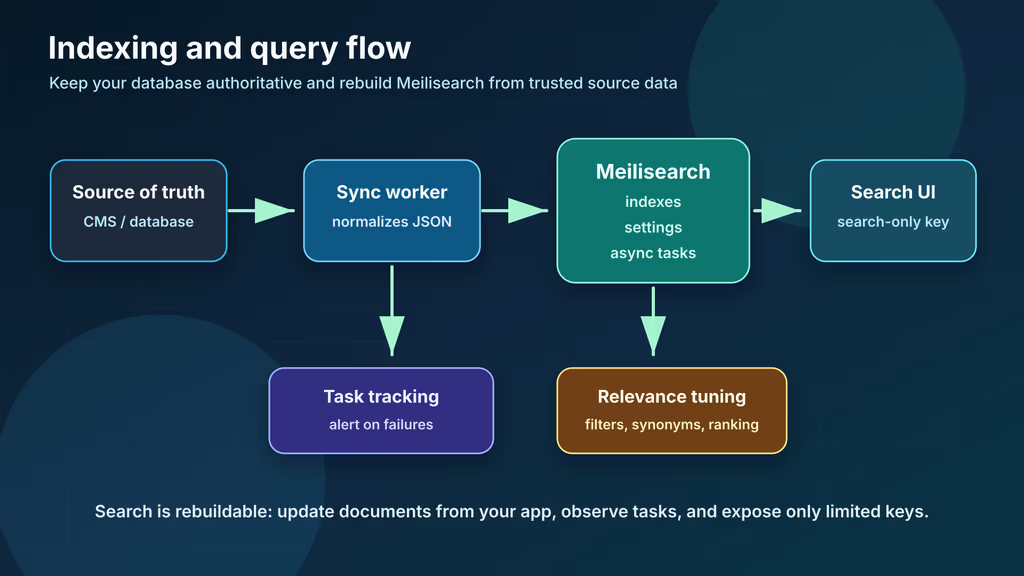
 Meilisearch indexing and query flow

Caption: Applications push source data into indexes, tune settings, wait for tasks, and query Meilisearch through limited API keys.

API Keys

The master key grants full control and should be reserved for key management and emergency administration. List available keys:

curl -s "${MEILISEARCH_URL}/keys" \
  -H "Authorization: Bearer ${MEILI_MASTER_KEY}" | jq

For browser search, use a search-only key. You can use the default search key created by Meilisearch or create a custom key scoped to one index:

curl -s -X POST "${MEILISEARCH_URL}/keys" \
  -H "Authorization: Bearer ${MEILI_MASTER_KEY}" \
  -H "Content-Type: application/json" \
  -d '{
    "description": "Public articles search key",
    "actions": ["search"],
    "indexes": ["articles"],
    "expiresAt": null
  }' | jq

Store admin keys only in backend services, CI secrets, or deployment tooling. Public JavaScript should receive a search-only key and still rely on index filters to prevent unpublished content from appearing.

Backups

Use snapshots for regular same-version safeguards and dumps before upgrades:

cd /opt/meilisearch
source .env
BACKUP_DATE="$(date +%F-%H%M%S)"

# Create a portable dump for migrations and upgrades.
curl -s -X POST "http://127.0.0.1:7700/dumps" \
  -H "Authorization: Bearer ${MEILI_MASTER_KEY}" | jq

# Archive deployment configuration.
tar czf "backups/meilisearch-config-${BACKUP_DATE}.tar.gz" compose.yaml .env
sha256sum backups/meilisearch-config-${BACKUP_DATE}.tar.gz > "backups/meilisearch-${BACKUP_DATE}.sha256"

Wait for the dump task to finish, then copy dumps, snapshots, and configuration off the server:

docker run --rm -v meilisearch_meili_data:/meili_data -v "$PWD/backups:/backup" alpine \
  sh -c 'cp -av /meili_data/dumps /meili_data/snapshots /backup/'

rsync -avh /opt/meilisearch/backups/ backup-user@backup.example.com:/srv/backups/meilisearch/
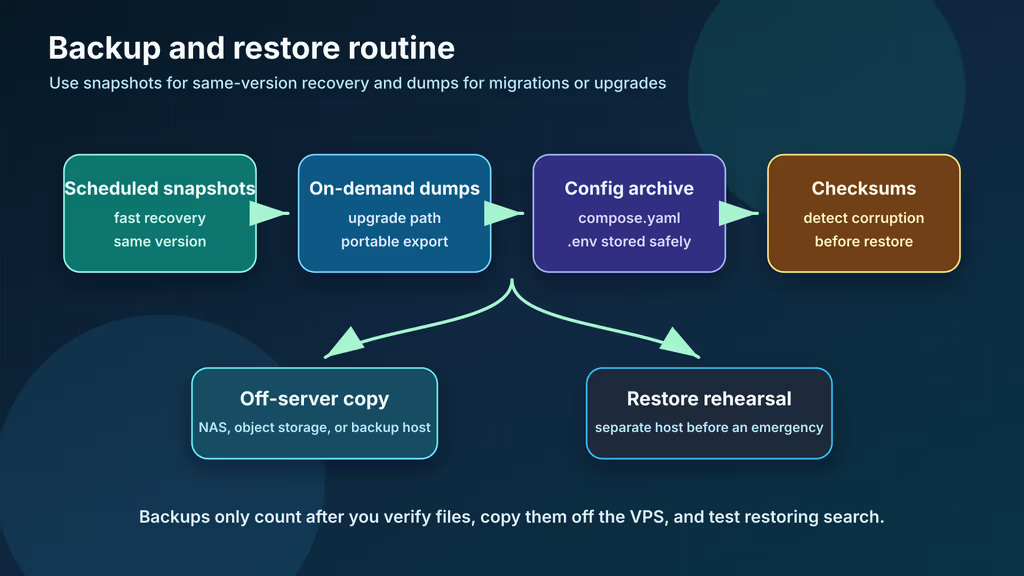
Practice restoring to a separate host before relying on the backup routine. If you restore a dump, remove or replace the existing database directory first because Meilisearch will not import over an existing database without explicit import options.

 Meilisearch backup and restore routine

Caption: A safe Meilisearch routine combines scheduled snapshots, upgrade dumps, config archives, off-server copies, checksums, and restore tests.

Monitoring

Start with simple service checks:

curl -s https://search.example.com/health | jq
docker compose ps
docker compose logs --since=10m meilisearch

For Prometheus, Meilisearch can expose a /metrics endpoint when launched with the experimental metrics option:

MEILI_EXPERIMENTAL_ENABLE_METRICS=true

After changing .env, restart and restrict metrics access to trusted networks:

docker compose up -d
curl -s http://127.0.0.1:7700/metrics

Do not publish metrics broadly if labels or traffic patterns reveal sensitive index names or usage details.

Usage

First Login and Search Checklist

After HTTPS and keys are configured:

  • Confirm https://search.example.com/health returns {"status":"available"}.
  • Confirm unauthenticated requests to /indexes fail.
  • Create one non-sensitive test index and add sample documents.
  • Verify task status reaches succeeded.
  • Search with a misspelled query and confirm relevant results appear.
  • Create a search-only API key for browser or frontend usage.
  • Store the master key in a password manager or secret manager.
  • Create a dump, confirm a dump file appears in the Docker volume, and copy it off-server.
  • Document which source system can rebuild each index.

Connect an Application

A common application flow looks like this:

  1. Source data changes: A CMS article, product, or record is created or updated.
  2. Backend syncs Meilisearch: A queue worker or webhook sends a normalized JSON document to the correct index.
  3. Task is tracked: The backend records the returned task UID and alerts on failures.
  4. Frontend searches: Browser code calls Meilisearch with a search-only key and filters such as published = true.
  5. Source remains authoritative: The application still loads full record details from its database or CMS.

This pattern keeps Meilisearch fast and rebuildable. If an index is corrupted, you can create a fresh index, import documents from the source system, tune settings, test relevance, and then switch the application to the new index.

Screenshots and Visuals

The images in this guide are original diagrams:

  • The hero image shows Meilisearch as a private search API for apps and documentation.
  • The Docker stack diagram shows Nginx, HTTPS, localhost binding, the container, and persistent volume paths.
  • The indexing flow diagram shows how source data, tasks, settings, API keys, and frontend queries connect.
  • The backup routine diagram separates snapshots, dumps, configuration archives, off-server copies, and restore tests.

Troubleshooting

  • Meilisearch refuses to start in production: Check that MEILI_ENV=production and MEILI_MASTER_KEY is set to a UTF-8 string of at least 16 bytes.
  • Nginx returns bad gateway: Run docker compose ps, inspect docker compose logs meilisearch, and confirm the Compose port mapping is 127.0.0.1:7700:7700.
  • Unauthenticated requests are accepted: You are probably running development mode or missing a master key. Stop the service, fix .env, and restart.
  • Search shows unpublished content: Add published or tenant-specific fields to filterableAttributes, then require filters in your application queries.
  • Documents do not appear immediately: Meilisearch writes documents through asynchronous tasks. Check /tasks for failed or still-processing jobs.
  • A public frontend has too much access: Rotate the exposed key, create a new search-only key scoped to the needed indexes, and update the app.
  • Snapshots are missing: Confirm MEILI_SNAPSHOT_DIR points inside /meili_data and that the container has been running long enough for the scheduled interval.
  • A dump import fails: Dumps are intended for migration, but importing can take time and should start with an empty or intentionally replaced database path.

Scaling, Securing, and Next Steps

A single Docker Compose Meilisearch service is a strong starting point for small and medium projects. As usage grows, watch query latency, indexing task backlogs, disk growth, memory pressure, Nginx error rates, and the age of your most recent dump or snapshot. Tune indexes deliberately: add only the filterable and sortable attributes your UI needs, keep document payloads compact, and test ranking changes with real user queries.

Security work should focus on key boundaries and rebuildability. Keep the master key out of browsers, use backend-only admin keys for indexing, rotate exposed keys, restrict direct network access, and make sure every index can be rebuilt from a trusted source. If search data is private, place Meilisearch behind a VPN, identity-aware proxy, or backend-only API instead of exposing the search endpoint publicly.

By following this guide, you now have a self-hosted Meilisearch deployment with Docker Compose, persistent storage, production authentication, HTTPS, a first index, scoped API keys, backup commands, and monitoring checks. Next, connect one low-risk application, record the indexing contract, test a restore, and then expand search to additional datasets once operational habits are proven.

References

Share:

Get new posts in your inbox

No spam. One short email per new article — practical PHP, Laravel, devops, and AI-assisted workflows.

Comments

Powered by GitHub Discussions via Giscus. A free GitHub account is required.