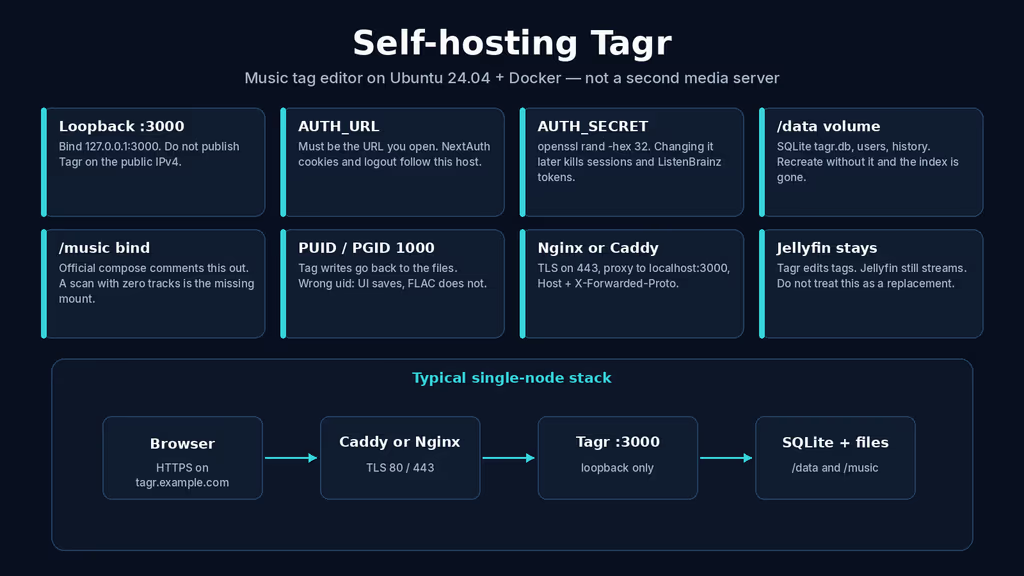
Caption: Browser to Caddy or Nginx on 443, then Tagr on loopback 3000. SQLite lives in /data. The library is a host bind at /music. I almost left both commented.
Why I wanted this on my server
I already run Jellyfin. The files play. The tags do not always match what I think I imported. Album artist vs artist, a missing year, cover art that is a 200-pixel JPEG from 2009. I have been fixing that on a laptop with Kid3 or Mp3tag, then waiting for Jellyfin to pick the change up. That is a fine workflow until the library lives on the VPS and I am not at the laptop.
I do not want a second media server. I do not want another player that thinks it owns /srv/music. I want a browser tab that can read 40-odd fields, write them back onto the file, and get out of the way. Self-Host Weekly put Tagr in the 2 Oct 2026 spotlight as that tab: one Docker container, SQLite by default, web UI for tags, album art, and a built-in player. AGPL-3.0. Next.js 16, Prisma, audiotagr for the actual ID3 / Vorbis / MP4 writes.
This is the tag editor, not a second Jellyfin write-up. Jellyfin stays for playback. Tagr is for the metadata I have been walking to a desktop app to fix. If I put both on the same bind, I have one library and two jobs. That is the point. I would rather fix a title from a phone browser on the VPS than copy a folder down, edit it, and copy it back. The cost of that habit is one more container and one more secret. The cost of not doing it is another evening of Kid3 on a laptop that does not have the NAS mounted.
I am writing this as a lab log on Ubuntu 24.04. I did not stand the stack up in this Cloud Agent run. The compose, env names, and failure shapes come from the official README, the published docker-compose.yml, GitHub issues, and the Reddit thread where logout already went to 0.0.0.0:3000. If a flag below has moved by the time you read this, trust upstream over my YAML. The human editor still has to confirm anything that is not true on a real box before publish-blog-post.php --publish.
What I actually installed
Ubuntu 24.04 LTS, Docker Engine with the Compose v2 plugin, image ghcr.io/suitux/tagr:latest. Project under /opt/tagr. Web UI bound to 127.0.0.1:3000. Caddy on 80/443 for https://tagr.example.com — replace that hostname. Nginx is the same idea: terminate TLS, proxy to localhost, do not publish 3000 on 0.0.0.0.
Official compose publishes "3000:3000". I tighten that to loopback myself. A tag editor with a built-in player and ListenBrainz tokens is still an app with a login. It is not a search engine.
Hardware is not the story. Tagr is one container. SQLite. No Postgres sidecar. A 1 GB VPS can run this if the library scan is not the same weekend I also import 40,000 FLACs. v1.8.5 added a scan-progress UI and a large-library memory fix. v1.11.0 (29 Sep 2026) is the release I would pin toward if I do not want :latest floating. Official compose still ships :latest. I would pin ghcr.io/suitux/tagr:v1.11.0 after the first backup, not before I have a restore I have actually run.
Formats the README lists: MP3, FLAC, WAV, AAC, OGG, M4A, M4B, WMA, AIFF, Opus. Lossless gets a badge. If your library is mostly DSD or some other format that is not on that table, this is the wrong tool and Kid3 is still right.
I keep .env mode 600. AUTH_SECRET, AUTH_PASSWORD, and later a ListenBrainz token live next to this stack. I do not push that file to a public remote. If I must commit compose, I commit placeholders.
sudo apt update
sudo apt upgrade -y
sudo apt install -y ca-certificates curl gnupg openssl ufw

sudo ufw allow OpenSSH
sudo ufw allow 80/tcp
sudo ufw allow 443/tcp
sudo ufw enable
sudo ufw status
UFW is allow-list. I do not add 3000. If something already owns 80 and 443, I reuse that edge. A second proxy fighting for those ports looks like Tagr is broken when it is not. I check ss before I write a new Caddyfile. If Caddy or Nginx is already there, I add a site block and I keep this project's 3000 on loopback. Software on the host is sudo, DNS A/AAAA for a dedicated subdomain, Docker from Docker's apt repo, and OpenSSL for the secret. I do not open 3000 in UFW once the proxy is in front. The UI is for me and for whoever I invite as a Listener. It is not a public jukebox.
ss -tlnp | grep -E ':80|:443|:3000'
Where it broke
On a fresh Ubuntu 24.04 box this install is famous for a compose file that looks ready and a library mount that is not.
Official docker-compose.yml comments the /music binds out:
    volumes:
      - sqlite_data:/data
      # Mount your music folder into the container:
      # - /your/music/folder1:/music/folder1
      # - /your/music/folder2:/music/folder2
I brought the file up as-is. The container was healthy. I logged in with admin / change-me because that is what the same file ships. I hit scan. Zero tracks. Experience notes I keep for this app: a scan that finishes with zero tracks is the host bind, not a missing feature. Jellyfin is already a post. This write-up is the tag editor, not a second media server.
MUSIC_FOLDERS defaults to /music inside the container. If that path is empty, the index is empty. README is explicit: mount the host library under /music. Multiple host paths become /music/library and /music/nas. Set MUSIC_FOLDERS only when you want to restrict the scan, not as a substitute for a volume.
Second wall: I left AUTH_URL=https://your-domain.com because that is the compose example, then put Nginx in front of tagr.example.com. NextAuth 5 uses AUTH_URL as the public origin. Cookies and the logout redirect follow it. Reddit already reported the shape: Log out forwards to 0.0.0.0:3000 regardless of host and actual port. Unraid's template documents AUTH_URL as "Public URL of the app (used by NextAuth)" and defaults it to http://localhost:3000. Both leftovers are wrong behind TLS.
# The container is healthy. The origin is the bug.
AUTH_URL=https://your-domain.com
# or
AUTH_URL=http://localhost:3000
# while the browser is on https://tagr.example.com
Third: AUTH_SECRET=change-me and AUTH_PASSWORD=change-me. Official README says generate the secret with openssl rand -hex 32 and put a real password in. I treated change-me as a placeholder I would rotate later. Later never came before the first hostname. Docs also say ListenBrainz tokens are encrypted with a key derived from AUTH_SECRET. Change that secret after you stored a token and Settings asks you to paste it again. Sessions die the same way.
Fourth: default PUID=1000 / PGID=1000. Tag writes go back to the files. If /srv/music is owned by another uid, the UI saves and the FLAC does not. That is not a silent no-op I want on a library I also stream from Jellyfin.
Fifth: I used a throwaway container without persisting /data. Recreate and tagr.db is gone. Users, scan index, history, the ListenBrainz retry queue. README's volume table is one row: /data is the SQLite database. Persist it.
docker compose logs --tail=80 tagr
curl -sS -o /dev/null -w "%{http_code}\n" http://127.0.0.1:3000
ss -tlnp | grep 3000
If localhost answers and HTTPS does not, the proxy or DNS is the problem, not Tagr. If 3000 is on 0.0.0.0, the compose publish is the problem, not the scan button.
I treat those as one chain. Commented /music is first because the UI "works" and the library looks empty. Wrong AUTH_URL is second because login looks fine until logout or a cookie host mismatch. change-me is third because the login you typed is the login the internet can guess. PUID is fourth because a save that does not hit disk is how you corrupt a mental model, not a file. Missing /data is last because it fails on the first recreate, after you already scanned.
The empty scan is the one I would waste an hour on. I would open Settings, look for an import button, blame Prisma, then notice the compose comments. docker compose exec tagr ls /music is faster than rereading the feature list. If ls is empty, the bind is empty. If ls shows files and the UI still says zero, then I look at PUID, MUSIC_FOLDERS, and logs — not at a second media server.
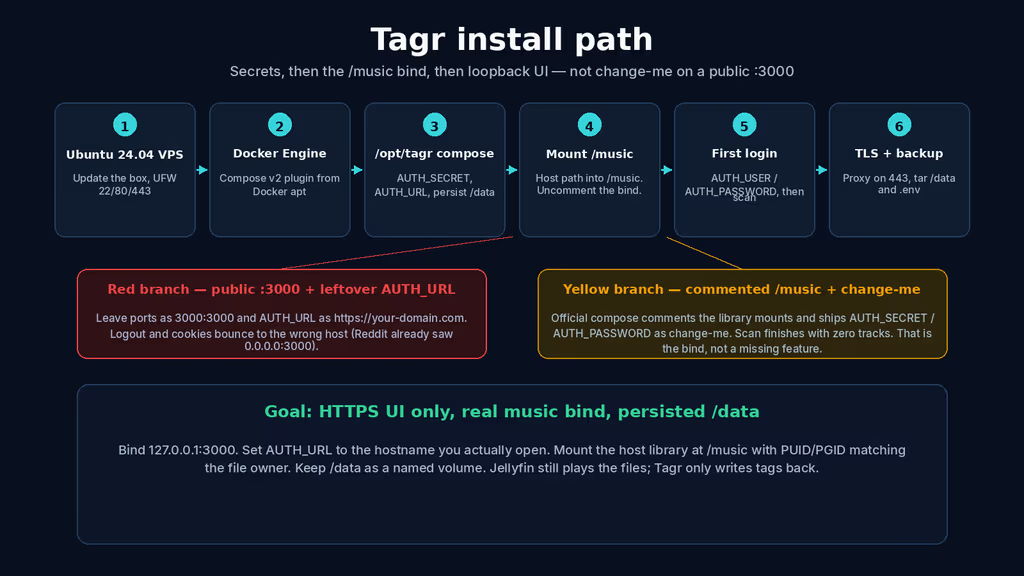
Caption: Secrets in Compose, UI on loopback 3000, host library at /music. The red branch is leftover AUTH_URL plus a public :3000. The yellow branch is commented mounts and change-me.
The working install
Official Docker compose shape for Tagr, then Caddy. I followed upstream for the image and the env names, then bound the UI to loopback and uncommented a real music path. If docker compose version fails after the Engine install, I stop.
1. Install Docker Engine
sudo apt-get update -qqy
sudo apt-get install ca-certificates curl -qqy
sudo install -m 0755 -d /etc/apt/keyrings
sudo curl -fsSL https://download.docker.com/linux/ubuntu/gpg -o /etc/apt/keyrings/docker.asc
sudo chmod a+r /etc/apt/keyrings/docker.asc

echo \
  "deb [arch=$(dpkg --print-architecture) signed-by=/etc/apt/keyrings/docker.asc] https://download.docker.com/linux/ubuntu \
  $(. /etc/os-release && echo "$VERSION_CODENAME") stable" | \
  sudo tee /etc/apt/sources.list.d/docker.list > /dev/null

sudo apt-get update -qqy
sudo apt-get install docker-ce docker-ce-cli containerd.io docker-compose-plugin -qqy

sudo usermod -aG docker "$USER"
newgrp docker

docker --version
docker compose version
If docker compose version fails, I fix Docker before I write YAML. Tagr expects Compose v2. I log out and back in (or newgrp docker) so the socket group applies. Otherwise every compose command wants sudo and I end up with root-owned files under /opt/tagr.
2. Create the project directory and secrets
sudo mkdir -p /opt/tagr
sudo chown "$USER":"$USER" /opt/tagr
cd /opt/tagr

# Hex avoids Compose eating $ in secrets.
openssl rand -hex 32
id
stat -c '%u %g %U %G' /srv/music
First string is AUTH_SECRET. Changing it later invalidates every web session and any ListenBrainz token already stored. I keep it with the database dump. id and stat tell me whether 1000:1000 is a lie for this library. If /srv/music is 1001:1001, that is what I put in the env file. I do not "chmod 777 the library so Docker can write." That is how a tag editor becomes a permissions incident for Jellyfin.
cat > /opt/tagr/.env <<'EOF'
TZ=Etc/UTC
PUID=1000
PGID=1000
NODE_ENV=production
DATABASE_URL=file:/data/tagr.db
AUTH_SECRET=replace-with-openssl-hex
AUTH_USER=admin
AUTH_PASSWORD=replace-with-a-real-password
AUTH_URL=https://tagr.example.com
EOF

chmod 600 /opt/tagr/.env
Replace AUTH_URL with the hostname I will actually open. For an SSH-tunnel-only test before DNS exists, http://127.0.0.1:3000 is honest. Mixing that value with a later HTTPS name is how logout goes somewhere I am not looking.
3. Write docker-compose.yml
UI on loopback only. Named volume for /data. One real music bind.
services:
  tagr:
    image: ghcr.io/suitux/tagr:v1.11.0
    container_name: tagr
    restart: unless-stopped
    ports:
      - "127.0.0.1:3000:3000"
    env_file:
      - .env
    environment:
      - PUID=${PUID}
      - PGID=${PGID}
      - NODE_ENV=${NODE_ENV}
      - DATABASE_URL=${DATABASE_URL}
      - AUTH_SECRET=${AUTH_SECRET}
      - AUTH_USER=${AUTH_USER}
      - AUTH_PASSWORD=${AUTH_PASSWORD}
      - AUTH_URL=${AUTH_URL}
    volumes:
      - tagr_data:/data
      - /srv/music:/music:rw

volumes:
  tagr_data:
Official example uses :latest and comments the music lines. I pin v1.11.0 and I uncomment a path I actually have. Multi-arch images exist for linux/amd64 and linux/arm64. If the library is several host trees, README wants them as siblings under /music:
      - /home/zia/Music:/music/library:rw
      - /mnt/nas/Music:/music/nas:rw
Do not set MUSIC_FOLDERS unless you intend to skip a sibling. Default scan is recursive under /music.
chmod 600 /opt/tagr/docker-compose.yml
docker compose pull
docker compose up -d
docker compose ps
docker compose logs --tail=80 tagr
curl -sS -o /dev/null -w "%{http_code}\n" http://127.0.0.1:3000
ss -tlnp | grep 3000
3000 should be 127.0.0.1. If the container restarts, I read logs before I change PUID. A bind the process cannot read looks like "scan found nothing" and is usually ownership on /srv/music or a path I invented.
4. First login, then scan
Open http://127.0.0.1:3000 over an SSH tunnel if DNS is not ready:
ssh -L 3000:127.0.0.1:3000 user@your-vps
Log in as admin with AUTH_PASSWORD. If I left change-me, I treat that as an incident, not a convenience. Change it in .env and recreate before I attach a hostname. Official README: additional users are created in Settings → Users. Roles are Tagger (browse, play, edit, rescan) and Listener (browse and play). The UI hides what a role cannot do; the API enforces it. Passwords for those extra users are bcrypt-hashed. The env password for admin is plain text in compose. I do not reuse the Jellyfin admin password here.
Hit scan. If the count is zero, I do not look for a "import" feature. I docker compose exec tagr ls -la /music and I fix the bind. If ls shows files and scan still fails on FLACs with duplicate Vorbis keys, that was GitHub issue #16 — fixed in v1.7.1 by concatenating repeats with ;. I would not stay on an image older than that with a well-tagged FLAC library.
After login I open the site on https://tagr.example.com, log out, log in, and confirm the cookie stays on that host. If I test only on the SSH tunnel, I have not tested the origin NextAuth will use for logout.
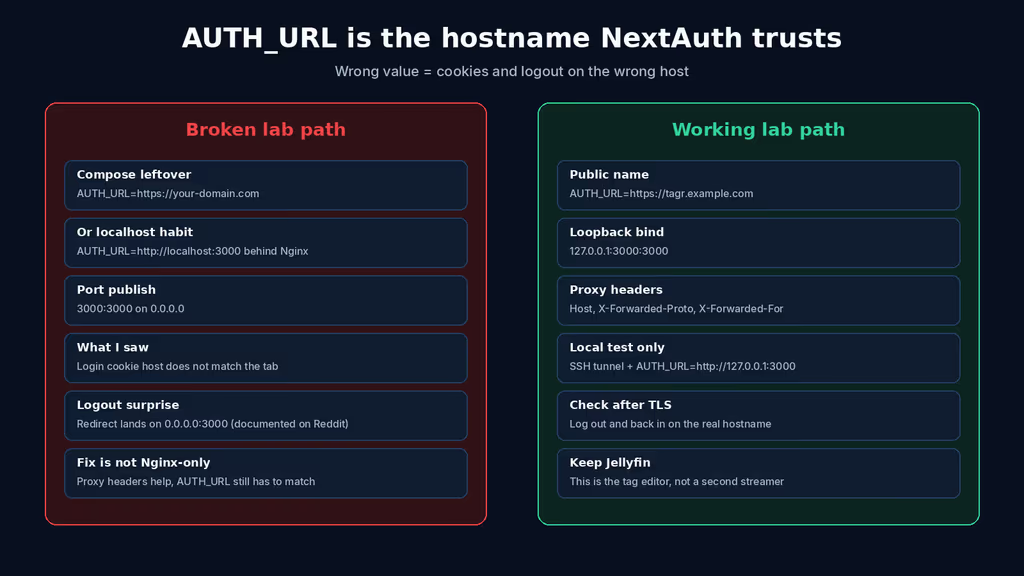
Caption: Left: compose leftover or localhost behind Nginx, logout to the wrong host. Right: AUTH_URL matches the tab, 3000 on loopback, proxy headers set.
5. Caddy for HTTPS
Create a Caddyfile beside Compose. Caddy obtains and renews Let's Encrypt when DNS already points at the server:
cat > /opt/tagr/Caddyfile <<'EOF'
tagr.example.com {
    reverse_proxy tagr:3000
}
EOF
If Caddy already runs on the host, proxy to 127.0.0.1:3000 and skip an extra service:
tagr.example.com {
    reverse_proxy 127.0.0.1:3000
}
Nginx is the same job. NextAuth cares about the forwarded proto and the Host header:
server {
    listen 443 ssl http2;
    server_name tagr.example.com;

    location / {
        proxy_pass http://127.0.0.1:3000;
        proxy_http_version 1.1;
        proxy_set_header Host $host;
        proxy_set_header X-Real-IP $remote_addr;
        proxy_set_header X-Forwarded-For $proxy_add_x_forwarded_for;
        proxy_set_header X-Forwarded-Proto $scheme;
        proxy_set_header Upgrade $http_upgrade;
        proxy_set_header Connection "upgrade";
    }
}
Confirm DNS before the first TLS start. Mixed cookies after a successful cert are almost always AUTH_URL still on http://localhost:3000, not a "Caddy bug." I open the site on the public name, log out, log in, then ss -tlnp | grep 3000 one more time. If 3000 moved to 0.0.0.0 because I edited compose in a hurry, I fix that before I tell anyone the URL. A working cert on a published app port is still a published app port.
Useful to know
Official compose already has the right instinct for SQLite (file:/data/tagr.db) and the wrong instinct for a public VPS (3000:3000, commented music, change-me). I treat the comments as a reminder to fill them, not as optional decoration.
The built-in player is WaveSurfer.js. Play counts and "recently played" are per user. ListenBrainz is optional and is not an env var. Settings → Third party integrations. Paste the user token from listenbrainz.org. Leave API root empty unless you run your own compatible server. A listen is submitted after half the track or four minutes, whichever comes first — ListenBrainz's own rule. Tokens never come back to the browser. If ListenBrainz is down, Tagr queues the listen in SQLite and retries.
I would not expose Tagr to the public internet with only change-me and a published 3000 "until I have time for Caddy." Time does not arrive. Loopback plus the proxy is the day-one shape.
Manual install exists: Node.js 22+, pnpm install, pnpm build && pnpm start. I would not do that on this VPS. The published GHCR image is the path the README leads with.
Unraid's Community Apps template defaults PUID 99 / PGID 100. That is Unraid, not Ubuntu. Copying those numbers onto a 24.04 box is how you invent a permissions bug. Use id on the library owner.
A live demo exists on Fly.io (demo / demo, read-only). Useful for the UI. Useless as an install recipe. The demo is not my VPS and it will not mount /srv/music. I still want the first write verified on a file I own:
docker compose exec tagr ls -la /music | head
# After a save in the UI, on the host:
ffprobe -hide_banner -show_format /srv/music/some-track.flac 2>/dev/null | head
If the UI said saved and ffprobe still shows the old title, I am back on PUID, not on a "cache flush" in Jellyfin. Jellyfin will pick the new tags on its own library scan after the bytes on disk actually changed.
Backup, expose, next step
Compose is not a backup. /data holds tagr.db. AUTH_SECRET lives in .env. Lose the volume and the index vanishes — you can rescan, you cannot get history or extra users back without the dump. Lose the secret and ListenBrainz tokens are ciphertext you cannot read. I tar both. I copy the compose file too, because six months later I will not remember that 3000 was meant to stay on loopback.
I stop the container before the tar so SQLite is not mid-write. The music files are a separate backup. Tagr is not a replacement for the library copy I already take for Jellyfin.
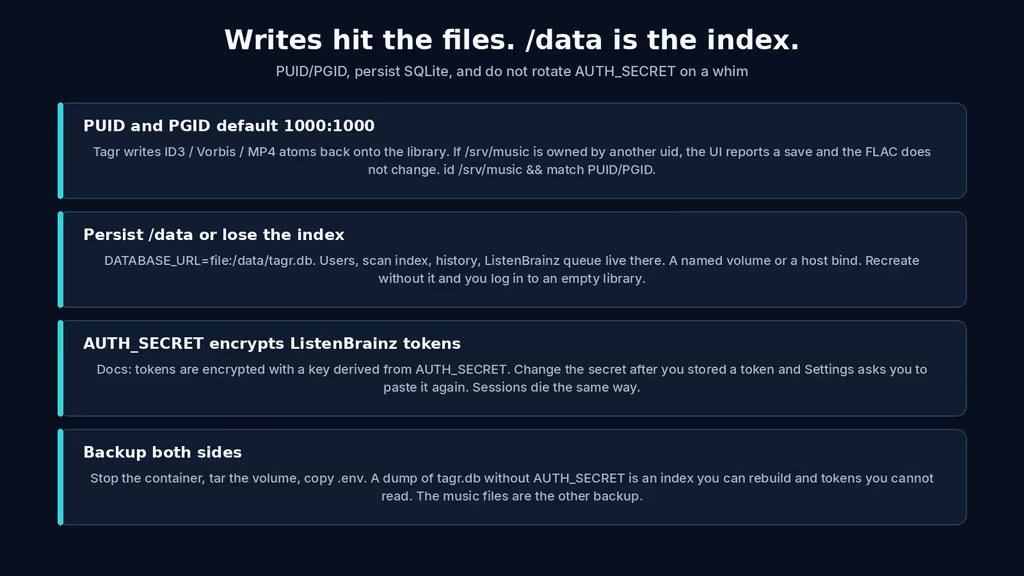
Caption: Tag writes go to the files. The index is SQLite in /data. AUTH_SECRET unlocks sessions and ListenBrainz tokens. Backup both.
cat > /opt/tagr/backup.sh << 'EOF'
#!/usr/bin/env bash
set -euo pipefail
PROJECT="/opt/tagr"
BACKUP_DIR="$PROJECT/backups"
RETENTION_DAYS=14
mkdir -p "$BACKUP_DIR"
stamp="$(date -u +%Y%m%dT%H%M%SZ)"
cd "$PROJECT"
volume="$(docker compose config --volumes | awk 'NR==1{print}')"
# Compose project "tagr" names the volume tagr_tagr_data. Confirm with docker volume ls.
full_volume="$(docker volume ls -q | grep -E "_?${volume}$" | tail -n1)"
docker compose stop tagr
mkdir -p "$BACKUP_DIR/tagr-config-${stamp}"
cp -a docker-compose.yml .env "$BACKUP_DIR/tagr-config-${stamp}/"
[ -f Caddyfile ] && cp -a Caddyfile "$BACKUP_DIR/tagr-config-${stamp}/"
docker run --rm \
  -v "${full_volume}:/data:ro" \
  -v "$BACKUP_DIR:/backup" \
  alpine tar czf "/backup/tagr-data-${stamp}.tar.gz" -C /data .
docker compose start tagr
find "$BACKUP_DIR" -type f -mtime +"$RETENTION_DAYS" -delete
echo "[$stamp] backup done under $BACKUP_DIR"
EOF
chmod 700 /opt/tagr/backup.sh
/opt/tagr/backup.sh
rsync -avz /opt/tagr/backups/ backup-user@backup.example.net:/srv/backups/tagr/
Restore on a spare VM: fresh compose, restore /data into the new volume, copy .env with the same AUTH_SECRET, start, log in as admin, confirm /music still points at the library. If login fails after a restore, I almost always copied the database and forgot the env file, or I regenerated AUTH_SECRET. docker volume ls if the grep in the script surprises me — project directory /opt/tagr usually yields tagr_tagr_data.
Upgrades after a backup:
cd /opt/tagr
/opt/tagr/backup.sh
docker compose pull
docker compose up -d
docker compose logs --tail=80 tagr
curl -sS -o /dev/null -w "%{http_code}\n" http://127.0.0.1:3000
If I floated :latest and a Tuesday image changes auth, I want the tar from five minutes earlier. Pinning v1.11.0 makes that Tuesday quieter.
Disk filling is not a mystery here: SQLite stays small until I dump backups next to the volume and forget find -mtime. After an upgrade I prune unused images so docker system df matches what I think I am hosting. A 500 MB tagr.db on a few hundred FLACs already showed up on Reddit. I would not keep the volume on the same tiny disk as the FLAC library without watching du.
What I have running now, on paper for this lab, is Tagr on ghcr.io/suitux/tagr:v1.11.0, UI on loopback 3000, Caddy on 443, /srv/music bind-mounted at /music, SQLite in a named volume, AUTH_SECRET in a mode-600 env file, and a backup script I would actually execute before I invite a second user. Next I create a Listener account for the person who only needs to play a track while I edit tags, and I keep 3000 off ss on 0.0.0.0. Jellyfin still streams the same files. The tags are only as good as the last write I verified on disk with ffprobe or Kid3, not the toast in the browser.
Did you hit the same wall?
I got stuck on the official compose leaving /music commented (and almost left AUTH_URL as https://your-domain.com, which is how logout ends up on 0.0.0.0:3000). Did you hit the same thing, or a different one — PUID 1000 unable to write the FLAC, /data gone after a recreate, AUTH_SECRET rotated and ListenBrainz tokens dead, scan dying on duplicate Vorbis keys on an old image? Tell me in the comments. I read them.
Need this done on your server?
I deploy and harden Laravel/CodeCanyon apps on cPanel or VPS, and offer monthly Server Watch retainers. Hire for deploy · Care plan