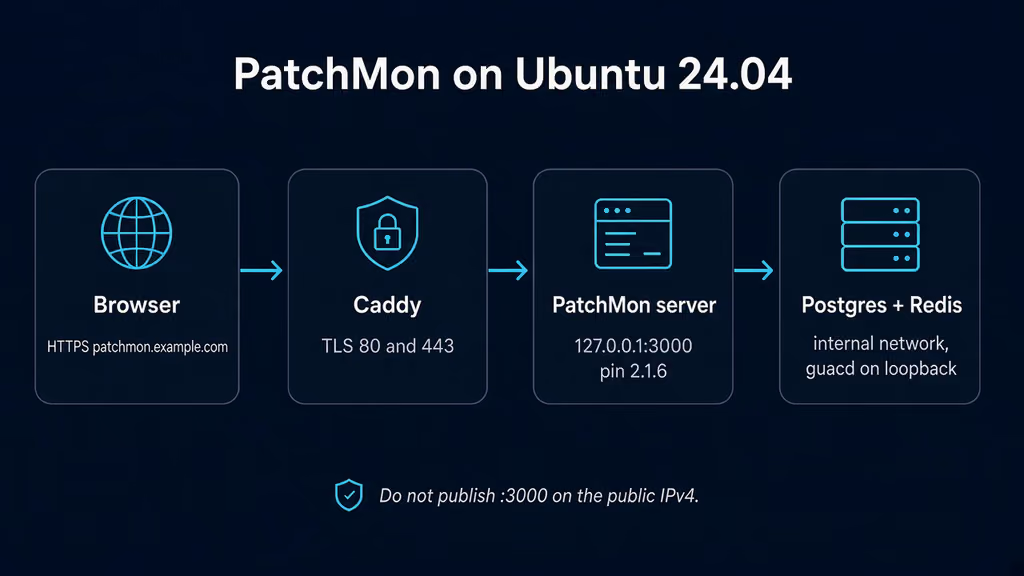
Caption: Browser to Caddy on 443, PatchMon server on loopback 3000, Postgres 17 and Redis 7 on the Compose network, guacd sharing the server namespace. I almost published 3000 and left CORS_ORIGIN on localhost.
Why I wanted this on my server
I already have Uptime Kuma watching HTTP. I already SSH in and run apt list --upgradable when I remember. What I do not have is one list of every package that is sitting unpatched on the boxes I actually run. Kuma will tell me the site is down. It will not tell me openssl has been sitting in upgradable for nine days. Beszel is still in my queue for host CPU and disk. This write-up is not a second uptime checker.
Self-Host Weekly put PatchMon in the 23 Oct 2026 spotlight as the fleet patch monitor: Linux agents, one-click approvals, scheduled and selective patching, Docker inventory, history, audit logs. AGPL-looking tree on GitHub under PatchMon. One compose file. Official docs were updated 30 Oct 2026. Weekly called Postgres and Redis “external.” The shipped compose includes them. I would rather write that down now than paste a compose that assumes I already have a 17 cluster.
v2.1.6 shipped 17 Oct 2026. One-fix release: agent install and check-in behind Traefik with the CrowdSec bouncer’s AppSec no longer die as HTTP 403 because the check-in had no body length over HTTP/2. Official compose still floats :latest. I pin ghcr.io/patchmon/patchmon-server:2.1.6. I do not float :latest on a box that will hold API keys for every host in the fleet. Docs mention 2.1.7 as the reboot wait-for-database fix. GitHub’s latest tagged release when I wrote this was still 2.1.6. I stay on the tag I can name.
I am writing this as a lab log on Ubuntu 24.04. I did not stand the stack up in this Cloud Agent run. The compose, env keys, and failure shapes come from the Docker operator guide, docker/env.example, docker/setup-env.sh, the first-time admin wizard, the reverse-proxy examples, the 2.1.6 notes, and the experience notes on this queue item. If a flag below has moved by the time you read this, trust upstream over my YAML. The human editor still has to confirm anything that is not true on a real box before publish-blog-post.php --publish.
What I actually installed
Ubuntu 24.04 LTS, Docker Engine with the Compose v2 plugin. Image ghcr.io/patchmon/patchmon-server:2.1.6, plus postgres:17-alpine, redis:7-alpine, and guacamole/guacd:1.6.0. Project under /opt/patchmon. Server bound to 127.0.0.1:3000. Caddy on 80/443 for https://patchmon.example.com — replace that hostname. Nginx is the same idea: terminate TLS, proxy to localhost 3000 with a 24-hour read timeout, do not publish 3000 on 0.0.0.0.
Official compose publishes "${PORT:-3000}:${PORT:-3000}". I tighten that to loopback myself. An admin UI that can trigger patch runs and mint agent API keys is still a control plane. It is not a status page. I do not publish 5432 or 6379.
Hardware is not the story. Four containers. Official floor is 1 GB RAM, 2 GB recommended. A 1 GB VPS can run this if I am not also importing a photo library the same weekend. I would not put PatchMon and a fat CI runner on a 512 MB toy and then blame Redis.
I keep .env mode 600. JWT_SECRET, SESSION_SECRET, AI_ENCRYPTION_KEY, POSTGRES_PASSWORD, and REDIS_PASSWORD live there. I do not push that file to a public remote. If I must commit compose, I commit placeholders.
sudo apt update
sudo apt upgrade -y
sudo apt install -y ca-certificates curl gnupg openssl ufw

sudo ufw allow OpenSSH
sudo ufw allow 80/tcp
sudo ufw allow 443/tcp
sudo ufw enable
sudo ufw status
UFW is allow-list. I do not add 3000. I do not add 5432. I do not add 6379. Agents talk to Caddy on 443. Publishing 3000 “so I can finish the wizard from my laptop” is how I skip the proxy and skip TLS, and how the first-admin form sits on a public IPv4. If something already owns 80 and 443, I reuse that edge. A second proxy fighting for those ports looks like PatchMon is broken when it is not. I check ss before I write a new Caddyfile.
ss -tlnp | grep -E ':80|:443|:3000|:5432|:6379'
Where it broke
On a fresh Ubuntu 24.04 box this install is famous for a UI that comes up and a wizard that the browser will not talk to.
I copied env.example to .env, generated three hex strings the way the Docker page’s “manual setup” block shows, and felt done. Official env.example still ships this:
CORS_ORIGIN=http://localhost:3000,http://patchmon:3000
JWT_SECRET=
DATABASE_URL=postgresql://${POSTGRES_USER}:${POSTGRES_PASSWORD}@${POSTGRES_HOST}:5432/${POSTGRES_DB}
Two of those lines are already enough to waste an evening. Experience notes I keep for this app say it twice: run docker/setup-env.sh so the secrets are filled, and do not leave DATABASE_URL as a template with ${POSTGRES_USER} inside it. Copy the example, leave that string, and the server never starts. The Go process is not Compose. It does not expand ${POSTGRES_HOST} into database. I opened the logs looking for Postgres. I had given it a hostname with dollar signs.
# The container is restarting. DATABASE_URL is the bug.
# DATABASE_URL=postgresql://${POSTGRES_USER}:${POSTGRES_PASSWORD}@${POSTGRES_HOST}:5432/${POSTGRES_DB}
# the server tries to connect to a host named ${POSTGRES_HOST}
The Docker page’s manual sed only fills POSTGRES_PASSWORD, REDIS_PASSWORD, and JWT_SECRET. setup-env.sh also fills SESSION_SECRET and AI_ENCRYPTION_KEY. Skip the script, leave JWT_SECRET= empty, and the server refuses to start — that pair is required. I treat the script as the bootstrap, then I still open .env and I still expand DATABASE_URL to a concrete string.
Second wall: I set Caddy to https://patchmon.example.com and left CORS_ORIGIN at the example value. The SPA loaded. I filled in the first-admin form. Next died as a CORS brick. Official first-time admin docs: CORS_ORIGIN must match the URL in the address bar. No path. Comma-separated, no spaces, if I use more than one origin. http://localhost:3000 is not https://patchmon.example.com. http://127.0.0.1:3000 is also not http://localhost:3000. I hit that on the SSH tunnel before DNS existed. Same brick, different hostname. The allow-list is exact.
# The container is healthy. CORS is the bug.
# browser Origin: https://patchmon.example.com
# CORS_ORIGIN: http://localhost:3000,http://patchmon:3000
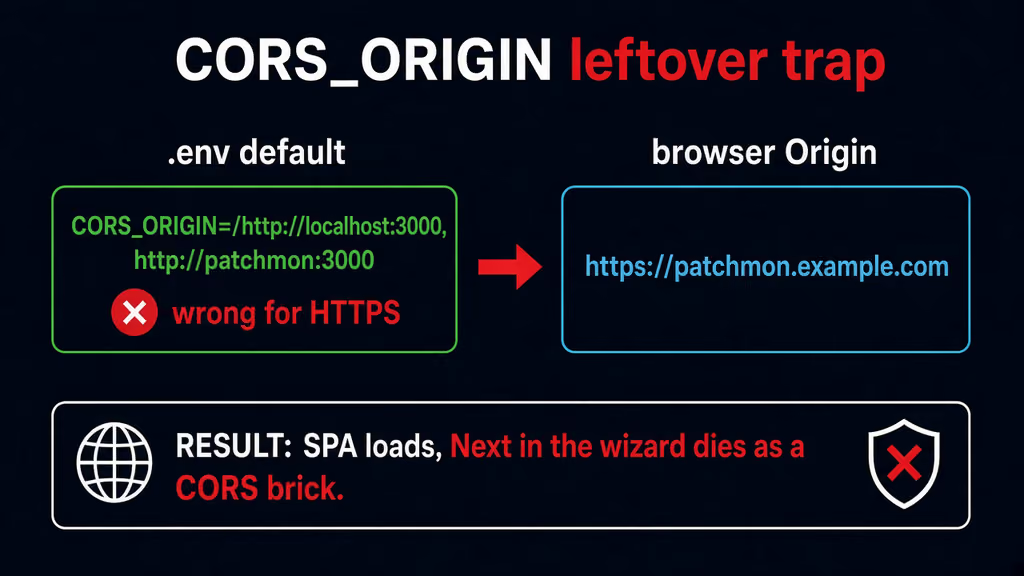
Caption: env.example still ships localhost:3000. I opened https://patchmon.example.com. The SPA loaded. Next in the wizard died as a CORS brick until CORS_ORIGIN was the public origin with no path.
Third: I got past the wizard on the SSH tunnel, then enrolled an agent from a second VPS. The install one-liner still pointed at http://localhost:3000. Settings → Server URL is stored in Postgres, not in .env. Official docs say that twice. The wizard step “Confirm Server URL” is the place it is supposed to land. I skipped it, or I ran the wizard at http://127.0.0.1:3000 and the pre-fill copied that. Agents bake whatever URL is in the database into the install command. Change it later and new agents get the new value. Existing agents keep the old one until I rerun their install script.
# Agent on another box
# install command host: http://localhost:3000
# ping request failed
# Settings → Server URL was never the public hostname
Fourth: I published "3000:3000" because that is the file I downloaded, and I opened the wizard from the public IPv4 before the first admin existed. The wizard only runs while no admin user exists. Whoever submits first wins. An empty first-admin form on a public port is the real failure, not a missing feature. I bind 3000 to loopback. I finish the wizard over an SSH tunnel or after Caddy has a cert. I do not add 3000 to UFW.
Fifth: I put Traefik and CrowdSec AppSec in front because that is how this VPS already works, and the agent install printed ping request failed with status 403. The agent never created the systemd unit. 2.1.6 is the fix: the check-in now always sends a body length over HTTP/2, which the bouncer was blocking. Until agents are on 2.1.6, crowdsecAppsecUnreadableBodyBlock: false on the bouncer middleware is the workaround. I pin the server image so new installs get that agent. I do not float :latest and hope Tuesday is still 2.1.6.
I treat those as one chain. Unexpanded DATABASE_URL is first because nothing starts. Leftover CORS_ORIGIN is second because the UI looks up and the wizard is dead. Server URL in the database is third because enroll looks like a firewall problem. Published 3000 is fourth because it fails as an exposure, not as PatchMon. CrowdSec 403 is last because it only shows up once an agent actually tries to talk.
On a fresh Ubuntu 24.04 box this is the failure this install is famous for: compose that looks ready, .env that looks copied, and a browser origin the server never allowed. I wasted a first hour on Caddy headers. The headers were fine. The allow-list was localhost.
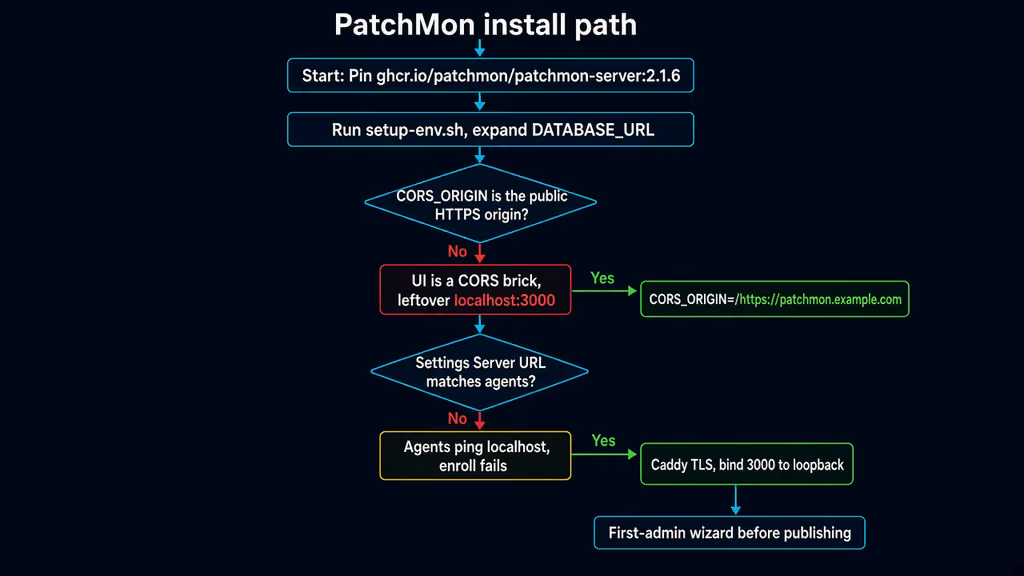
Caption: Pin 2.1.6, expand DATABASE_URL, set CORS_ORIGIN to the public origin, bind 3000 to loopback. The red branch is leftover localhost CORS. The yellow branch is Server URL still on localhost in Postgres.
The working install
Official Docker shape for PatchMon 2.1.6, then Caddy. I followed upstream for image names and env keys, then pinned the tag, bound the UI to loopback, expanded DATABASE_URL, and set CORS_ORIGIN to the hostname I actually open. If docker compose version fails after the Engine install, I stop.
1. Install Docker Engine
sudo apt-get update -qqy
sudo apt-get install ca-certificates curl -qqy
sudo install -m 0755 -d /etc/apt/keyrings
sudo curl -fsSL https://download.docker.com/linux/ubuntu/gpg -o /etc/apt/keyrings/docker.asc
sudo chmod a+r /etc/apt/keyrings/docker.asc

echo \
  "deb [arch=$(dpkg --print-architecture) signed-by=/etc/apt/keyrings/docker.asc] https://download.docker.com/linux/ubuntu \
  $(. /etc/os-release && echo "$VERSION_CODENAME") stable" | \
  sudo tee /etc/apt/sources.list.d/docker.list > /dev/null

sudo apt-get update -qqy
sudo apt-get install docker-ce docker-ce-cli containerd.io docker-compose-plugin -qqy

sudo usermod -aG docker "$USER"
newgrp docker

docker --version
docker compose version
If docker compose version fails, I fix Docker before I write YAML. I log out and back in (or newgrp docker) so the socket group applies. Otherwise every compose command wants sudo and I end up with root-owned files under /opt/patchmon.
2. Create the project directory and run the official setup script
I do not invent a compose file. Official docs want setup-env.sh. That is the one I would run. It downloads docker-compose.yml and env.example, copies .env, and fills empty secrets. Non-interactive it leaves CORS_ORIGIN at the example value. I still edit that.
sudo mkdir -p /opt/patchmon
sudo chown -R "$USER":"$USER" /opt/patchmon
cd /opt/patchmon

curl -fsSL -o setup-env.sh \
  https://raw.githubusercontent.com/PatchMon/PatchMon/refs/heads/main/docker/setup-env.sh
bash setup-env.sh
chmod 600 .env docker-compose.yml
If I am not on a TTY, the script prints that it skipped the CORS prompt. That is expected. I do not up yet.
3. Expand DATABASE_URL, set CORS, pin 2.1.6, bind loopback
cd /opt/patchmon
set -a
# shellcheck disable=SC1091
source .env
set +a

sed -i "s|^DATABASE_URL=.*|DATABASE_URL=postgresql://${POSTGRES_USER}:${POSTGRES_PASSWORD}@${POSTGRES_HOST}:5432/${POSTGRES_DB}|" .env
sed -i 's|^CORS_ORIGIN=.*|CORS_ORIGIN=https://patchmon.example.com|' .env
sed -i 's|^# TRUST_PROXY=false|TRUST_PROXY=true|' .env
grep -q '^TRUST_PROXY=' .env || echo 'TRUST_PROXY=true' >> .env
grep -q '^ENABLE_HSTS=' .env || echo 'ENABLE_HSTS=true' >> .env

sed -i 's|ghcr.io/patchmon/patchmon-server:latest|ghcr.io/patchmon/patchmon-server:2.1.6|' docker-compose.yml
sed -i 's|"${PORT:-3000}:${PORT:-3000}"|"127.0.0.1:${PORT:-3000}:${PORT:-3000}"|' docker-compose.yml
openssl rand -hex passwords are hex. Expanding DATABASE_URL with them does not need extra quoting. If I ever hand-typed a password with @ or :, I would URL-encode it instead of this sed. I replace patchmon.example.com with the hostname DNS already points at. No trailing slash. No /patchmon prefix. Official env docs: agents and the install script are checked against CORS_ORIGIN too, so the Server URL hostname has to appear here.
I keep hostname: patchmon-server from the downloaded compose. Without it the server identifies itself by the container ID. docker compose up -d after an upgrade recreates the container and the new process cannot recognise the agent presence records the old one left in Redis.
chmod 600 /opt/patchmon/.env
docker compose pull
docker compose up -d
docker compose ps
docker compose logs --tail=80 server
curl -sS -o /dev/null -w "%{http_code}\n" http://127.0.0.1:3000/
ss -tlnp | grep -E ':3000|:5432|:6379'
3000 should be 127.0.0.1. 5432 and 6379 should be absent from the host. The server should answer on /. If it restart-loops, I look for [fatal] in docker compose logs server first. Empty JWT_SECRET and a leftover ${POSTGRES_HOST} in DATABASE_URL both show up there. Redis rejecting --requirepass because REDIS_PASSWORD is empty shows up there too.
4. Finish first-admin on loopback, then put Caddy in front
Open http://127.0.0.1:3000 over an SSH tunnel if DNS is not ready:
ssh -L 3000:127.0.0.1:3000 user@your-vps
If I use the tunnel, I temporarily set CORS_ORIGIN=http://localhost:3000 or I add it comma-separated next to the public origin, recreate the server, then switch back. I do not leave both in production longer than the tunnel. The wizard creates the superadmin, offers TOTP, then asks for the URL agents will use. Protocol HTTPS, host patchmon.example.com, port 443. That is Settings → Server URL. It is not CORS_ORIGIN. I do not enable the self-signed SSL toggle unless the agents truly cannot trust the cert. That toggle puts -k on the generated curl.
Default password policy wants eight characters, upper, lower, number, special. I set that password once. I turn MFA on in the wizard. Backup codes are shown once.
Create a Caddyfile beside Compose. Official reverse-proxy examples want a 24-hour read timeout so the agent WebSocket at /api/v1/agents/ws is not dropped by a 60-second idle default. Caddy sets X-Forwarded-Proto and upgrades WebSockets on its own. Confirm DNS before the first TLS start.
patchmon.example.com {
    reverse_proxy 127.0.0.1:3000 {
        transport http {
            read_timeout 86400s
            write_timeout 86400s
        }
    }
}
sudo systemctl reload caddy
After the cert lands I open https://patchmon.example.com, log in, log out, log in. If /api fails only on the hostname and works on the SSH tunnel, I left CORS_ORIGIN on localhost. I do not add a wildcard origin.
I also open Settings → Server URL once more and confirm it is https://patchmon.example.com on port 443. Then Hosts → Add Host, Linux, a friendly name, copy the one-liner, run it on a box that can reach 443.
# Shape of the generated command — I copy the real one from the UI, I do not invent IDs.
curl -s "https://patchmon.example.com/api/v1/hosts/install" \
  -H "X-API-ID: patchmon_a1b2c3d4" \
  -H "X-API-KEY: <64-char-key>" | sudo sh
The bootstrap token is five minutes and single-use. If I copy the command, make tea, and then run it, I regenerate credentials from that host’s page. Within a minute the host should show online. If it does not:
sudo journalctl -u patchmon-agent -n 50
sudo patchmon-agent ping
ping request failed with status 403 behind Traefik plus CrowdSec is 2.1.6, or the bouncer workaround, not a missing package. A connection to localhost is Server URL. Agents that flap every sixty seconds are the proxy read timeout.
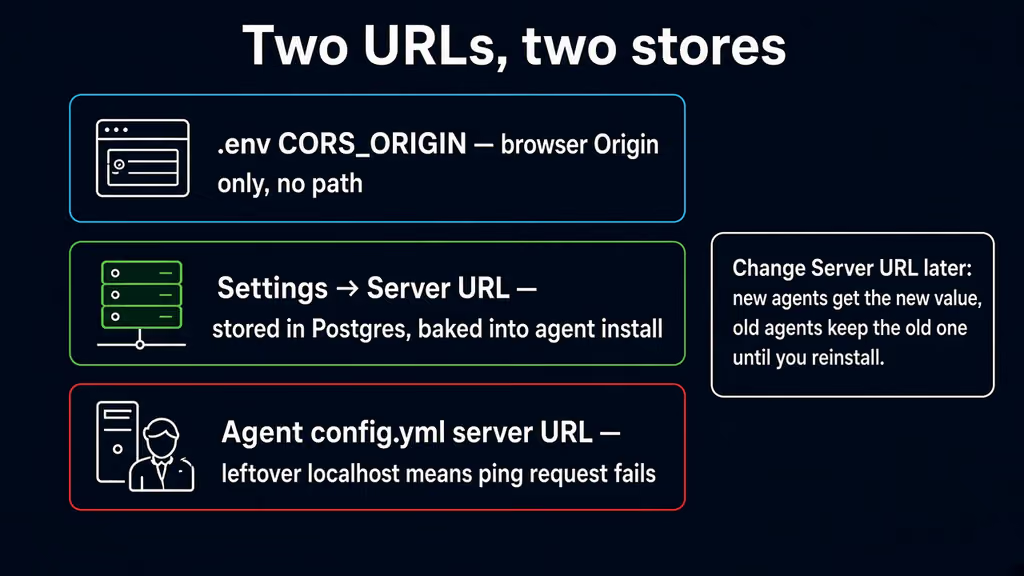
Caption: CORS_ORIGIN is the browser Origin. Server URL lives in Postgres and is baked into every agent install command. I fixed CORS and still had agents pinging localhost until I opened Settings.
Useful to know
:latest on this image is the current stable. Tags also exist as x.y.z, x.y, and x. I pin 2.1.6. Tuesday should not move the agent binary under me because I was lazy with a tag.
setup-env.sh is a bootstrap. If a .env already exists it keeps secrets and only fills empty keys. Re-running it does not rewrite CORS_ORIGIN unless I answer the prompt. I still do not treat it as a weekly upgrade.
TRUST_PROXY defaults to true because the supported layout is Docker behind a reverse proxy. I leave it. Set false only if I publish 3000 with no proxy, which I am not doing. TRUSTED_PROXY_RANGES stays empty when Caddy is on the same host. I set it only if a CDN with public IPs talks to PatchMon directly.
Official compose gives guacd the server’s network namespace so in-browser RDP can reach a per-session port on 127.0.0.1. docker compose pull does not update my compose file. If I had an older file with GUACD_ADDRESS=guacd:4822, RDP fails until I match current compose. On 2.1.6, a host reboot can leave guacd Exited if the server died waiting for Postgres. docker compose up -d brings it back. Docs say 2.1.7 waits for database and Redis at startup. I am not climbing until that tag exists on GitHub and I have a dump.
Agent binaries and SCAP content are baked into the server image. No extra volume. Postgres is postgres_data. Redis is redis_data. Lose .env and a restored volume is a database I cannot log into, because JWT_SECRET and AI_ENCRYPTION_KEY have to match.
Do not edit docker-compose.yml to add env vars. Official tip: the compose file uses env_file: .env. All configuration lives in .env. The exception I already made is the image pin, the loopback bind, and GUACD_ADDRESS which compose already sets.
WebSockets that matter: /api/v1/agents/ws, SSH terminal, RDP tunnel, live patch-run stream. Nginx needs proxy_http_version 1.1, the upgrade map, proxy_read_timeout 86400s, proxy_buffering off, and client_max_body_size 40m. NPM needs Websockets Support plus those timeouts on the Advanced tab. I am on Caddy. I still keep the 86400s transport timeout.
This is not Uptime Kuma. Kuma stays the HTTP checker. Beszel stays in the queue for CPU and disk. PatchMon is the package list and the patch run.
Backup, expose, next step
Compose is not a backup. Named volumes hold Postgres and Redis. Lose them and every host, API key, and patch history vanish while the containers look fine. I dump Postgres, copy .env and compose, copy the Caddyfile. Six months later I will not remember that 3000 was meant to stay on loopback, or that Server URL lives in the dump and not in .env.
I stop the stack before the dump so I am not copying a mid-write cluster. A patch monitor nobody is clicking at 3am is cheap to pause. A backup that only lives next to the volume is a snapshot, not an offsite copy.
cat > /opt/patchmon/backup.sh << 'EOF'
#!/usr/bin/env bash
set -euo pipefail
PROJECT="/opt/patchmon"
BACKUP_DIR="$PROJECT/backups"
RETENTION_DAYS=14
mkdir -p "$BACKUP_DIR"
stamp="$(date -u +%Y%m%dT%H%M%SZ)"
cd "$PROJECT"
docker compose stop
mkdir -p "$BACKUP_DIR/patchmon-config-${stamp}"
cp -a docker-compose.yml .env "$BACKUP_DIR/patchmon-config-${stamp}/"
[ -f Caddyfile ] && cp -a Caddyfile "$BACKUP_DIR/patchmon-config-${stamp}/"
docker compose start database
sleep 3
docker compose exec -T database pg_dump -U patchmon_user -d patchmon_db \
  > "$BACKUP_DIR/patchmon-${stamp}.sql"
docker compose start
find "$BACKUP_DIR" -type f -mtime +"$RETENTION_DAYS" -delete
echo "[$stamp] backup done under $BACKUP_DIR"
EOF
chmod 700 /opt/patchmon/backup.sh
/opt/patchmon/backup.sh
rsync -avz /opt/patchmon/backups/ backup-user@backup.example.net:/srv/backups/patchmon/
Restore on a spare VM: fresh compose with the same JWT_SECRET, SESSION_SECRET, AI_ENCRYPTION_KEY, POSTGRES_PASSWORD, and REDIS_PASSWORD, restore the dump, start, log in. If login fails after a restore, I almost always restored the SQL and regenerated .env, or I left CORS_ORIGIN on localhost in front of the new hostname. If agents come back pointing at the old hostname, that is Server URL in the dump. I either keep the hostname or I update Settings and reinstall agents.
Upgrades after a backup:
cd /opt/patchmon
/opt/patchmon/backup.sh
# Edit the image tag, then:
docker compose pull
docker compose up -d
docker compose logs --tail=80 server
curl -sS -o /dev/null -w "%{http_code}\n" http://127.0.0.1:3000/
If I floated :latest and a Tuesday image moves 2.1 to 2.2 under the same word, I want the dump from five minutes earlier. Pinning 2.1.6 makes that Tuesday quieter. Do not climb until I have read the changelog. docker compose pull does not refresh my compose file; guacd layout changes have to be copied by hand.
What I have running now, on paper for this lab, is PatchMon 2.1.6 on loopback 3000, Caddy on 443 for https://patchmon.example.com, CORS_ORIGIN set to that origin, Server URL in Settings matching it, Postgres 17 and Redis 7 on named volumes, guacd without a host port, and a backup script I would actually execute before I enroll the rest of the fleet. Next I enroll one Ubuntu box, I watch patchmon-agent ping for ten minutes so I know the WebSocket timeout is not 60 seconds, I keep 3000 off ss on 0.0.0.0, and I leave OIDC and in-browser RDP until the restore is boring. I do not turn on CrowdSec AppSec in front of this hostname until the 2.1.6 agent is the one doing check-in. Kuma stays the checker. Beszel stays in the queue. PatchMon is the patch list.
Did you hit the same wall?
I got stuck on CORS_ORIGIN left at http://localhost:3000,http://patchmon:3000 while the browser was on https://patchmon.example.com. Did you hit the same thing, or a different one — DATABASE_URL still full of ${POSTGRES_USER}, Settings → Server URL still localhost so agents never enroll, 3000 on the public IPv4 before the first-admin wizard, ping request failed with status 403 behind Traefik and CrowdSec? Tell me in the comments. I read them.
Need this done on your server?
I deploy and harden Laravel/CodeCanyon apps on cPanel or VPS, and offer monthly Server Watch retainers. Hire for deploy · Care plan