Introduction
In an era where financial privacy and control over personal data are paramount, self-hosting your own finance management tool offers unparalleled benefits. Firefly III is a robust, open-source personal finance manager designed to help individuals and small teams track expenses, manage budgets, monitor net worth, and gain deep insights into their financial habits.
Built primarily with PHP on the Laravel framework, Firefly III emphasizes double-entry bookkeeping, multi-currency support, powerful reporting, and seamless data import capabilities. It solves common problems like reliance on proprietary apps (e.g., Mint or YNAB) that may shut down, sell data, or limit features. With Firefly III, your data stays on your server—secure, private, and fully customizable.
Why Firefly III is popular in 2026:
- Active development with frequent updates.
- Excellent community support and Docker-first options.
- Features like rules-based automation, bills, piggy banks, recurring transactions, and API access.
- Suitable for developers, sysadmins, families, or small businesses.
This guide provides a comprehensive, step-by-step walkthrough for self-hosting Firefly III on a Linux server (Ubuntu/Debian recommended), with notes for other environments. By the end, you'll have a production-ready instance.
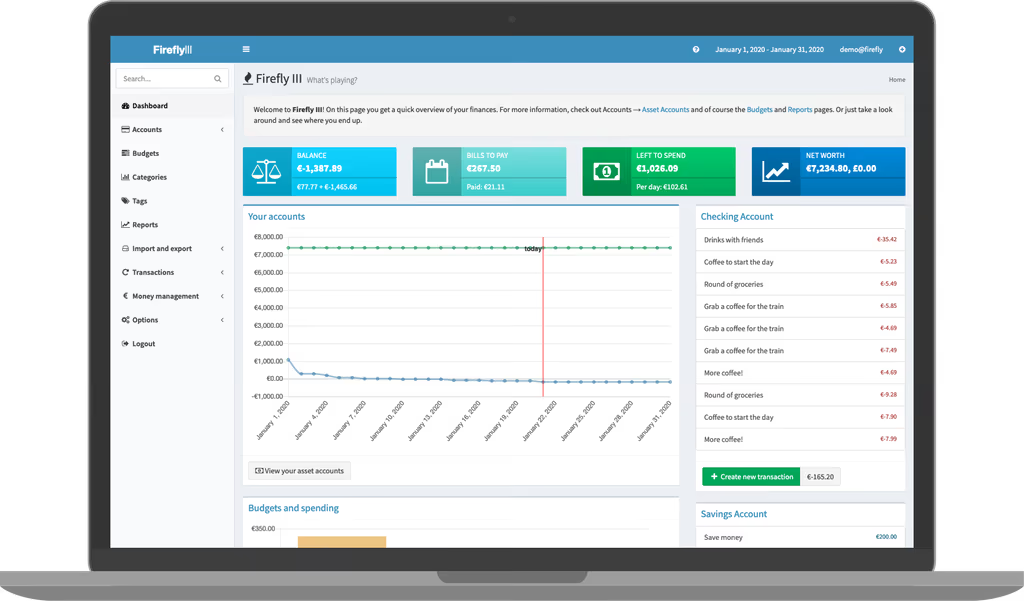
Caption: Firefly III Dashboard – Overview of balances, budgets, and recent activity.
Prerequisites
Before starting, ensure your system meets these requirements:
Hardware Recommendations (Minimum):
- CPU: 1-2 cores
- RAM: 2 GB (4 GB+ recommended for smoother performance with imports/reports)
- Storage: 10 GB+ free (database and uploads grow over time)
- A domain name (optional but recommended for HTTPS)
Software/OS:
- Ubuntu 22.04/24.04 LTS or Debian 12 (LEMP stack preferred: Linux, Nginx, MySQL/MariaDB, PHP)
- PHP 8.3+ (Firefly III supports up to 8.5+)
- Composer, Git, unzip
- MySQL/MariaDB (or SQLite for simple setups)
- Redis (optional, for caching/queues)
- A web server (Nginx or Apache)
Accounts/Dependencies:
- Root or sudo access
- Database user with CREATE privileges
- SSL certificate (via Let's Encrypt)
Install core dependencies on Ubuntu:
sudo apt update && sudo apt upgrade -y
sudo apt install -y nginx mariadb-server php8.3 php8.3-fpm php8.3-cli php8.3-mysql php8.3-curl \
php8.3-mbstring php8.3-xml php8.3-zip php8.3-gd php8.3-bcmath php8.3-intl php8.3-sodium \
unzip curl git
For Redis (recommended):
sudo apt install redis-server
Verify PHP:
php -v
Installation Guide
We'll use the self-managed server method with the official release for full control. Docker is an alternative for easier updates (covered briefly at the end).
Step 1: Set Up the Web Server and Database
Configure Nginx: Create a virtual host:
sudo nano /etc/nginx/sites-available/firefly
Add this configuration (replace yourdomain.com and paths):
server {
    listen 80;
    server_name yourdomain.com;

    root /var/www/firefly-iii/public;
    index index.php;

    location / {
        try_files $uri $uri/ /index.php?$query_string;
    }

    location ~ \.php$ {
        fastcgi_pass unix:/var/run/php/php8.3-fpm.sock;
        fastcgi_index index.php;
        fastcgi_param SCRIPT_FILENAME $realpath_root$fastcgi_script_name;
        include fastcgi_params;
    }
}
Enable and restart:
sudo ln -s /etc/nginx/sites-available/firefly /etc/nginx/sites-enabled/
sudo nginx -t && sudo systemctl restart nginx
Database Setup:
sudo mysql -u root -p
CREATE DATABASE firefly CHARACTER SET utf8mb4 COLLATE utf8mb4_unicode_ci;
CREATE USER 'fireflyuser'@'localhost' IDENTIFIED BY 'strongpassword';
GRANT ALL PRIVILEGES ON firefly.* TO 'fireflyuser'@'localhost';
FLUSH PRIVILEGES;
EXIT;
Step 2: Download and Extract Firefly III
Latest version as of guide (check version.firefly-iii.org for updates):
cd /var/www
sudo mkdir firefly-iii
cd firefly-iii
sudo wget https://github.com/firefly-iii/firefly-iii/releases/download/v6.6.3/FireflyIII-v6.6.3.tar.gz
sudo tar -xzf FireflyIII-v6.6.3.tar.gz --strip-components=1
sudo rm FireflyIII-v6.6.3.tar.gz
Set permissions (critical for Laravel):
sudo chown -R www-data:www-data /var/www/firefly-iii
sudo chmod -R 755 /var/www/firefly-iii
sudo chmod -R 775 storage bootstrap/cache
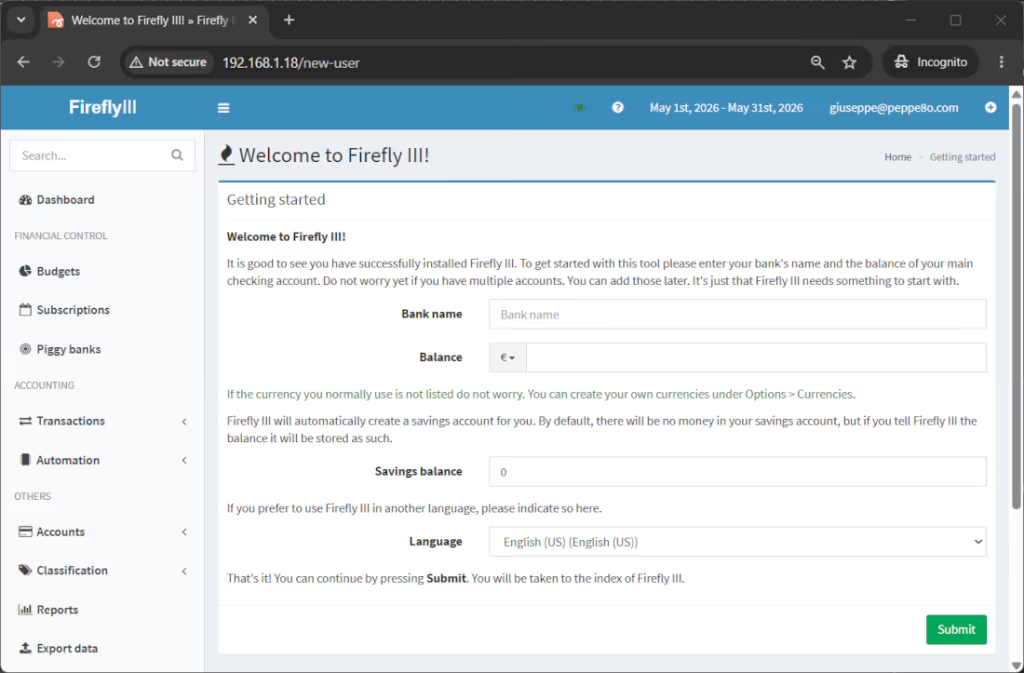
Caption: Initial setup screen after installation.
Step 3: Configure Environment
cd /var/www/firefly-iii
sudo cp .env.example .env
sudo nano .env
Key settings:
APP_NAME="Firefly III"
APP_ENV=production
APP_DEBUG=false
APP_URL=http://yourdomain.com   # or https://

DB_CONNECTION=mysql
DB_HOST=127.0.0.1
DB_PORT=3306
DB_DATABASE=firefly
DB_USERNAME=fireflyuser
DB_PASSWORD=strongpassword

# Mail (optional, use SMTP or Mailgun)
MAIL_DRIVER=smtp
MAIL_HOST=smtp.example.com
MAIL_PORT=587
MAIL_USERNAME=your@email.com
MAIL_PASSWORD=yourpassword
MAIL_ENCRYPTION=tls
MAIL_FROM_ADDRESS=firefly@yourdomain.com
MAIL_FROM_NAME="Firefly III"

# Security
APP_KEY=  # Will be generated
Generate APP_KEY:
sudo -u www-data php artisan key:generate
Step 4: Initialize the Application
Run these as www-data:
sudo -u www-data php artisan firefly-iii:upgrade-database
sudo -u www-data php artisan firefly-iii:correct-database
sudo -u www-data php artisan firefly-iii:report-integrity
sudo -u www-data php artisan firefly-iii:laravel-passport-keys
sudo -u www-data php artisan config:cache
sudo -u www-data php artisan route:cache
sudo -u www-data php artisan view:cache
First Visit & Setup:
Browse to http://yourdomain.com (or IP). Complete the initial setup wizard for accounts and language.
Configuration
Advanced .env Tweaks:
APP_TIMEZONE=UTCDEFAULT_LANGUAGE=en_US- Enable 2FA in settings.
- For Redis caching:
CACHE_DRIVER=redis, configure connection.
Cron Jobs for Automation:
sudo crontab -e -u www-data
Add:
* * * * * cd /var/www/firefly-iii && php artisan schedule:run >> /dev/null 2>&1
Nginx SSL (Let's Encrypt):
sudo apt install certbot python3-certbot-nginx
sudo certbot --nginx -d yourdomain.com
Backup Strategy:
- Database:
mysqldump - Files:
/var/www/firefly-iii/storage - Regular snapshots.
Usage
Core Features:
- Dashboard: Real-time overview of net worth, budgets, and recent transactions.
- Accounts & Transactions: Add asset/liability accounts; record double-entry transactions.
- Budgets & Bills: Set monthly budgets and recurring bills.
- Reports: Detailed charts on spending by category, time, etc.
- Import Data: Use the companion Data Importer for CSV, bank exports, or Plaid-like connectors.
- Automation: Rules to auto-categorize transactions.
- API: Integrate with custom scripts or mobile apps.
Test by creating a transaction and viewing reports.
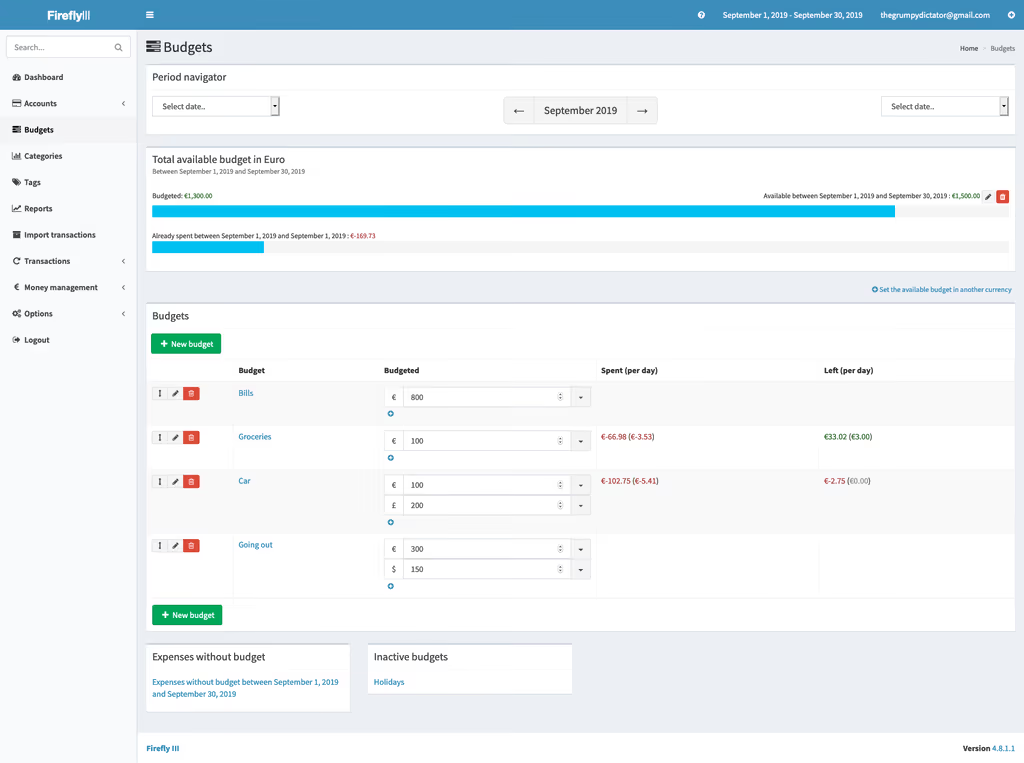
Caption: Budgets page in Firefly III.
Screenshots and Visuals
(Images embedded above demonstrate the clean, responsive UI across devices.)
Troubleshooting
Common Issues & Fixes:
- Permission Errors:
chown -R www-data:www-data storage/and clear cache. - Database Connection: Verify credentials in
.env; check MySQL logs. - Blank Page/500 Error: Enable
APP_DEBUG=truetemporarily; checkstorage/logs/laravel.log. - Composer/PHP Issues:
sudo -u www-data composer install --no-dev. - Cron Not Running: Test manually with
php artisan schedule:run. - Nginx 404: Ensure
try_filesdirective points topublic/index.php. - Memory Limits: Increase
memory_limitinphp.inifor large imports.
For more, consult the official FAQ.
Docker Alternative (Quick Deploy)
For simpler management:
# docker-compose.yml (excerpt)
services:
  firefly_iii:
    image: fireflyiii/core:latest
    volumes:
      - firefly_iii_upload:/var/www/html/storage/upload
    env_file: .env
  db:
    image: mariadb:10.11
Full Docker docs are excellent for production scaling.
References
- Official Documentation: https://docs.firefly-iii.org/
- GitHub Repository: https://github.com/firefly-iii/firefly-iii
- Releases: https://github.com/firefly-iii/firefly-iii/releases
- Awesome Self-Hosted: https://awesome-selfhosted.net/
Conclusion
Self-hosting Firefly III with Laravel gives you complete ownership of your financial data while providing enterprise-grade features in a lightweight package. It's secure, extensible via API, and empowers better financial decisions through insightful reporting.
Next Steps:
- Secure with Fail2Ban, regular updates, and strong passwords.
- Scale with Docker Swarm or Kubernetes for multi-user setups.
- Integrate with Home Assistant, custom scripts, or the Data Importer.
- Contribute to the project or sponsor development.
Start today—your financial future deserves privacy and control. Deploy Firefly III and take command of your money!
This guide equips you with everything needed for a successful deployment. For updates, always check the official version tracker.