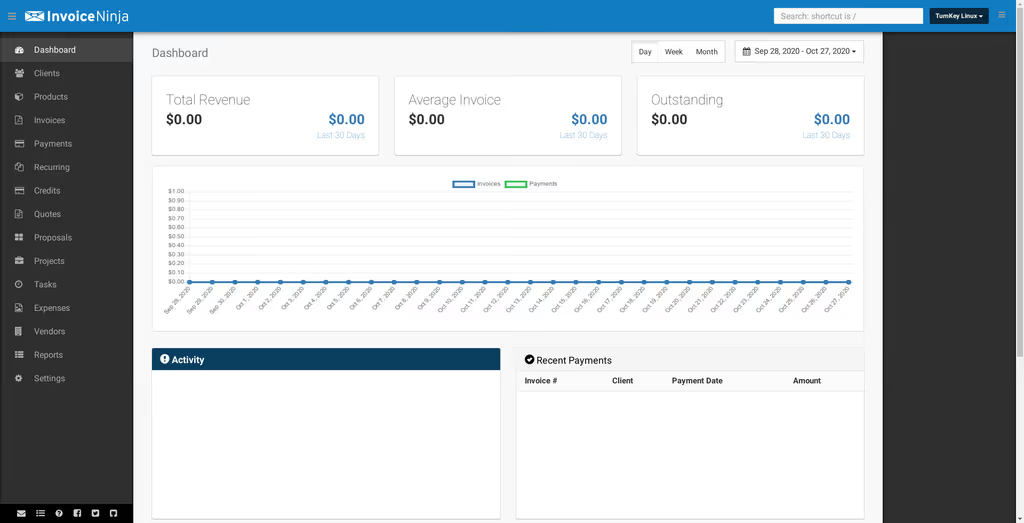
Caption: Invoice Ninja self-hosted invoicing and billing dashboard.
Introduction
I wanted professional invoices, quotes, expenses, and a client portal on a VPS I control. Invoice Ninja is source-available: Laravel on the backend, a React frontend, mobile/desktop apps that talk to your instance. I am not trying to replace a bookkeeper’s whole stack — I wanted PDFs and payment links without another per-user SaaS bill.
I used the official Dockerfiles on Ubuntu 22.04/24.04. That is the path the project documents for repeatable upgrades. Manual LEMP is possible; I would only do it if Docker is off the table.
On a fresh Ubuntu box this install is famous for two things: a white screen until APP_KEY and storage ownership are right, and jobs (PDF, email) that never leave Redis because Compose brought up Redis but not a worker.
Where it broke
1. White screen / 500 — missing APP_KEY or storage permissions
On a fresh Ubuntu 24.04 box this is the failure this install is famous for. The app container is up, Nginx answers, the page is blank. storage/logs/laravel.log usually says the key is missing or it cannot write the log.
docker compose exec app php artisan config:clear
docker compose exec app php artisan cache:clear
docker compose exec app chown -R www-data:www-data storage bootstrap/cache
APP_KEY has to be a real base64:... value in .env from:
docker run --rm -it invoiceninja/invoiceninja php artisan key:generate --show
2. PDFs and mail never send — Redis is up, nobody runs the queue
This post already sets QUEUE_CONNECTION=redis. Redis is not a worker. If you never add a queue:work (or Octane/worker) service, invoices sit in the queue.
Shape of the problem: invoice status stuck, empty PDF, or mail never leaving, with Redis healthy in docker compose ps.
Fix in this stack: keep Redis, then run Laravel’s queue inside the app image (or a dedicated worker service). The Compose file below is the app/db/redis/nginx baseline from the original install; a worker is php artisan queue:work in that same image, not a second Redis.
docker compose exec app php artisan queue:work
For something that survives a reboot, add a worker service that runs that command, or Supervisor inside the container if you already operate it that way. I would not claim Horizon is in this image unless you confirmed it in their composer.json.
Prerequisites
Hardware (small team):
- CPU: 2+ cores (4 is more comfortable)
- RAM: 4 GB (8 GB+ if many users or heavy PDF generation)
- Storage: 20 GB+ SSD
- Domain for HTTPS (recommended)
Software:
- Ubuntu 22.04 or 24.04 LTS
- Docker and Docker Compose v2
- Git
- Reverse proxy (Nginx Proxy Manager, Traefik, or Caddy) for TLS
Accounts:
- SMTP (Postmark, Brevo, Postal, etc.)
- Stripe/PayPal optional
- DNS you can point at Let’s Encrypt
Inside Docker (you do not apt-install these on the host): PHP 8.3+, Laravel, MySQL/MariaDB or PostgreSQL, Redis for queues, Supervisor in some images.
Update the host:
sudo apt update && sudo apt upgrade -y
sudo apt install curl git -y
Install Docker:
curl -fsSL https://get.docker.com -o get-docker.sh
sh get-docker.sh
sudo usermod -aG docker $USER  # Log out and back in
Verify:
docker --version
docker compose version
Installation Guide
Official Docker setup. Isolation and upgrades are why I use it.
Step 1: Clone the Dockerfiles repository
mkdir ~/invoiceninja && cd ~/invoiceninja
git clone https://github.com/invoiceninja/dockerfiles.git .
Step 2: Environment variables
cp .env.example .env
nano .env
Key settings:
APP_NAME="Invoice Ninja"
APP_ENV=production
APP_KEY=  # generate below
APP_DEBUG=false
APP_URL=https://invoices.yourdomain.com

DB_CONNECTION=mysql
DB_HOST=db
DB_PORT=3306
DB_DATABASE=invoiceninja
DB_USERNAME=ninja
DB_PASSWORD=strong_password_here

REDIS_HOST=redis
REDIS_PASSWORD=strong_redis_pass

MAIL_MAILER=smtp
MAIL_HOST=smtp.yourprovider.com
MAIL_PORT=587
MAIL_USERNAME=your@email.com
MAIL_PASSWORD=your_password
MAIL_ENCRYPTION=tls
MAIL_FROM_ADDRESS=no-reply@yourdomain.com
MAIL_FROM_NAME="${APP_NAME}"

QUEUE_CONNECTION=redis
Generate APP_KEY:
docker run --rm -it invoiceninja/invoiceninja php artisan key:generate --show
Paste the base64: line into .env.
Step 3: docker-compose.yml
version: '3.8'

services:
  app:
    image: invoiceninja/invoiceninja-debian:latest  # Or :octane for faster performance
    restart: unless-stopped
    env_file: .env
    volumes:
      - ./storage:/var/www/html/storage
      - ./public:/var/www/html/public
    depends_on:
      - db
      - redis

  db:
    image: mariadb:10.11
    restart: unless-stopped
    environment:
      MYSQL_ROOT_PASSWORD: root_strong_pass
      MYSQL_DATABASE: invoiceninja
      MYSQL_USER: ninja
      MYSQL_PASSWORD: strong_password_here
    volumes:
      - dbdata:/var/lib/mysql

  redis:
    image: redis:7-alpine
    restart: unless-stopped
    command: redis-server --requirepass strong_redis_pass

  nginx:
    image: nginx:alpine
    restart: unless-stopped
    ports:
      - "8080:80"  # Change to 80 if no reverse proxy
    volumes:
      - ./nginx:/etc/nginx/conf.d:ro
      - ./public:/var/www/html/public
    depends_on:
      - app

volumes:
  dbdata:
nginx/default.conf example:
server {
    listen 80;
    server_name invoices.yourdomain.com;
    root /var/www/html/public;
    index index.php;

    location / {
        try_files $uri $uri/ /index.php?$query_string;
    }

    location ~ \.php$ {
        fastcgi_pass app:9000;
        fastcgi_index index.php;
        fastcgi_param SCRIPT_FILENAME $document_root$fastcgi_script_name;
        include fastcgi_params;
    }
}
Step 4: Start the stack
docker compose up -d
Wait 30–60 seconds for the database.
Step 5: Migrations
docker compose exec app php artisan migrate --force
docker compose exec app php artisan db:seed --class=DatabaseSeeder  # Optional sample data
docker compose exec app php artisan ninja:create-test-data  # For testing
Alternative: manual install on Ubuntu (no Docker)
- Install LEMP (Nginx, MariaDB, PHP 8.3+ with bcmath, gd, and the rest of Laravel’s usual extensions).
- Download the latest tarball:
wget https://github.com/invoiceninja/invoiceninja/releases/download/v5.x.x/invoiceninja.tar - Extract to
/var/www/invoiceninja. - Permissions:
chown -R www-data:www-data storage/ bootstrap/cache/ - Nginx vhost to
public/. - Composer and Artisan the same way as any Laravel app.
I still prefer Docker for this app because the image already carries PDF tooling.
Configuration
Beyond the basics:
# Performance
OCTANE_SERVER=swoole  # If using Octane image

# Security
APP_CIPHER=AES-256-CBC
SANCTUM_STATEFUL_DOMAINS=yourdomain.com

# PDF & Mail
PDF_GENERATOR=snappy  # or mpdf
MariaDB indexing matters once the invoice table is large. Redis is the cache/queue brain in this Compose file. Client portal branding lives in Settings → Account; full white-label is a paid license last I checked, not a Composer flag.
Backups I would actually take:
- Daily DB:
docker compose exec db mysqldump ... - Volume copy of
storage/ - Duplicati or rsync off-box
Dependent Packages
Invoice Ninja is Laravel. The Docker README gets containers running. Production still depends on:
- Laravel —
APP_KEY,artisan migrate,storage/on a volume, config cache. A white screen is this layer. - Queues — this post sets
QUEUE_CONNECTION=redis. PDFs and outbound mail are jobs. Redis withoutqueue:workis a silent stall, not a “PDF generator bug.” - PDF generators (Snappy / wkhtmltopdf or mPDF) — the Debian image usually includes the binary. If PDFs fail after the queue is running, switch
PDF_GENERATORas in the.envabove rather than inventing a new package. - Sanctum —
SANCTUM_STATEFUL_DOMAINSis already in this post’s config. Mobile apps and the SPA need the domain to matchAPP_URL.
I am not listing Horizon or Spatie here. If your image includes Supervisor, that is how long-running workers stay alive — still Laravel’s queue, not a different product.
Usage
Open http://your-server:8080 or the HTTPS name in front of it.
- Hit
/setupfor company details and the admin user. - Log in.
- Clients → Products → New Invoice.
What I actually click after that:
- Send an invoice and watch whether mail and PDF appear
- Client portal as a second browser
- Reports: revenue, aging, tax
- Tasks/projects if you bill time
- Mobile apps via an API token
Startup check:
docker compose logs --tail 20 app
Look for a ready app and no repeating exceptions.
Caption: Clean dashboard showing revenue metrics, activity, and recent payments.
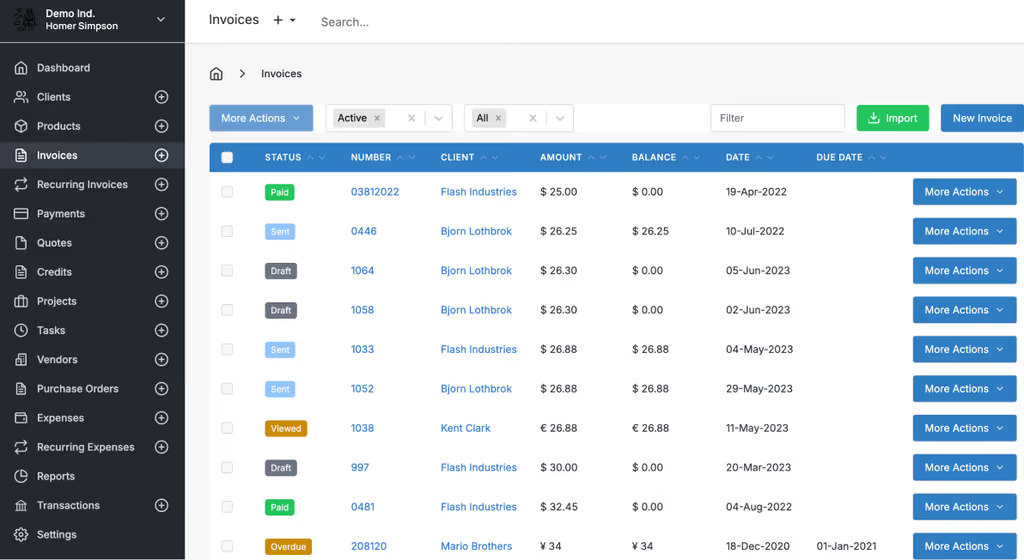
Caption: Invoices list view with status filters and quick actions.
Architecture in one line: browser and apps → Nginx → Laravel (PHP-FPM or Octane) → MariaDB + Redis + storage/.
A feature I would not have found from the homepage
The client portal and mobile apps talk to Laravel, not to a second product. Tokens and SANCTUM_STATEFUL_DOMAINS have to match APP_URL. If you open the panel on http://IP:8080 and set APP_URL to the HTTPS name, logins and the SPA misbehave in ways that look like “Docker is broken.”
White-label is a license, not an .env flag. You can self-host Pro features; removing branding is still the paid switch they document. I would not promise a client a clean portal until that is settled.
PDF in the queue. Snappy can be installed and still do nothing if queue:work is not running. I treat “PDF generator fails” as a worker problem first, binary problem second.
Day two on the VPS
Docker does not remove Laravel ops. It just moves them into docker compose exec:
- Add a worker service (or a restart policy around
queue:work) so PDFs survive a reboot. Redis indocker compose psis not a worker. - Nightly
mysqldumpfrom thedbservice and a copy of thestoragevolume. Attachments live there. - Put HTTPS on a reverse proxy and set
APP_URL/ Sanctum domains to that name. Do not leave:8080on the public internet. APP_DEBUG=false. Rotate the MariaDB and Redis passwords you pasted from this post.- Pull images on a schedule, then
php artisan migrate --forceinsideapp. Read their release notes; I am not inventing migrate flags.
I would send one invoice to myself, pay it with a test gateway, and only then connect the mobile app.
Troubleshooting
I already walked the white screen and the idle queue. Same lab notes, shorter:
- White screen / 500:
storage/logs/laravel.log. Often missingAPP_KEY, wrong DB creds, or permissions.docker compose exec app php artisan config:clear && php artisan cache:clearpluschownonstorageandbootstrap/cache. - DB connection failed: Is
dbhealthy?docker compose exec db mysql -u ninja -p - Email not sending: SMTP in
.env, provider quotas. Tinker/Mailonly after the queue worker is running if mail is queued. - PDF generation fails: Snappy/wkhtmltopdf in the image; switch generators in config after the queue is actually consuming jobs.
- Permissions:
docker compose exec app chown -R www-data:www-data storage bootstrap/cache - Updates:
docker compose pull, migrate, restart. - High load: Octane image and more RAM.
docker stats.
Always: docker compose logs app and Laravel’s log file.
Security
- HTTPS on the reverse proxy, not a public
:8080forever - Strong passwords, 2FA in the app
- UFW: 80/443 + SSH
- Backups and image updates
- Non-root, Docker networks
- Fail2Ban if the login URL is on the public internet
- White-label license if clients should not see Invoice Ninja branding
Scaling
When it outgrows one VPS: more app containers, a dedicated worker service in Compose, monitoring, offsite backups, API/n8n if you need workflows. I would not jump to Kubernetes until the queue and DB are boring.
Conclusion
Invoice Ninja is running in Docker on my Ubuntu box: MariaDB, Redis, Nginx, Laravel app. Invoices create. What I would do next is a Compose worker that always runs queue:work, TLS on a real hostname, and a nightly dump of the database plus storage/. Then I would connect the mobile app with an API token and turn on a payment gateway only after mail actually delivers.
References:
Did you hit the same wall?
I got stuck on invoices that never rendered a PDF because Redis was healthy and nothing ran php artisan queue:work. Did you hit the same thing, or a different one — Composer memory, storage permissions, PHP extensions, a queue worker that never started? Tell me in the comments. I read them.
Need this done on your server?
I deploy and harden Laravel/CodeCanyon apps on cPanel or VPS, and offer monthly Server Watch retainers. Hire for deploy · Care plan