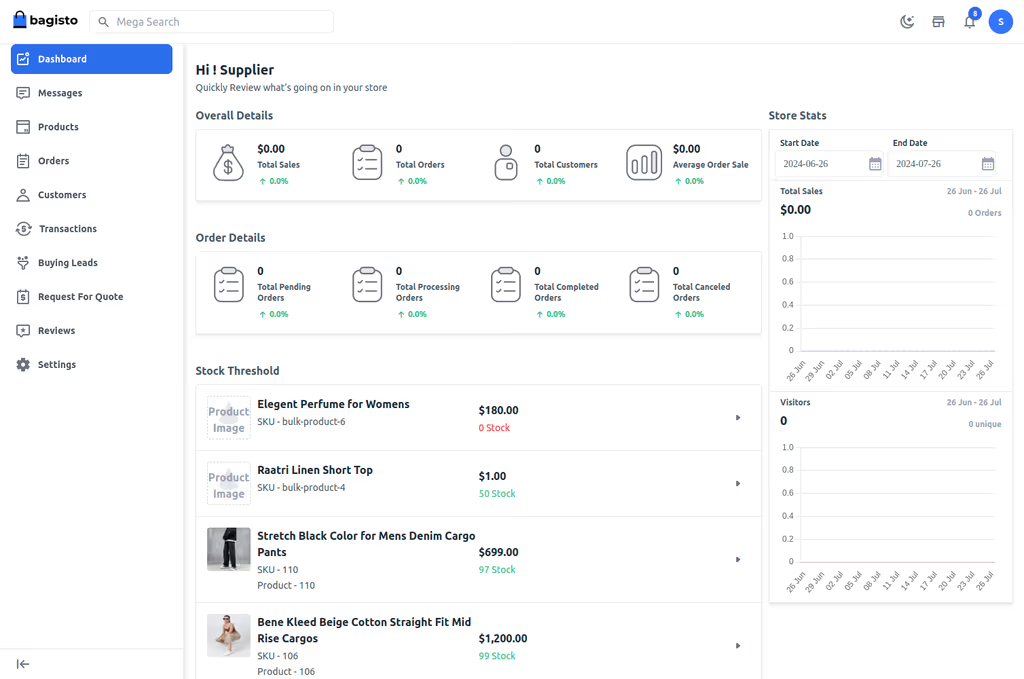
Caption: Bagisto open-source Laravel eCommerce admin dashboard.
Introduction
I wanted a store I could host on my VPS: catalog, checkout, admin, Laravel under the hood. Bagisto (Webkul, MIT) is Laravel plus Vue. Multi-language, multi-currency, payments, inventory — the marketing page lists all of that. I care that composer create-project bagisto/bagisto is a real Laravel app with storage/, queues, and a document root in public/.
I installed on Ubuntu 22.04/24.04 with Nginx and PHP 8.3. Composer for control; Docker if I only need a demo. On a 1 GB VPS, Composer is the wall. Elasticsearch is optional later — I did not turn it on for this lab.
Where it broke
1. Composer out of memory
On a fresh Ubuntu box this is the failure this install is famous for. create-project or composer install dies before migrations.
PHP Fatal error: Allowed memory size of 134217728 bytes exhausted
Fix already in this post:
COMPOSER_MEMORY_LIMIT=-1 composer install
I would also raise memory_limit in FPM (512M is in the PHP step below) so the shop can actually render, not just install.
2. Queues never process — Supervisor is installed, the worker is not running
Bagisto is Laravel. Orders, mail, and imports sit on the queue if QUEUE_CONNECTION=redis (or database). This post already adds Supervisor with php artisan queue:work. If that program is not RUNNING, the storefront looks fine and the admin looks “stuck.”
sudo supervisorctl reread && sudo supervisorctl update
sudo supervisorctl status
If the process is fatal, chmod -R 775 storage bootstrap/cache and chown to www-data — permission errors show up in storage/logs/laravel.log the same way they do on every other Laravel app.
Prerequisites
From official docs, what I actually installed:
- OS: Ubuntu 22.04/24.04
- PHP: 8.3+ with BCMath, Ctype, JSON, Mbstring, OpenSSL, PDO, Tokenizer, XML, Curl, Intl, Zip, GD, Imagick
- Database: MySQL 8.0.32+ or MariaDB 10.3+
- Web server: Nginx (or Apache)
- Composer: 2.5+
- Node.js & npm: for custom themes
- Hardware: 2 CPU, 4 GB RAM, 20 GB SSD minimum. 8 GB+ if you expect traffic. 1 GB RAM is how you meet Composer first.
- Other: Git, Supervisor (queues), Redis (cache/queues), Let’s Encrypt
Sudo on the box. Domain optional for a first hit on the IP. SMTP later.
sudo apt update && sudo apt upgrade -y
sudo apt install software-properties-common -y
Installation Guide
Composer for a shop I will keep. Docker for a throwaway look.
Method 1: Manual install on Ubuntu with Nginx
- Dependencies:
sudo apt install nginx mysql-server php8.3 php8.3-fpm php8.3-mysql php8.3-curl php8.3-gd \
php8.3-mbstring php8.3-xml php8.3-zip php8.3-bcmath php8.3-intl php8.3-imagick unzip git -y
PHP limits:
sudo sed -i 's/memory_limit = .*/memory_limit = 512M/' /etc/php/8.3/fpm/php.ini
sudo sed -i 's/upload_max_filesize = .*/upload_max_filesize = 64M/' /etc/php/8.3/fpm/php.ini
sudo sed -i 's/post_max_size = .*/post_max_size = 64M/' /etc/php/8.3/fpm/php.ini
sudo systemctl restart php8.3-fpm
- Database:
sudo mysql -u root -p
CREATE DATABASE bagisto_db CHARACTER SET utf8mb4 COLLATE utf8mb4_unicode_ci;
CREATE USER 'bagisto_user'@'localhost' IDENTIFIED BY 'StrongPassword123!';
GRANT ALL PRIVILEGES ON bagisto_db.* TO 'bagisto_user'@'localhost';
FLUSH PRIVILEGES;
EXIT;
- Bagisto via Composer:
cd /var/www/
COMPOSER_MEMORY_LIMIT=-1 composer create-project bagisto/bagisto my-bagisto-store --prefer-dist
cd my-bagisto-store
If that still OOMs, add swap or use a 2 GB droplet for the install, then you can shrink later. I would not invent extra Composer flags.
- Permissions:
sudo chown -R www-data:www-data /var/www/my-bagisto-store
sudo chmod -R 755 storage bootstrap/cache
- Installer:
cp .env.example .env
php artisan key:generate
php artisan bagisto:install
Prompts: database, admin, store name. Migrations and seeds run here.
Method 2: Docker
sudo apt install docker.io docker-compose-v2 -y
sudo usermod -aG docker $USER  # Log out/in
docker pull webkul/bagisto:latest
docker run -it -d -p 80:80 --name bagisto webkul/bagisto:latest
Hit http://your-ip. For persistence, volumes and a real MySQL. Compose path: clone https://github.com/bagisto/bagisto-docker and run sh setup.sh.
Configuration
.env in /var/www/my-bagisto-store/.env:
APP_NAME=YourStore
APP_ENV=production
APP_KEY=base64:xxxxxxxxxxxxxxxxxxxxxxxxxxxxxxx
APP_DEBUG=false
APP_URL=https://yourdomain.com

DB_CONNECTION=mysql
DB_HOST=127.0.0.1
DB_PORT=3306
DB_DATABASE=bagisto_db
DB_USERNAME=bagisto_user
DB_PASSWORD=StrongPassword123!

REDIS_HOST=127.0.0.1
REDIS_PASSWORD=null
REDIS_PORT=6379

MAIL_MAILER=smtp
MAIL_HOST=smtp.mailtrap.io
MAIL_PORT=2525
MAIL_USERNAME=youruser
MAIL_PASSWORD=yourpass
MAIL_ENCRYPTION=tls
MAIL_FROM_ADDRESS=store@yourdomain.com
MAIL_FROM_NAME="${APP_NAME}"

QUEUE_CONNECTION=redis
CACHE_DRIVER=redis
Nginx (/etc/nginx/sites-available/bagisto):
server {
    listen 80;
    server_name yourdomain.com;
    root /var/www/my-bagisto-store/public;
    index index.php;

    location / {
        try_files $uri $uri/ /index.php?$query_string;
    }

    location ~ \.php$ {
        fastcgi_pass unix:/var/run/php/php8.3-fpm.sock;
        fastcgi_index index.php;
        fastcgi_param SCRIPT_FILENAME $realpath_root$fastcgi_script_name;
        include fastcgi_params;
    }

    location ~ /\.ht {
        deny all;
    }
}
sudo ln -s /etc/nginx/sites-available/bagisto /etc/nginx/sites-enabled/
sudo nginx -t && sudo systemctl reload nginx
SSL:
sudo apt install certbot python3-certbot-nginx -y
sudo certbot --nginx -d yourdomain.com
Queues and scheduler
sudo apt install supervisor -y
/etc/supervisor/conf.d/bagisto.conf:
[program:bagisto-queue]
process_name=%(program_name)s_%(process_num)02d
command=php /var/www/my-bagisto-store/artisan queue:work --sleep=3 --tries=3
autostart=true
autorestart=true
numprocs=1
user=www-data
sudo supervisorctl reread && sudo supervisorctl update
Cron:
crontab -e
* * * * * cd /var/www/my-bagisto-store && php artisan schedule:run >> /dev/null 2>&1
Storage link:
php artisan storage:link
Broken product images are usually APP_URL wrong, no storage:link, or mixed content after you forced HTTPS.
Important Information about Packages
Bagisto is Laravel and Vue. I am not adding Spatie to this list.
- Laravel — Eloquent,
.env,artisan,storage/. Composer OOM and permission 500s are Laravel ops, not “Bagisto bugs.” - Vue — admin and storefront UI. Theme work needs Node; skipping npm is fine until you customize.
- Queues + Supervisor — this post already runs
queue:workunder Supervisor. That is Laravel’s queue worker, not Horizon, unless you install Horizon yourself. - Redis — cache and queue when you set
QUEUE_CONNECTION=redis/CACHE_DRIVER=redis. Redis without Supervisor is another silent stall. - Elasticsearch — optional for serious catalog search. I did not enable it on this VPS. Do not assume it is required for
bagisto:install.
php -m if an extension is missing. Imagick/GD matter for product images.
Usage
Storefront: https://yourdomain.com. Admin: /admin.
Default admin in many seeds is admin@example.com / admin123 — change it immediately.
Caption: Bagisto Admin Dashboard – Overview of sales, orders, and stock (example view).
Smoke test: browse, cart, checkout. In admin: products, orders, tax, shipping. php artisan route:list if you care about the API.
Themes: admin or php artisan vendor:publish --tag=public. Vue components for the bits you actually change.
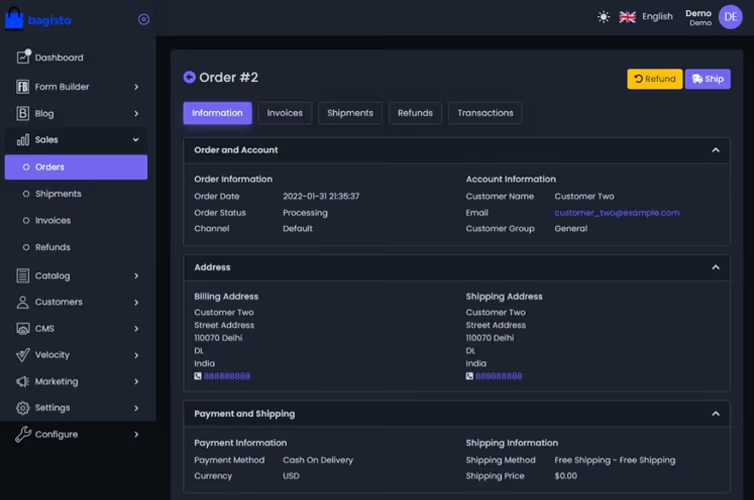
Caption: Detailed Order View in Bagisto Admin Panel.
Troubleshooting
- Permissions:
chmod -R 775 storage bootstrap/cacheandchowntowww-data. - Composer OOM:
COMPOSER_MEMORY_LIMIT=-1 composer install. - Database: credentials in
.env;php artisan config:clear. - Broken images:
APP_URL,storage:link, HTTPS. - 500:
storage/logs/laravel.log.APP_DEBUGonly while you look. - Queues idle: restart Supervisor.
- Nginx 404: document root is
/public. - Missing PHP modules:
php -m, reinstall.
OPCache, Redis, and image optimization after the shop is boring.
A feature I would not have found from the homepage
Product images are a storage:link problem, not a theme problem. The admin upload writes under storage/app/public. The storefront expects /storage/... on the web. If you skip php artisan storage:link, every product looks broken while the file is sitting on disk. Mixed content (HTTP APP_URL behind HTTPS) does the same thing.
Orders and mail sit on Laravel’s queue. The homepage shows a cart. It does not say “install Supervisor or checkouts look finished and the merchant gets no mail.” This post’s bagisto-queue program is the difference between a demo and a shop. I would place a test order and watch sudo supervisorctl status plus storage/logs/laravel.log before I advertised the URL.
Elasticsearch is optional. Catalog search on a small catalog works without it. I would not add another JVM on a 2 GB VPS on day one. If search is slow later, that is when I read Webkul’s current ES docs — I am not pasting an invented php artisan flag for it here.
Default admin credentials. Seeds often leave admin@example.com / admin123. Change that before the host has a public DNS name. APP_DEBUG=false in production so a 500 does not dump .env to the internet.
UFW on the host: SSH, 80, 443. Redis and MySQL stay on localhost. Backups are mysqldump of bagisto_db plus a copy of storage/ — themes and uploaded images are not in the database.
Day two on the VPS
A shop that cannot take an order is still a Laravel app with extra Vue. I would:
- Place a test order with a dummy payment method before opening DNS to the world.
- Confirm Supervisor shows
bagisto-queueasRUNNINGafter a reboot (supervisorctl status).autostart=trueis in the conf; if I skippedsupervisorctl update, it will not come back. - Confirm cron is installed for the user that should run
schedule:run— root vswww-datamatters. - Set
APP_DEBUG=falseand a realAPP_URLwith HTTPS. - Dump MySQL and tarball
storage/to another machine. - Only then look at Elasticsearch, extra workers, or a CDN.
If Composer still OOMs on deploy, I would run composer install on a bigger box or with COMPOSER_MEMORY_LIMIT=-1 and rsync vendor/ — I would not keep a 1 GB VPS as the machine that compiles the project. Runtime with 512M PHP can work after vendor exists.
Missing php8.3-xml or imagick shows up as product image or install fatals. php -m is faster than guessing.
References
Conclusion
Bagisto is installed on my Ubuntu VPS: Composer project, Nginx to public/, Redis in .env, Supervisor on queue:work, cron for the scheduler. Admin opens. Next I would put TLS on a real hostname, take MySQL dumps, and only then look at Elasticsearch if search is slow. I would not scale workers until the first order actually leaves the queue.
Did you hit the same wall?
I got stuck on PHP Fatal error: Allowed memory size exhausted during composer create-project. Did you hit the same thing, or a different one — Composer memory, storage permissions, PHP extensions, a queue worker that never started? Tell me in the comments. I read them.
Need this done on your server?
I deploy and harden Laravel/CodeCanyon apps on cPanel or VPS, and offer monthly Server Watch retainers. Hire for deploy · Care plan