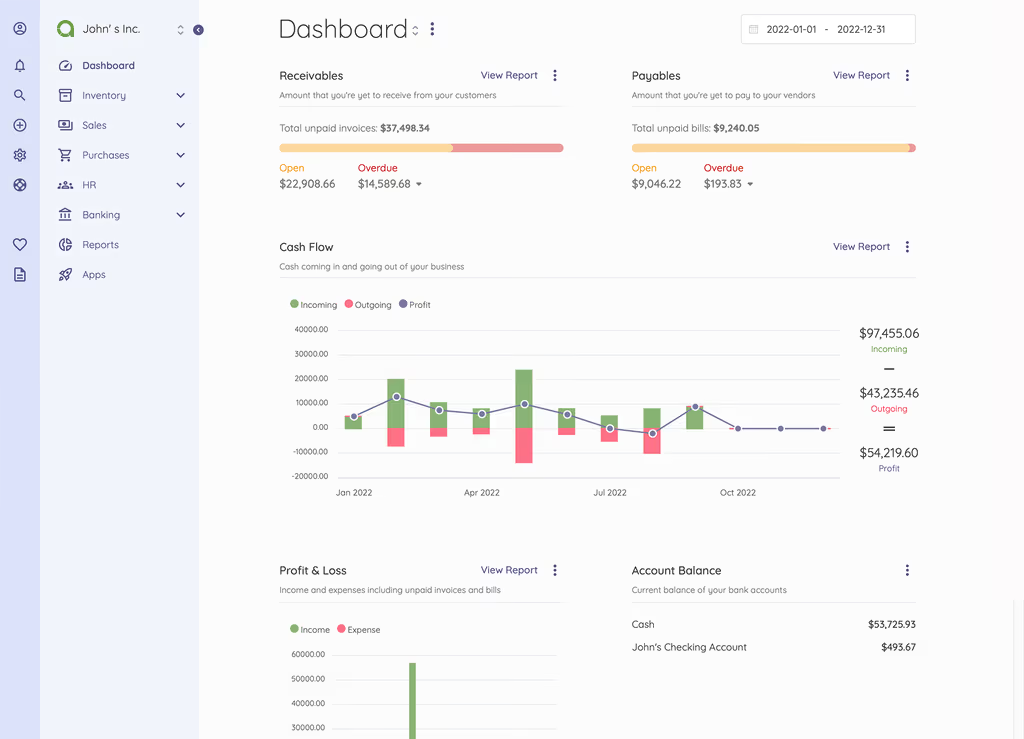
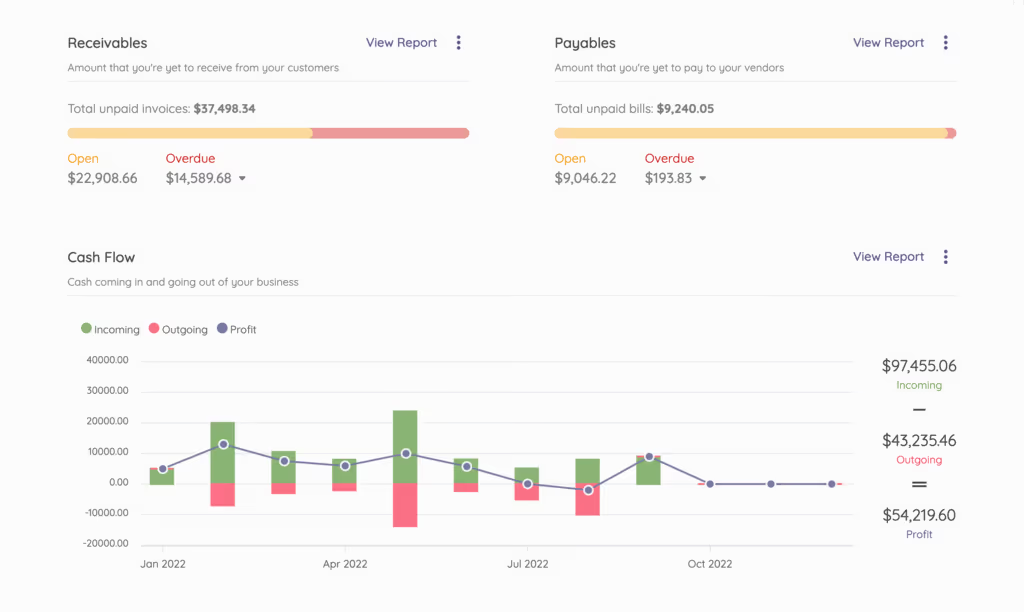
Caption: Akaunting self-hosted Laravel accounting and invoicing dashboard.
Introduction
I wanted invoices, bills, and a proper ledger on a box I control. Spreadsheets and a rotating set of SaaS tabs were eating evenings. Akaunting is a Laravel accounting app with a Vue/Tailwind UI, a module App Store, and a CLI installer. Latest line I used for this write-up is v3.1.21.
I put it on Ubuntu 24.04 LTS with Nginx, MariaDB, PHP 8.3, Composer, and Node. Git clone into /var/www/akaunting, then php artisan install. That is the path I would run again. The tarball from akaunting.com and community Docker images exist if you do not want Git.
On a fresh Ubuntu 24.04 box this install is famous for hanging when a PHP extension is missing, then serving a 500 until storage and bootstrap/cache are writable by the FPM user. I treat those as lab facts, not a war story about a client.
Where it broke
1. php artisan install hung — missing PHP extensions
On a fresh Ubuntu 24.04 box this is the failure this install is famous for. The CLI installer sits there, or you get a blank page, because xml, intl, gd, or zip never made it into the FPM build.
Shape of the problem:
PHP Extension xml is required.
# or the installer never finishes and laravel.log is quiet
Fix from this post: install the modules this app actually lists, then restart FPM.
sudo apt install -y php8.3-bcmath php8.3-curl php8.3-gd php8.3-intl \
    php8.3-mbstring php8.3-mysql php8.3-xml php8.3-zip php8.3-bz2
sudo systemctl restart php8.3-fpm
2. 500 / blank page after install — missing APP_KEY or storage ownership
Akaunting is Laravel. If APP_KEY is empty or www-data cannot write logs, you get a 500.
cd /var/www/akaunting
sudo -u www-data php artisan key:generate
sudo chown -R www-data:www-data storage bootstrap/cache
sudo chmod -R 775 storage bootstrap/cache
Prerequisites
Akaunting v3.1.x wants a normal Laravel stack. I used:
Hardware (1–20 users, hundreds of transactions):
- CPU: 2 cores (4+ if you generate a lot of PDFs)
- RAM: 2 GB (4 GB is more comfortable)
- Storage: 10 GB+ free, SSD if you can
OS: Ubuntu 24.04 LTS (Debian 12 is fine). Windows/WSL2 or Docker work; I stay on Linux for production.
Software:
- PHP 8.3+ (8.1 minimum) with
bcmath,curl,gd,intl,mbstring,mysql,openssl,xml,zip,bz2 - Composer 2.8+
- Node.js 20+ and npm (frontend assets)
- Nginx (or Apache)
- MariaDB 10.6+ / MySQL 8.0+ (PostgreSQL or SQLite are supported)
- Git
Accounts / extras:
- Domain or subdomain (
accounting.example.com) and Let’s Encrypt - SSH with sudo
- SMTP if you want invoice mail; payment gateways via apps
Checklist:
- Fresh Ubuntu 24.04 with sudo
- Backups if this is not a throwaway VPS
- DNS pointing at the server
- Firewall allowing 80/443
Installation Guide
I used the official Git clone. Updates are git pull plus Composer/npm. The tarball from akaunting.com is the other official path.
Step 1: System preparation (Ubuntu 24.04)
sudo apt update && sudo apt upgrade -y
sudo apt install -y nginx mariadb-server php8.3-fpm php8.3-cli \
    php8.3-bcmath php8.3-curl php8.3-gd php8.3-intl \
    php8.3-mbstring php8.3-mysql php8.3-xml php8.3-zip \
    php8.3-bz2 git unzip curl nodejs npm build-essential
Install Composer:
curl -sS https://getcomposer.org/installer | php
sudo mv composer.phar /usr/local/bin/composer
Secure MariaDB:
sudo mysql_secure_installation
Create database and user (replace strong_password):
sudo mysql -u root -p
CREATE DATABASE akaunting CHARACTER SET utf8mb4 COLLATE utf8mb4_unicode_ci;
CREATE USER 'akaunting_user'@'localhost' IDENTIFIED BY 'strong_password';
GRANT ALL PRIVILEGES ON akaunting.* TO 'akaunting_user'@'localhost';
FLUSH PRIVILEGES;
EXIT;
Step 2: Download and install Akaunting
sudo mkdir -p /var/www/akaunting
cd /var/www/akaunting
sudo git clone https://github.com/akaunting/akaunting.git .
sudo chown -R www-data:www-data /var/www/akaunting
Install dependencies:
sudo -u www-data composer install --no-dev --optimize-autoloader
sudo -u www-data npm install
sudo -u www-data npm run dev
If npm run dev fails, I install build-essential (already in the apt line above) and retry. That is the other common stall on a minimal Ubuntu image.
Step 3: Configure Nginx
sudo nano /etc/nginx/sites-available/akaunting
Production config (replace accounting.example.com):
server {
    listen 80;
    server_name accounting.example.com;
    return 301 https://$host$request_uri;
}

server {
    listen 443 ssl;
    server_name accounting.example.com;

    root /var/www/akaunting/public;
    index index.php index.html;

    ssl_certificate /etc/letsencrypt/live/accounting.example.com/fullchain.pem;
    ssl_certificate_key /etc/letsencrypt/live/accounting.example.com/privkey.pem;

    location / {
        try_files $uri $uri/ /index.php?$query_string;
    }

    location ~ \.php$ {
        fastcgi_pass unix:/run/php/php8.3-fpm.sock;
        fastcgi_index index.php;
        fastcgi_param SCRIPT_FILENAME $realpath_root$fastcgi_script_name;
        include fastcgi_params;
    }

    location ~ /\.ht {
        deny all;
    }
}
Enable and restart:
sudo ln -s /etc/nginx/sites-available/akaunting /etc/nginx/sites-enabled/
sudo nginx -t && sudo systemctl restart nginx php8.3-fpm
Document root must be public/. If CSS and images 404, that is almost always Nginx pointing at the project root instead of public.
Step 4: Run the installer
cd /var/www/akaunting
sudo -u www-data php artisan install \
  --db-name="akaunting" \
  --db-username="akaunting_user" \
  --db-password="strong_password" \
  --admin-email="admin@accounting.example.com" \
  --admin-password="your_strong_admin_password"
Optional sample data:
sudo -u www-data php artisan sample-data:seed
Alternative: tarball
Download the latest package from https://akaunting.com/download, unzip to /var/www/akaunting, then use the web installer at https://accounting.example.com.
Alternative: Docker
Community images exist on the GitHub repo. I still want the same .env and permission habits if I go that route.
Configuration
Akaunting copies a Laravel .env during install. I edit production values with:
sudo -u www-data nano .env
Sample production configuration:
APP_NAME="Akaunting"
APP_ENV=production
APP_DEBUG=false
APP_URL=https://accounting.example.com

DB_CONNECTION=mysql
DB_HOST=127.0.0.1
DB_PORT=3306
DB_DATABASE=akaunting
DB_USERNAME=akaunting_user
DB_PASSWORD=strong_password

MAIL_MAILER=smtp
MAIL_HOST=smtp.example.com
MAIL_PORT=587
MAIL_USERNAME=your-smtp-user
MAIL_PASSWORD=your-smtp-pass
MAIL_ENCRYPTION=tls
MAIL_FROM_ADDRESS=noreply@accounting.example.com
MAIL_FROM_NAME="Akaunting"

# Optional: queue for background jobs
QUEUE_CONNECTION=database
APP_KEY is generated by the installer / key:generate. I do not paste a placeholder key into production.
Clear caches:
sudo -u www-data php artisan config:cache
sudo -u www-data php artisan route:cache
Permissions (repeat this if logs stay empty and you still get 500s):
sudo chown -R www-data:www-data storage bootstrap/cache
sudo chmod -R 775 storage bootstrap/cache
Cron for scheduled tasks (recurring invoices, reports):
sudo -u www-data crontab -e
Add:
* * * * * cd /var/www/akaunting && php artisan schedule:run >> /dev/null 2>&1
If you set QUEUE_CONNECTION=database, you still need a worker (php artisan queue:work) or jobs sit in the table. Recurring invoices also need that cron line.
Packages Information
Akaunting is Laravel. The README will get you Composer and the installer. Operators still need to know what that stack implies:
- Laravel —
.env,artisan,storage/andbootstrap/cacheownership, config cache. The 500 after a “successful” install is almost always this layer, not “Akaunting is broken.” - Modules / App Store — extra apps (inventory, payroll, and so on) are modules, not a second CMS. After you install an app, keep
storagewritable and rerun caches if the UI looks half-built. - Vue + Tailwind assets —
npm installandnpm run devare part of the Git clone path. Skip them and the UI looks like 2009. - Queues (optional) — this post already sets
QUEUE_CONNECTION=database. That is Laravel’s database queue, not Horizon. If you enable it, run a worker. I would not invent Redis/Horizon here unless you add them yourself.
I am not claiming Spatie or Horizon live in this app. I did not open composer.json on this rewrite and I will not invent packages.
Usage
- Open the app:
https://accounting.example.com. Log in with the admin you created inphp artisan install. - Dashboard: cash flow, receivables, payables, profit/loss.
- First invoice: Sales → Invoices → New Invoice. Customer, line items, send.
- Smoke test:
- Purchases → Expenses
- Banking reconciliation
- Profit & loss / cash flow reports
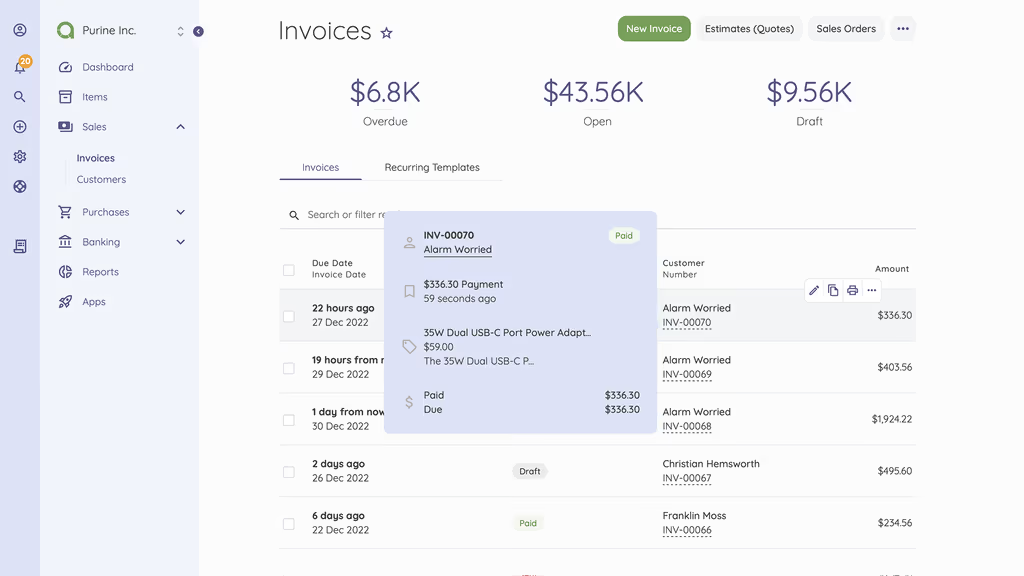
The UI is usable on a phone. Extra behaviour lives in the App Store and the REST API, not in a hidden Laravel package I would guess at.
A feature I would not have found from the homepage: companies and the App Store are first-class. Akaunting is not “one .env and you are done.” After php artisan install you still pick a company, currencies, and which modules to enable. Recurring invoices only fire if the cron line above is actually in www-data’s crontab — the dashboard will not warn you loudly. I would enable the database queue only after I have watched one invoice email leave with sync (or after I have a worker). php artisan sample-data:seed is useful on a lab box and dangerous on a company that already has live invoices.
Day two on the VPS
Akaunting holds invoices. After the first real invoice I would:
- Confirm the
www-datacron is present (crontab -l -u www-data) so recurring invoices are not a dashboard lie. - If
QUEUE_CONNECTION=database, run a worker under Supervisor — same pattern as Bagisto, without Horizon unless I add it myself. mysqldump akauntingand copystorage/. Attachments and logs are not only in MySQL.APP_DEBUG=false, HTTPS, strong admin password. The App Store can wait until mail actually sends.- Keep
npm run devin the Git update path I already listed. Agit pullwithout npm is how the UI looks half-upgraded.
Missing php8.3-xml / intl / gd is still the hang. I would rather reinstall those packages than stare at a silent artisan process.
Troubleshooting
I already walked the two walls above. The rest I keep next to the box:
| Error | Cause | Fix |
|---|---|---|
| 500 / blank page | Missing APP_KEY or permissions |
php artisan key:generate + storage ownership |
| Database connection failed | Wrong .env credentials |
Verify DB user/password and re-run installer |
npm run dev fails |
Missing build tools | Install build-essential and retry |
| Images/CSS not loading | Wrong Nginx document root | root /var/www/akaunting/public; |
| Emails not sending | SMTP misconfigured | Test .env mail settings and check logs |
| Installer hangs | Missing PHP extensions | Reinstall required PHP modules and restart PHP-FPM |
Logs: storage/logs/laravel.log or journalctl -u nginx.
Conclusion
Akaunting is running on my Ubuntu 24.04 VPS behind Nginx: Git clone, Composer, npm, php artisan install, cron for the scheduler. Books stay on the server. Next I would add Redis only if the database queue gets slow, turn on a backup module or mysqldump, and keep SSL and 2FA in the apps that provide them.
Updates I would actually run:
git pull origin master
composer install --no-dev --optimize-autoloader
npm run dev
php artisan akaunting:upgrade
Official resources:
- GitHub: https://github.com/akaunting/akaunting
- Docs: https://akaunting.com/hc/docs
- Demo and downloads: https://akaunting.com
Did you hit the same wall?
I got stuck on php artisan install hanging until php8.3-xml (and the rest of the extension list) was actually loaded. Did you hit the same thing, or a different one — Composer memory, storage permissions, PHP extensions, a queue worker that never started? Tell me in the comments. I read them.
Need this done on your server?
I deploy and harden Laravel/CodeCanyon apps on cPanel or VPS, and offer monthly Server Watch retainers. Hire for deploy · Care plan