Akaunting is open-source online accounting software aimed at small businesses and freelancers. I follow it when I want invoices, expenses, and day-to-day books on a stack I already operate — Laravel, Vue.js, Tailwind, and a RESTful API — instead of locking finance data into a closed SaaS. The GitHub project and akaunting.com position the Standard on-premise plan as free (price and source), with Cloud options and a large App Store for Double-Entry, Inventory, Payroll, CRM, Projects, and more. Product docs live under the Help Center; module authors use the Developers guides (hierarchy, modules, menus, permissions, REST API, payment methods).
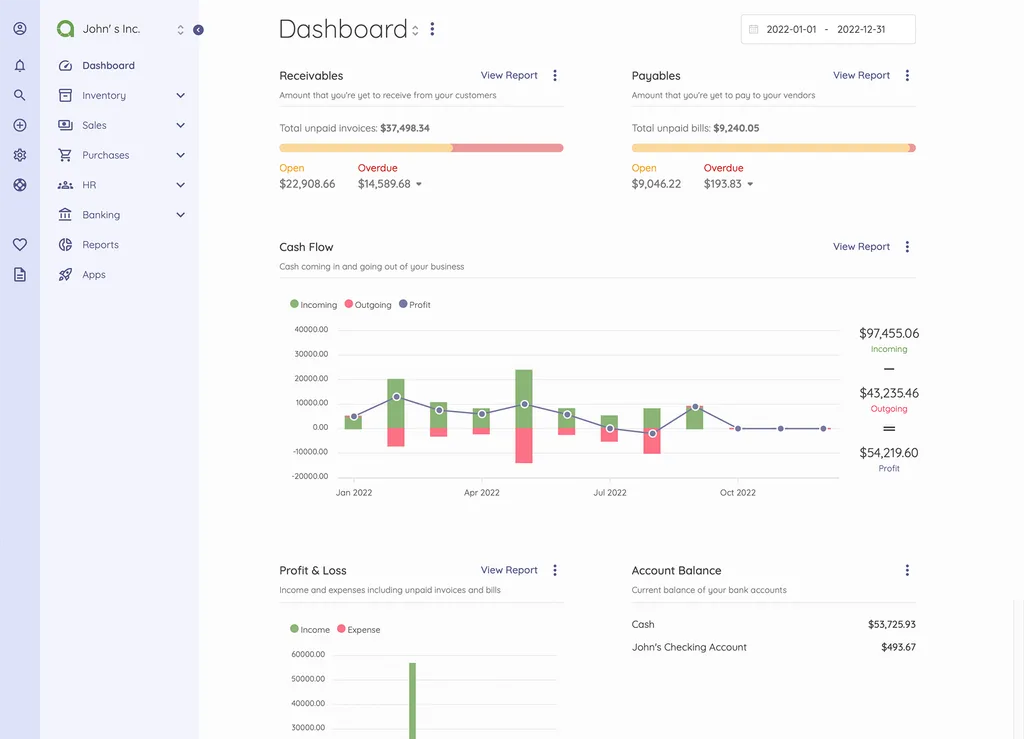
What I like most about Akaunting
I reach for Akaunting when the job is real bookkeeping UX on PHP/Laravel, not a thin invoice PDF generator bolted onto a custom app.
1. Core bookkeeping that covers SME day-to-day
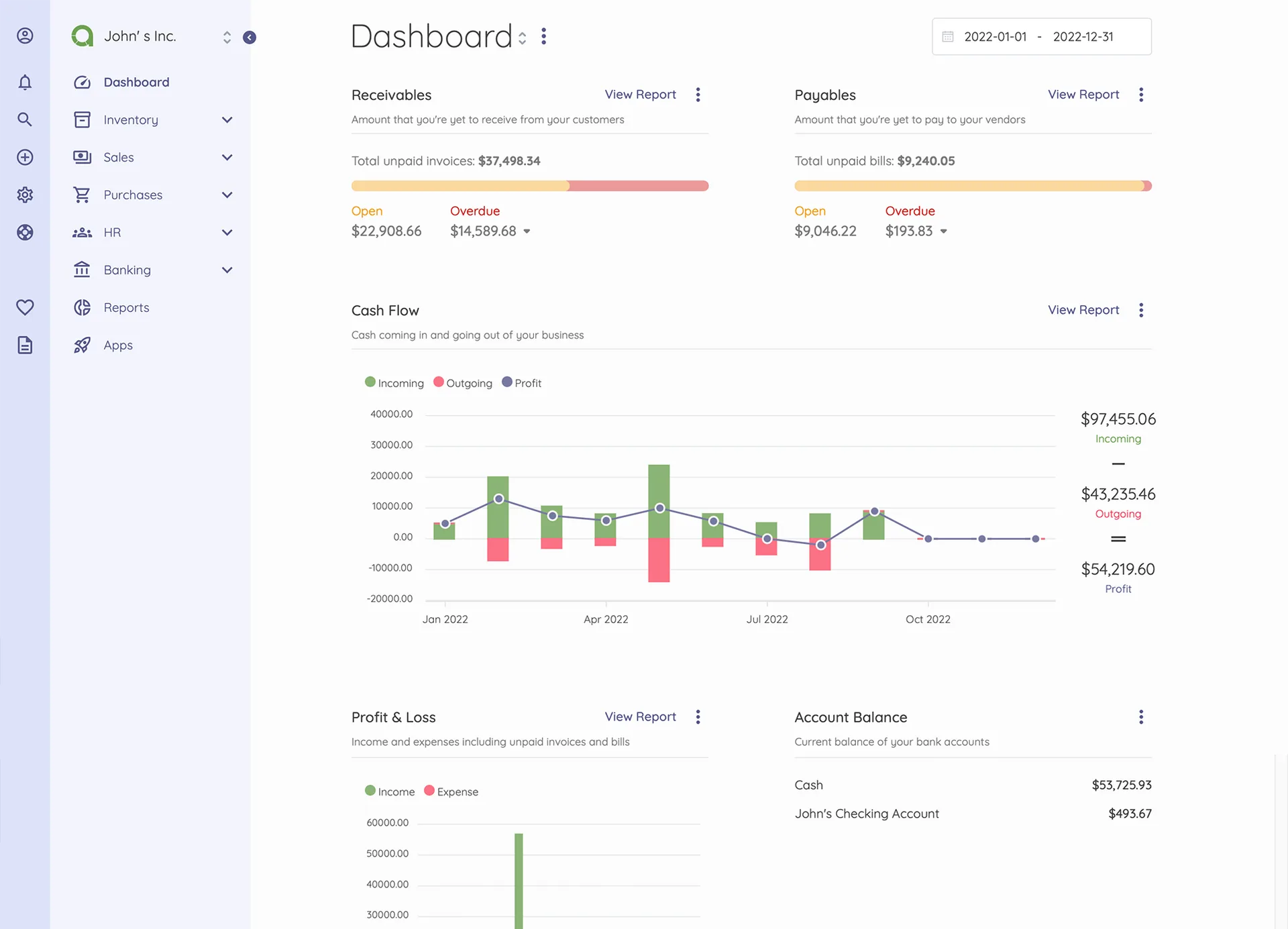
Invoices and estimates, bills, banking/transactions, taxes, contacts, items, categories, cash-flow style views, and a client portal — as covered across the docs and marketing feature set.
Why it matters: Most freelancers and small companies need exactly this loop before they need a full ERP.
2. Laravel + Vue + Tailwind stack
Upstream describes modern web tech with Laravel as the foundation and the Akaunting Module package for Apps. Current composer.json targets PHP ^8.1 and Laravel ^10, with Sanctum, Livewire, Laratrust, DomPDF, Maatwebsite Excel, Omnipay, and S3 Flysystem among the dependencies.
Why it matters: Deploy, queues, env, and debugging habits transfer from other Laravel work.
3. Modular App Store model
Optional apps (Double-Entry / Chart of Accounts, Inventory, Projects, Payroll, CRM, Expense Claims, Bank Feeds, Custom Fields, etc.) extend the core without forcing every install to ship everything.
Why it matters: Start lean; add Double-Entry or Inventory only when the business actually needs them.
4. Developer extension surface
Developer docs cover modules, menus, settings, permissions, bulk actions, search strings, overriding output, hooking models, RESTful API, and payment-method modules — plus a Developer Portal.
Why it matters: Custom finance workflows can live as modules instead of permanent core forks.
5. Multi-company / multi-language orientation
Company setup, localization, and community translations (Akaunting markets 50+ languages) show up repeatedly in product docs and site copy.
Why it matters: Agencies and freelancers often run more than one legal entity or serve clients across locales.
6. Self-host vs Cloud choice
On-premise Standard is the open path; Cloud plans exist for teams that do not want to run PHP themselves (On-Premise vs Cloud is documented in the Help Center).
Why it matters: Privacy- and cost-sensitive installs can keep data on their own VPS; others can buy ops as a service.
TIP
For a first look: skim Getting Started and On-Premise installation, then decide whether Double-Entry (or other apps) are required before promising “full accounting” to a client.
Project structure
High-level layout from the repository:
| Path | Role |
|---|---|
app/ |
Application code (controllers, models, jobs, utilities) |
modules/ |
Installed Apps / modules (Modules\ PSR-4) |
overrides/ |
Targeted overrides of vendor packages (Livewire, Excel, module commands, etc.) |
resources/ |
Views, JS/CSS, lang assets |
routes/ |
HTTP routes |
database/ |
Migrations / seeds |
public/ |
Web root |
tests/ |
Automated tests |
Mental model:
- Core app — companies, invoices, bills, banking, settings, users/roles
- Modules (
modules/) — App Store features installed as packages - Overrides — deliberate vendor patches Akaunting maintains for product behavior
- API — RESTful surface documented for developers
- Client portal — customer-facing invoice/payment experience
git clone https://github.com/akaunting/akaunting.git
cd akaunting
composer install
npm install && npm run dev
php artisan install \
  --db-name="akaunting" \
  --db-username="root" \
  --db-password="pass" \
  --admin-email="admin@company.com" \
  --admin-password="secret"
# optional: php artisan sample-data:seed
Requirements upstream: PHP 8.1+, a supported database (MariaDB/MySQL/PostgreSQL/SQLite), and a normal web server — see On-Premise requirements.
Code analysis
Stack snapshot (from composer.json + README):
| Layer | Technology | Notes |
|---|---|---|
| Framework | Laravel ^10 | PHP ^8.1 |
| UI | Vue.js + Tailwind (+ Livewire in places) | Modern admin UX |
| Auth / ACL | Sanctum, Laratrust | API tokens + roles |
| Modules | akaunting/laravel-module | App Store architecture |
| Money / i18n | akaunting/laravel-money, laravel-language | Multi-currency oriented |
| Documents | DomPDF, Excel | Invoices / imports-exports |
| Payments | Omnipay + offline/PayPal modules | Extensible payment methods |
| Media | plank/laravel-mediable, Intervention | Attachments / images |
| License | BUSL-1.1 (BSL family) | Check commercial thresholds before redistribute |
Strengths when I evaluate it:
- Product completeness for SME accounting — not just “send PDF invoices”
- Laravel familiarity — ops and customization stay in my usual toolbox
- Module marketplace — Double-Entry, Inventory, Payroll when needed
- Documented developer hierarchy — modules, menus, hooks, REST API
Trade-offs / caveats:
- BSL / BUSL — free for many self-hosted Standard uses; still read the license before white-label or large commercial redistribution
- Apps are often paid — core is free; Double-Entry and other serious accounting features may be App Store purchases
- Laravel 10 era — plan upgrade/maintenance work if you need bleeding-edge Laravel
- Overrides folder — powerful, but means upgrades need regression testing against Akaunting’s vendor patches
- Cloud vs on-premise support paths differ; self-host means you own backups, PHP, and queue/cron health
Integration sketch (Laravel client calling Akaunting API — illustrative):
// config/services.php
return [
    'akaunting' => [
        'base_url' => env('AKAUNTING_URL'), // https://books.example.com
        'token' => env('AKAUNTING_API_TOKEN'),
        'timeout' => 15,
    ],
];
Why people use it
| Audience | Why Akaunting fits |
|---|---|
| Freelancers / SMEs | Free on-premise Standard for invoices and expenses |
| Privacy-conscious teams | Self-host financial data |
| Laravel developers | Accounting UI on a familiar PHP stack |
| Agencies | Multi-company setups and module extensions |
| Builders selling finance apps | Module + REST API path via developer docs |
Skip it if you need a full ERP day one with no App Store spend, or if the team refuses to run Laravel/PHP ops and Cloud pricing does not fit.
Conclusion
Akaunting remains one of the strongest Laravel-native open-source accounting options I follow: real invoicing and books UX, modular Apps, and developer docs that explain how to extend it (repo, site, docs, developers).
Honest caveat: treat “free accounting” as core Standard + self-host ops. Double-Entry, Inventory, Payroll, and similar depth usually mean evaluating App Store cost and license terms before promising a full QuickBooks replacement.