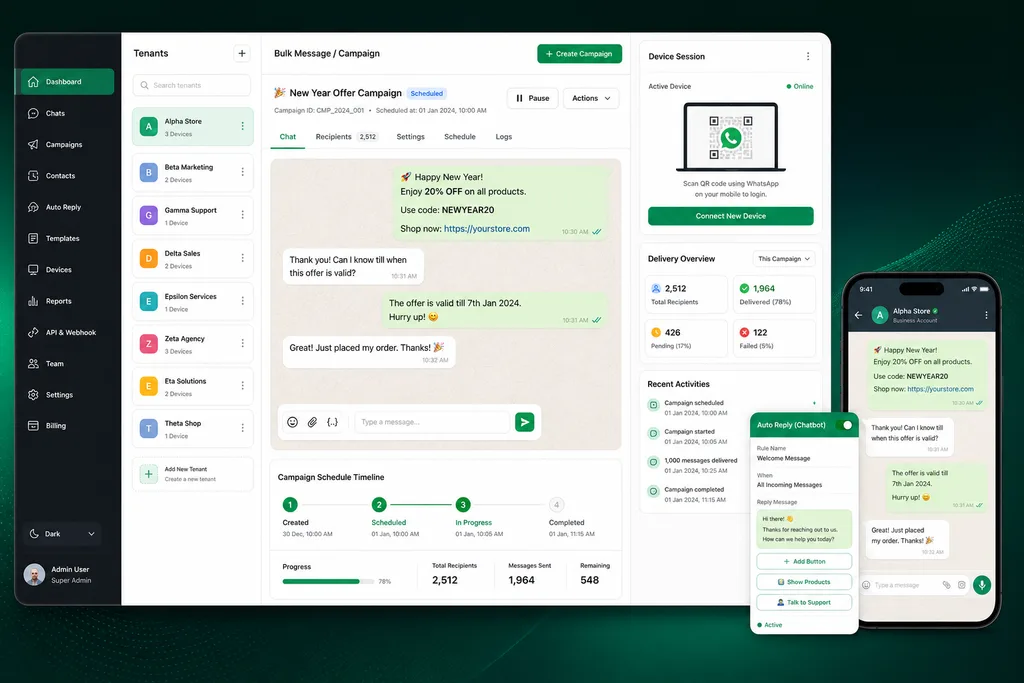
Whatsender (also referred to as WhatSender / WASender) is a Laravel/Node.js-style WhatsApp bulk messaging SaaS: multi-tenant admin, multiple WhatsApp device sessions, and campaign/broadcast flows.
Note: I rewrote this page from a SaaS-readiness point of view (rather than specific “what I changed last time” details), because I lost the original engagement notes. The goal is still the same: help you understand what to verify for a production-ready WhatsApp SaaS, and what I can build if you need audit/custom development/AI integration.
Best match use case
Whatsender-style scripts are a fit when you want to run WhatsApp outreach as a service (agency, automation provider, reseller) and need:
| Situation | Why this fits |
|---|---|
| Multi-client / multi-tenant messaging | Admin separation, plan boundaries, role-based access |
| Many WhatsApp accounts/devices | Device session management and reconnect strategy |
| Scheduled campaigns | Queue-based sending, retries, and delivery logging |
| Developer-led integrations | APIs / webhooks for CRM and lead flows |
Features you typically get (overview)
Whatsender-style deployments usually include:
- Multi-tenant admin (roles such as admin/reseller and tenant users)
- Subscription plans and plan-based feature restrictions
- Multiple WhatsApp device sessions (often QR-linked sessions)
- Bulk message sending (single user + campaign/broadcast behavior)
- Message types like plain text, templates, and interactive “button/list” style messages
- Auto reply / chatbot / autoreply blocks
- Message logs (sent/delivered/failed visibility)
- APIs and webhooks for integration
- Storage settings for media (local and/or cloud)
- Queue / worker orchestration for reliability at scale
Limitations & what can break in production
WhatsApp SaaS is less about “sending a message once” and more about reliability under traffic:
- Session stability
- device sessions drop, reconnect loops, inconsistent “connected” state
- Queue/worker requirements
- wrong queue driver or worker settings cause partial campaign sends or silent failures
- Tenant boundary safety
- auth/RBAC issues can lead to data leakage between tenants
- Rate limits + policy compliance
- throughput must align with WhatsApp limits and your opt-in rules
- Delivery reporting accuracy
- the app’s “sent” vs “delivered/received” logging must match reality
- Webhook payload robustness
- retries, idempotency, and (if supported) signature verification
- AI/chat integration constraints
- bots need prompt scope, guardrails, and privacy rules; otherwise they become noisy or unsafe
The problem (why SaaS auditing matters)
Common failure patterns I see on WhatsApp SaaS installs:
- Campaigns “run” but deliveries are missing or mixed across tenants
- Session reconnect works on one server but not another (storage/queue differences)
- An admin can restart/modify work, but actions are not permission-safe
- Upgrades break jobs or session handlers, producing intermittent regressions
SaaS audit checklist (what I review)
If you ask for a Whatsender SaaS audit, I check:
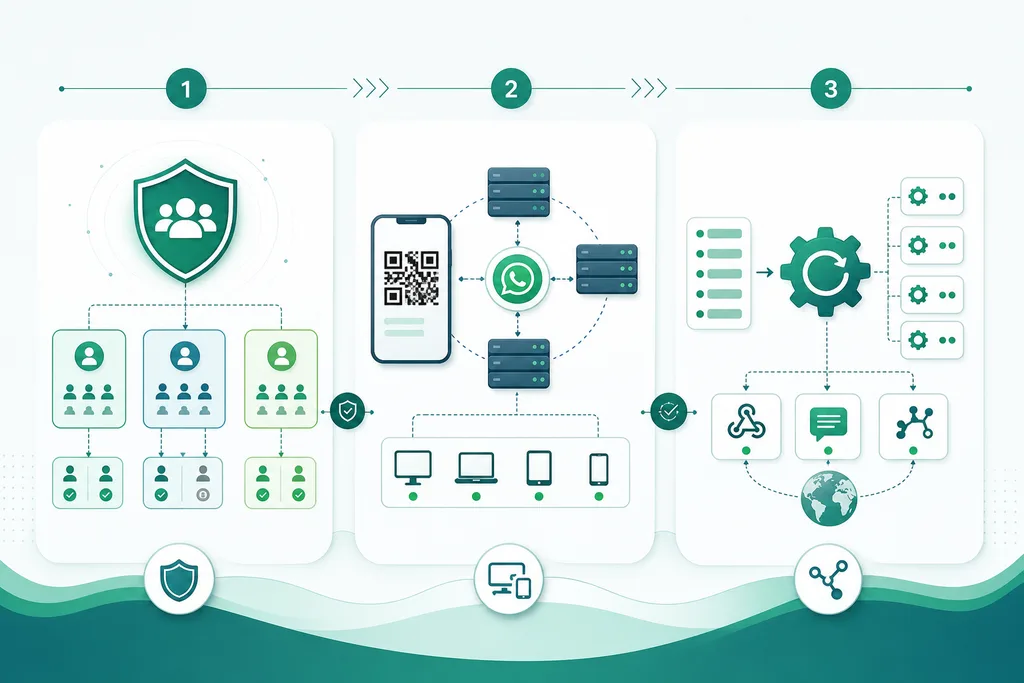
- Tenant isolation (auth, RBAC, database query scoping)
- Sessions + device lifecycle (storage, reconnect strategy, state transitions)
- Send pipeline reliability (queues, retries, idempotency, failure recovery)
- Webhook handling (verification, retries, and data integrity)
- Operational observability (what you can monitor: failures, latency, delivery stats)
- Admin UX safety (limits, resends/retries, and auditability)
What you can request (custom dev / AI integration)
If you want to go beyond stock behavior, tell me your direction:
- SaaS hardening / custom modules
- tenant-level quotas, safer resends/retries, clearer operational dashboards
- Integration work
- CRM sync via webhooks (leads, tags, conversation status)
- internal APIs for automation and reporting
- AI integration (chatbot / autoreply assistance)
- a student-style support bot for WhatsApp users: FAQs, appointment prompts, lead capture
- admin copilot to draft safe messages and templates (with human approval)
Conclusion
Whatsender-style WhatsApp SaaS can work well when you treat it like an ops system: sessions, queues, tenant boundaries, and delivery logs.
Do you want a SaaS readiness audit, custom module development, or AI integration for chat/autoreply? Contact me with your current version and deployment setup, and I will suggest the next step.