NexoPOS is a Laravel + Vue.js point-of-sale platform with inventory, customers, orders, taxes, receipts, roles, and a module system for extensions. The free core lives on GitHub; the product site, cloud/self-host docs, and marketplace orbit around my.nexopos.com (documentation, blog). Upstream positions it for retail, restaurant (with Gastro and related modules), warehouse, and grocery-style workflows — with optional Multistore, Racks Manager, Bulk Importer, and other marketplace add-ons rather than stuffing every vertical into core.
I work on NexoPOS when the install needs custom product work on top of that foundation: dashboard widgets (calendar + announcements), operational UI, and API development to integrate with AmazCart so POS and the Laravel ecommerce storefront stay in sync.
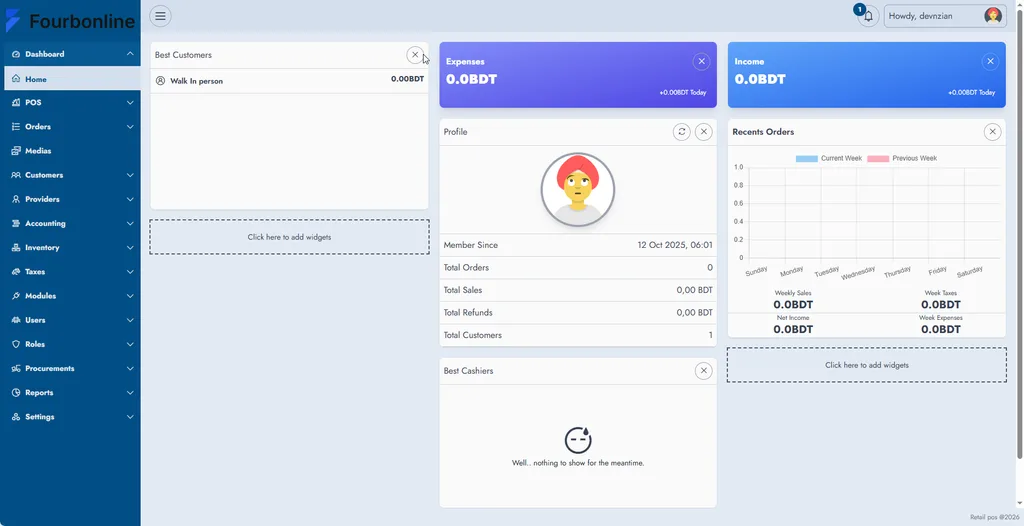
Best match use case
NexoPOS fits when you need a real POS + inventory backbone on Laravel, not a theme that “looks like” a till.
| Situation | Why NexoPOS |
|---|---|
| Retail / grocery / warehouse | Core sales, stock, customers, and reports on one stack (product positioning) |
| Restaurant / café | Core + Gastro / Raw Material Tracker and related modules (README module list) |
| Multi-location | Multistore + Stock Transfers modules instead of separate apps |
| Online + in-store | Custom API bridges (e.g. AmazCart) when marketplace modules do not cover your storefront |
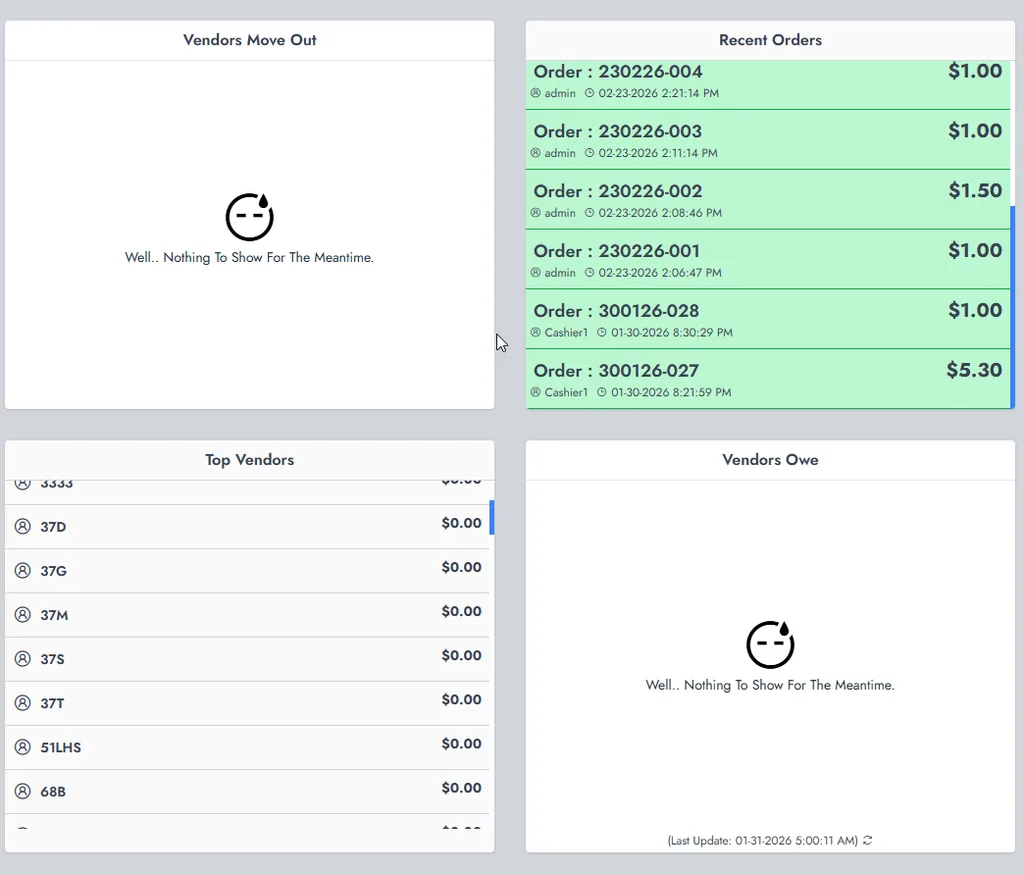
| Ops visibility | Custom dashboard widgets — calendar, announcements, vendor/order cards — for staff who live in the admin all day |

The problem
Stock NexoPOS (plus marketplace modules) covers a lot of till and inventory work. Gaps show up when the business needs in-admin communication and scheduling, or when online ecommerce and POS must share catalog/orders without manual CSV gymnastics.
Typical friction I see:
- No clear place for vendor/staff announcements (SMS/email follow-ups) inside the dashboard they already use
- No calendar-style planning surface next to sales widgets
- AmazCart (or another CodeCanyon shop) running separately from NexoPOS — products, stock, or orders drift
- Inherited installs mixing core + Gastro/Multistore with undocumented custom patches
What I build on NexoPOS
My recent customization work focuses on three product pieces:
1. Calendar dashboard widget
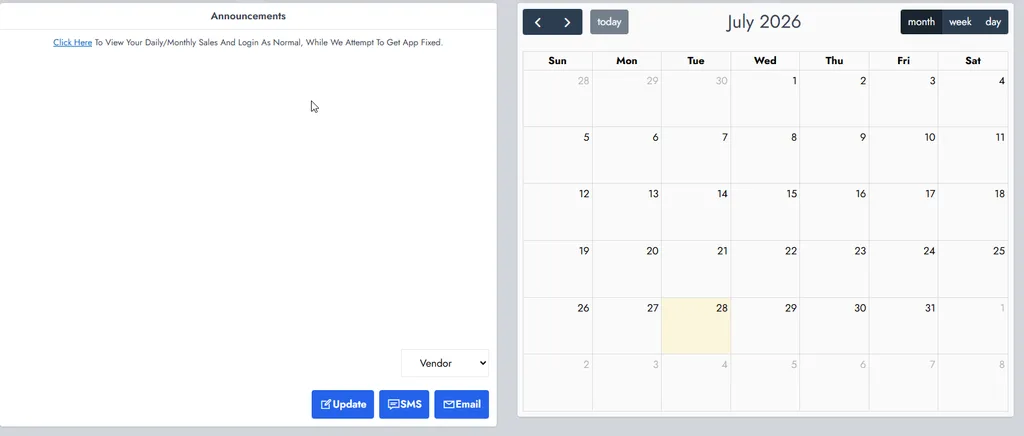
Month / week / day views with navigation and “today,” embedded as a dashboard card so ops can plan around the same screen as sales widgets. Built against NexoPOS’s Vue dashboard widget patterns (developer docs: dashboard widgets).
2. Announcements widget
In-dashboard announcements with role/audience targeting (e.g. Vendor), plus update / SMS / email actions so messages reach the right channel without leaving the POS admin.
3. API work for AmazCart integration
Custom API surfaces and sync flows so NexoPOS can talk to AmazCart Laravel Ecommerce CMS — catalog, stock, or order handoff depending on the project’s rules — instead of double-entry between POS and the online store.
TIP
Upstream documents self-host install (requirements, env, setup wizard), cloud, Windows native, and a full module author guide (config, migrations, menus, Vue components, POS hooks). Prefer modules or documented extension points over silent core forks — see Documentation.
Audit and plan
Before coding widgets or AmazCart sync, I inventory the install so the work does not fight module boundaries.
- Laravel / NexoPOS version and PHP env
- Installed modules (Gastro, Multistore, etc.) and custom folders
- Queue / cron / media URL health (troubleshooting docs)
- Which AmazCart entities must sync (products, stock, orders) and ownership rules
- Dashboard widget placement and roles who see announcements
Fit checklist (excerpt)
$audit = [
    'nexopos'   => config('nexopos.version') ?? 'unknown',
    'modules'   => collect(glob(base_path('modules/*')))->map(fn ($p) => basename($p)),
    'queue'     => config('queue.default'),
    'targets'   => [
        'calendar_widget' => true,
        'announcements'   => true,
        'amazcart_api'    => ['catalog', 'stock', 'orders'], // scope per project
    ],
];
Comparison — approach
| Approach | When it wins | Risk |
|---|---|---|
| Official marketplace module | Need already solved upstream | License + upgrade path |
| Custom module / widgets | Calendar, announcements, AmazCart bridge | You own maintenance |
| Core fork | Last resort | Upgrade pain |
Implementation
Work lands as scoped patches and modules, verified against real SKUs and roles:
- Dashboard widgets — register calendar + announcements (and supporting cards) via NexoPOS widget declaration APIs; keep empty states and refresh patterns consistent with existing cards
- Announcements ops — persist messages, audience (e.g. Vendor), and wire Update / SMS / Email actions to the channels the client already uses
- AmazCart API bridge — auth’d endpoints or jobs for the agreed sync direction; logging and failure retries so a storefront outage does not silently desync the till
- Staging smoke tests — POS sale, stock movement, announcement visibility by role, one AmazCart round-trip
Integration sketch (illustrative)
// config/services.php — AmazCart bridge credentials stay in .env
return [
    'amazcart' => [
        'base_url' => env('AMAZCART_URL'),
        'token'    => env('AMAZCART_API_TOKEN'),
        'timeout'  => 20,
    ],
];

Outcome
Operators get a dashboard that matches how they actually work (schedule + announcements next to sales), and a defined path between NexoPOS and AmazCart instead of tribal spreadsheet sync. Module boundaries stay documented so the next NexoPOS upgrade does not wipe the custom layer.
Conclusion
NexoPOS remains one of the strongest Laravel-native POS options I customize: solid core + marketplace modules for vertical depth, and enough developer surface to ship real widgets and ecommerce APIs (GitHub, my.nexopos.com, docs, blog).
If you need calendar/announcement widgets, an AmazCart (or similar) integration, or a stuck NexoPOS rescue, I usually start with a short audit of modules and sync ownership — then implement the smallest safe module-shaped change. Related: /services/nexopos.